

INTRODUCTION
Working with record type-specific picklist values in Apex has always been a challenge. Different record types can have different picklist values—what’s valid for one record type might not be valid for another. Getting those values required workarounds: describe calls, custom metadata, or external UI API callouts. None were ideal.
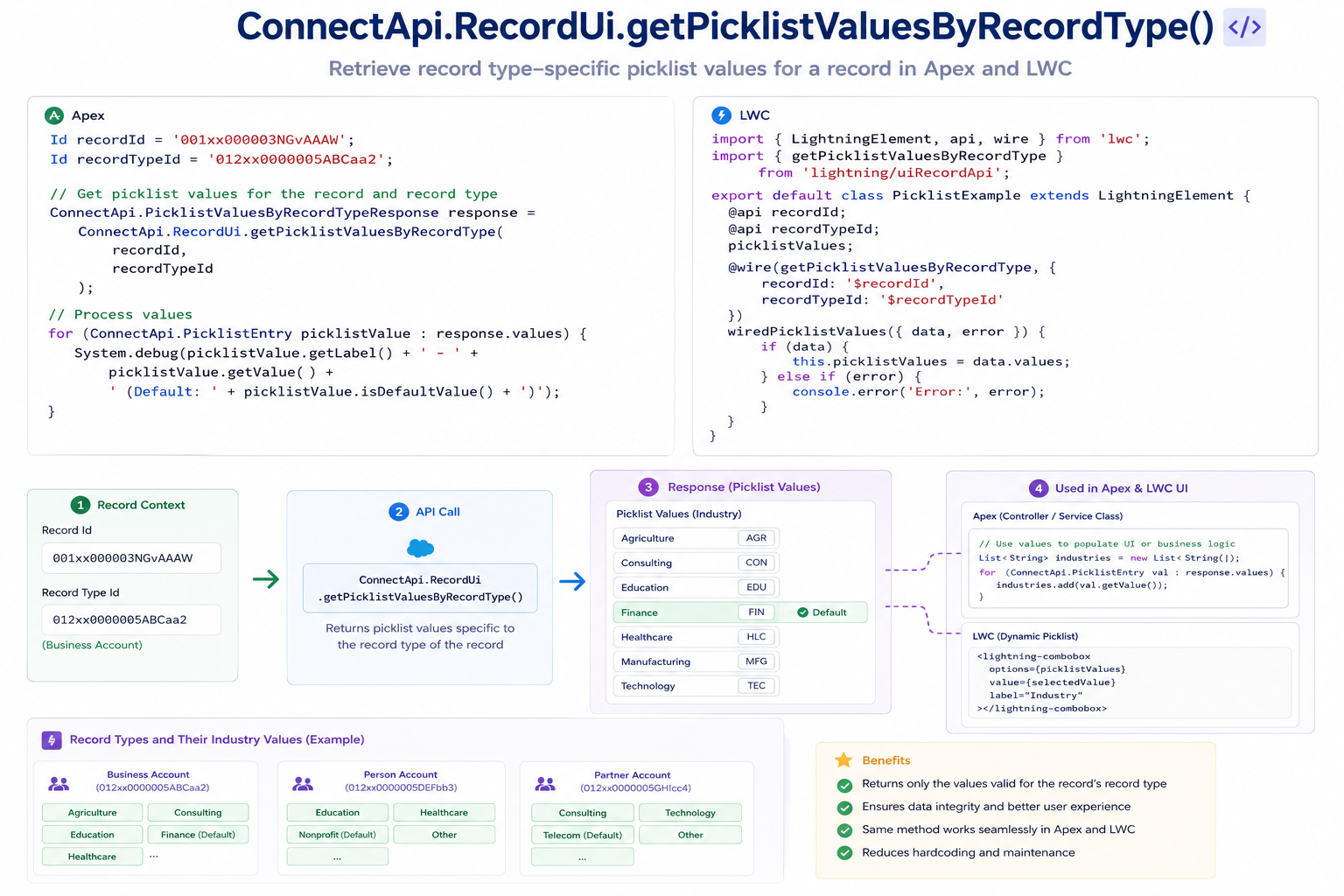
Spring ’26 introduces ConnectApi.RecordUi.getPicklistValuesByRecordType()—a native Apex method that directly retrieves record type-specific picklist values. No external callouts. No complex workarounds. Just a clean, efficient API call that does exactly what developers need.
This post explores what the method does, why it’s useful, how to implement it, and practical patterns for dynamic form building and dependent picklist logic.
THE PICKLIST VALUE RETRIEVAL PROBLEM
Why This Feature Was Needed
The Before Scenario: Workarounds and Limitations
Problem 1: Record Type-Specific Values
Case object with two record types:
– “Incident”: Status options = [New, In Progress, Resolved, Closed]
– “Change Request”: Status options = [Requested, Scheduled, Completed, Rejected]
Requirement: Get valid Status values for a specific record type
Before Spring ’26:
Option 1: Describe API
– Global describe returns all values for field
– Can’t filter by record type
– Requires post-processing
Option 2: Custom metadata
– Create custom metadata for each record type
– Maintain manually
– Error-prone
– Extra setup work
Option 3: UI API callout
– Make external REST call to UI API
– ConnectApi.UiObjectInfoRepresentation
– Adds API call overhead
– More complex code
Problem 2: Dependent Picklists
Scenario: Industry field (picklist) → Service field (dependent picklist)
Different services available based on industry selected
Before Spring ’26:
– No native way to get dependent values
– Must implement custom logic
– Must maintain mappings manually
– Complex to get correct values dynamically
Problem 3: Dynamic Forms
Building form with picklist fields
Form must adapt based on record type
Before Spring ’26:
– Get record type
– Get all picklist values
– Filter manually
– Still missing dependencies
– Multiple API calls
– Complex code
Real-World Scenarios
Scenario 1: Case Management Form
User selects case record type: “Incident”
Form displays record type-specific fields
Status field should show: [New, In Progress, Resolved, Closed]
Priority field should show: [Low, Medium, High, Critical]
Before:
– Describe call gets all values
– Manual filtering by record type
– Dependent picklists not handled
– Complex form logic
After:
– Single ConnectApi call with record type
– Returns only valid values
– Handles dependencies
– Clean, simple implementation
Scenario 2: Opportunity Stage Validation
Different opportunity record types have different stages
“Standard Deal”: Prospecting → Qualification → Negotiation → Closed Won
“Internal Deal”: Approved → Executed → Closed
“Channel Deal”: Lead → Active → Closed
Requirement: Validate stage value for record type
Before:
– Custom metadata or describe calls
– Manual validation logic
– Error-prone
After:
– Single call with record type
– Get valid stages
– Simple validation
Scenario 3: Dynamic LWC Component
Component displays different picklist options based on record type
Component used across multiple objects
Component must be flexible and maintainable
Before:
– Complex conditional logic
– Multiple describe calls
– Brittle code
– Hard to maintain
After:
– Pass record type to method
– Get all valid values
– Simple, clean component code
THE NEW METHOD
ConnectApi.RecordUi.getPicklistValuesByRecordType()
Method Signature
java
// Apex
ConnectApi.PicklistValuesCollection picklistCollection =
ConnectApi.RecordUi.getPicklistValuesByRecordType(
String objectApiName,
String recordTypeId
);
What It Returns
PicklistValuesCollection Object:
Contains all picklist field values for a specific record type.
java
// Structure
ConnectApi.PicklistValuesCollection contains:
– picklistFieldValues (Map<String, List<ConnectApi.PicklistEntry>>)
– Key: Field API name
– Value: List of picklist entries for that field
– Each entry contains: label, value, defaultValue, validForRecordTypeIds
Example Return:
java
Map<String, List<ConnectApi.PicklistEntry>> fieldValues =
picklistCollection.picklistFieldValues;
// fieldValues contains:
{
“Status”: [
{label: “New”, value: “New”, defaultValue: true},
{label: “In Progress”, value: “In_Progress”, defaultValue: false},
{label: “Resolved”, value: “Resolved”, defaultValue: false},
{label: “Closed”, value: “Closed”, defaultValue: false}
],
“Priority”: [
{label: “Low”, value: “Low”, defaultValue: false},
{label: “Medium”, value: “Medium”, defaultValue: true},
{label: “High”, value: “High”, defaultValue: false},
{label: “Critical”, value: “Critical”, defaultValue: false}
]
}
Key Advantages Over Previous Approaches
Advantage 1: Native, No Callouts
Before: ConnectApi.UiObjectInfoRepresentation (requires callout)
After: ConnectApi.RecordUi.getPicklistValuesByRecordType() (native)
Benefit: Faster, no API call overhead, no @future needed
Advantage 2: Record Type Filtering Built-In
Before: Describe returns all values, manual filtering needed
After: Method directly returns record type-specific values
Benefit: Clean, accurate, no post-processing
Advantage 3: Simple, Clean Code
Before:
// Multiple steps, manual filtering
ConnectApi.UiObjectInfoRepresentation objInfo = ConnectApi.getUiObjectInfo(…);
// Filter by record type…
After:
// Single call
ConnectApi.PicklistValuesCollection collection =
ConnectApi.RecordUi.getPicklistValuesByRecordType(‘Case’, recordTypeId);
BENEFITS OVER PREVIOUS APPROACHES
Why This Matters
Benefit 1: Performance
Comparison:
Old approach (UI API callout):
ConnectApi.UiObjectInfoRepresentation objInfo =
ConnectApi.getUiObjectInfo(‘Case’, caseRecordTypeId);
// Makes external HTTP callout
// Slower
// Uses API limits
New approach (Native method):
ConnectApi.PicklistValuesCollection collection =
ConnectApi.RecordUi.getPicklistValuesByRecordType(‘Case’, recordTypeId);
// Native Apex call
// Faster
// No API call overhead
Impact:
- Faster response time
- No callout exceptions
- No API limit pressure
- Better user experience
Benefit 2: Simplicity
Comparison:
Old approach:
- Get record type
- Call ConnectApi.getUiObjectInfo
- Extract all picklist values
- Filter by record type
- Post-process for dependencies
- Handle errors and null cases
New approach:
- Call ConnectApi.RecordUi.getPicklistValuesByRecordType
- Use returned values
Impact:
- Less code
- Fewer bugs
- Easier maintenance
- Clearer intent
Benefit 3: Accuracy
Comparison:
Old approach:
– Manual filtering error-prone
– Easy to miss dependencies
– Dependencies require separate logic
New approach:
– Record type built into method
– Dependencies handled natively
– Guaranteed accurate
Impact:
- Correct values always
- Fewer validation issues
- Dependencies handled properly
- Fewer bugs
WHEN TO USE THIS METHOD
Appropriate Use Cases
Use Case 1: Dynamic Forms
Scenario:
LWC component displays different form fields based on record type.
Perfect For:
- Component reusability
- Multiple record types
- Different field sets per type
- Clean component code
Implementation:
Call method in Apex controller, return to LWC, populate form.
Use Case 2: Record Validation
Scenario:
Validate record data before insertion.
Perfect For:
- Record type-specific validation
- Ensuring field values valid for type
- Custom validation logic
- Preventing data errors
Implementation:
Call method, validate against returned values, throw error if invalid.
Use Case 3: Default Value Setting
Scenario:
Set appropriate defaults when creating record.
Perfect For:
- New record creation
- Record type-specific defaults
- Improving data quality
- Reducing manual entry
Implementation:
Call method, extract defaults, set on new record.
Use Case 4: API Response Preparation
Scenario:
Prepare API response for external system.
Perfect For:
- Integration scenarios
- External system needs valid values
- Data synchronization
- External form population
Implementation:
Call method, format values for external system, include in response.
Not Ideal For
Performance-Critical Code:
- If method called thousands of times
- Consider caching results
- Cache per record type
Complex Dependent Picklist:
- Method handles dependencies
- But complex logic may need custom approach
- Evaluate case-by-case
FINAL THOUGHTS
ConnectApi.RecordUi.getPicklistValuesByRecordType() solves a real problem that developers have worked around for years. Getting record type-specific picklist values is a common need. Having a native, efficient way to do it simplifies code and improves performance.
The method is simple to use, returns exactly what you need, and handles the complexity of record type-specific values natively. No external callouts. No manual filtering. No workarounds.
For LWC developers working with dynamic forms, the equivalent method in the UI API provides the same clean solution in JavaScript.
This is one of those features that doesn’t sound glamorous but delivers real value. Cleaner code. Fewer bugs. Better performance. Improved maintainability.
If you’re building dynamic forms, validating record data, or working with record type-specific picklist logic, this method should be in your toolkit. It makes a common task significantly simpler and more robust.

