

INTRODUCTION
One of the most persistent challenges in CRM adoption is getting sales and service teams to consistently log their activities — emails sent, meetings held, follow-up calls made. When logging requires manual effort, it does not happen reliably. Data becomes incomplete. Managers cannot see what is actually happening in their pipelines. CRM value erodes.
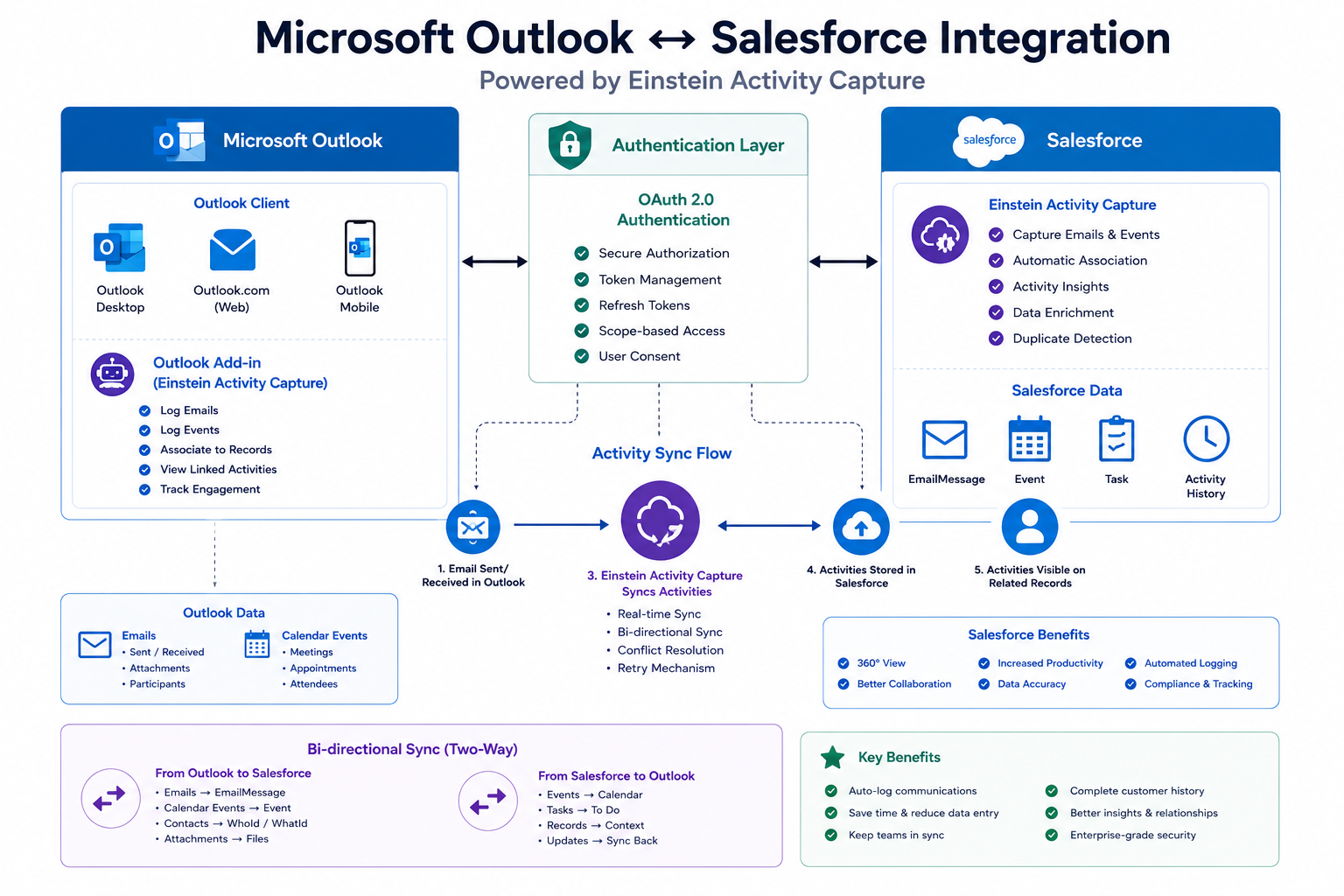
Einstein Activity Capture addresses this challenge directly by automatically synchronizing email and calendar activity between Microsoft Outlook and Salesforce — without requiring users to manually log anything.
Recently, I completed the integration of Salesforce with Microsoft Outlook using Einstein Activity Capture to streamline email and calendar activity management for an organization. The integration was secured using Microsoft 365 user-level OAuth authentication, ensuring each user’s mailbox was connected safely and independently.
This blog covers what Einstein Activity Capture is, how the integration was configured, what it delivers in practice, and the key learnings from working with EAC behavior and its limitations.
THE CHALLENGE
Why Manual Activity Logging Fails in Practice
Every CRM implementation faces the same adoption challenge: the people who benefit most from CRM data — managers, operations teams, leadership — are not the same people who are expected to enter it. Sales reps and account managers are focused on selling and serving customers. Manual data entry into Salesforce is friction that competes with that focus.
The Real Cost of Manual Activity Logging:
- Emails with prospects and customers are never logged, leaving the CRM blind to key communications
- Meeting records are created inconsistently — some reps log every meeting, others log none
- Follow-up tasks fall through the cracks when they are not recorded at the time of the activity
- Managers making pipeline decisions work with incomplete or stale activity data
- New team members taking over accounts have no visibility into previous communication history
- CRM adoption metrics look poor not because the system is bad but because the logging requirement creates resistance
The Underlying Problem: Manual logging asks users to do something twice — first the actual activity, then the record of it. When time is scarce, the second step is skipped. The solution is not better training or stricter enforcement. The solution is removing the second step entirely.
Einstein Activity Capture automates the second step. Activities happen in Outlook. EAC captures them automatically in Salesforce. The CRM stays current without requiring any change in user behavior.
WHAT EINSTEIN ACTIVITY CAPTURE IS
Automatic Activity Synchronization Between Outlook and Salesforce
Einstein Activity Capture is a Salesforce feature that automatically captures emails and calendar events from connected email and calendar accounts and associates them with the relevant Salesforce records — Contacts, Leads, Accounts, and Opportunities.
It works in the background, continuously. Users send emails and schedule meetings in Outlook as they normally would. EAC detects those activities, matches them to Salesforce records based on email addresses and other matching criteria, and surfaces them in Salesforce’s Activity Timeline without any manual action required.
What EAC Captures:
- Emails sent and received in Outlook that involve known Salesforce contacts or leads
- Calendar events created in Outlook that include Salesforce contacts as attendees
- Meeting updates and cancellations reflected in Salesforce in near real time
- Bi-directional calendar sync so Salesforce calendar events appear in Outlook and vice versa
What Makes EAC Different From Manual Logging:
Traditional Salesforce email logging requires users to use the Salesforce for Outlook add-in or BCC a specific email address to associate an email with a record. EAC replaces this with automatic background capture — the user does nothing different, and Salesforce captures the activity automatically.
IMPLEMENTATION DETAILS
How the Salesforce–Outlook Integration Was Configured
Step 1: Prerequisites and License Verification
Before beginning configuration, the first step was verifying that the necessary licenses and permissions were in place. Einstein Activity Capture is included with certain Salesforce editions and as an add-on for others. Confirming license availability before starting prevents configuration effort from being blocked at a late stage.
Key verification actions:
- Confirm Einstein Activity Capture is included in the org’s Salesforce edition or add-on licenses
- Verify that Microsoft 365 licenses are in place for all users who will participate in the integration
- Confirm admin access to both Salesforce Setup and the Microsoft 365 Admin Center
Step 2: Configure Einstein Activity Capture in Salesforce Setup
With prerequisites confirmed, EAC configuration begins in Salesforce Setup under the Einstein Activity Capture section.
Key configuration actions:
- Navigate to Setup and search for Einstein Activity Capture
- Enable Einstein Activity Capture for the org
- Configure which activities should be captured — emails, events, or both
- Define the default sharing settings for captured activities — who can see captured emails and events in Salesforce
- Set up Activity Capture settings to define how captured activities are matched to Salesforce records
Step 3: Configure Microsoft 365 OAuth Authentication
The integration uses Microsoft 365 user-level OAuth authentication to connect each user’s Outlook mailbox to Salesforce. This means each user authenticates independently — Salesforce never has org-level access to the entire Microsoft 365 tenant. Each user’s connection is scoped to their own mailbox.
Key configuration actions:
- In Salesforce Setup, navigate to the Connected Apps section for Microsoft 365
- Configure the OAuth connection between Salesforce and the Microsoft 365 tenant
- Work with the Microsoft 365 administrator to grant the necessary API permissions in Azure Active Directory
- Verify that the required Microsoft Graph API permissions are approved — typically Mail.Read, Mail.ReadWrite, Calendars.ReadWrite, and related permissions
- Test the OAuth connection from a pilot user account before rolling out to the full organization
Step 4: Deploy the Salesforce Outlook Add-In
In addition to automatic background capture, the integration includes a Salesforce add-in for Outlook that allows users to view and relate Salesforce records directly from within the Outlook interface. This gives users Salesforce context — account information, open opportunities, recent cases — without leaving their email client.
Key configuration actions:
- Configure the Salesforce add-in for Outlook through the Microsoft 365 Admin Center
- Deploy the add-in to user mailboxes through centralized Microsoft 365 deployment
- Verify the add-in appears in Outlook desktop and Outlook web access for pilot users
- Configure which Salesforce record types and fields are visible in the add-in panel
Step 5: Configure Activity Capture Settings Per User Group
Not all users may need the same capture configuration. Sales reps may need full email and calendar capture. Managers may need calendar sync only. Administrators may not need capture at all. EAC supports configuration at the user level through Activity Capture settings.
Key configuration actions:
- Create Activity Capture configurations for different user groups
- Define which email domains are included or excluded from capture
- Set email sharing settings — private, internal only, or everyone
- Assign configurations to users or profiles through permission-based assignment
Step 6: Pilot Testing and Validation
Before rolling out to the full organization, a pilot group of users was connected and their activity capture validated end-to-end.
Key validation checks:
- Confirm emails sent and received in Outlook appear in the Activity Timeline of the relevant Salesforce contact or lead within the expected synchronization window
- Verify calendar events created in Outlook with Salesforce contact attendees appear in Salesforce
- Confirm bi-directional calendar sync — events created in Salesforce appear in Outlook
- Test the Outlook add-in to verify Salesforce record lookup and relationship management work correctly
- Verify that private emails and excluded domains are not captured
KEY OUTCOMES
What the Integration Delivers in Practice
Outcome 1: Automatic Capture of Emails and Meetings From Outlook Emails and calendar events are captured automatically without any action required from users. The Activity Timeline in Salesforce stays current and complete, reflecting actual communication and meeting activity rather than what users remembered to log.
Outcome 2: Bi-Directional Calendar Sync Between Outlook and Salesforce Calendar events created in Salesforce appear in Outlook. Events created in Outlook with relevant attendees appear in Salesforce. Teams can manage their calendars in either system and maintain consistency across both without manual duplication.
Outcome 3: Secure User-Level Authentication Each user’s connection to Outlook is established through individual OAuth authentication. Salesforce does not have blanket access to the Microsoft 365 tenant. Each user controls their own connection and can revoke it independently. This architecture meets enterprise security requirements and aligns with least-privilege access principles.
Outcome 4: Salesforce Records Visible Directly From Outlook Through the Salesforce Outlook add-in, users can view account information, recent activities, open opportunities, and related records without leaving Outlook. This brings CRM context into the tool where users already spend significant time, reducing the need to switch applications for basic CRM lookups.
Outcome 5: Improved Data Accuracy, Visibility, and CRM Adoption With activity capture happening automatically, the CRM data quality improves without requiring behavior change from users. Managers gain reliable visibility into team activity. Reports based on activity data become trustworthy. CRM adoption metrics improve because the barrier to data quality has been removed.
EAC BEHAVIOR AND LIMITATIONS
What to Know About How Einstein Activity Capture Actually Works
Understanding EAC’s behavior and limitations is as important as understanding its capabilities. Several aspects of how EAC works differ from what users might expect based on traditional Salesforce activity logging.
Important Behavioral Characteristics:
Captured Activities Are Not Standard Salesforce Activities Emails and events captured by EAC are stored differently from manually logged Salesforce activities. They are not stored as standard Task or Event records in the same way. This affects how they appear in reports — standard activity reports may not include EAC-captured activities without specific configuration.
Synchronization Is Not Instantaneous EAC synchronizes activities on a schedule rather than in real time. There is typically a delay between when an email is sent in Outlook and when it appears in the Salesforce Activity Timeline. For most use cases this is acceptable, but it is important to set appropriate expectations with users.
Email Matching Depends on Contact Records EAC matches emails to Salesforce records based on email addresses. If a contact’s email address in Salesforce does not match the address in the email thread, EAC cannot associate the activity automatically. Maintaining accurate email addresses on Contact and Lead records is a prerequisite for reliable capture.
Data Retention Limits Apply EAC captured activities have data retention limits that differ from standard Salesforce data. By default, captured activities are retained for 24 months. Organizations with longer retention requirements need to evaluate whether EAC’s retention policy meets their compliance needs.
Exclusion Rules Are Important Without exclusion rules, EAC may attempt to capture internal emails between employees or emails from domains that should not be logged. Configuring domain exclusions and email exclusion rules during setup prevents unwanted capture and protects email privacy within the organization.
KEY LEARNING
What This Integration Taught Me
Learning 1: Authentication Architecture Matters for Enterprise Adoption User-level OAuth authentication — where each individual authorizes their own mailbox connection — is the right architecture for enterprise deployments. It respects individual privacy, limits the blast radius of any single authentication issue, and aligns with enterprise security policies. Understanding this architecture before starting the configuration prevents design decisions that create security concerns later.
Learning 2: EAC and Standard Activity Reporting Are Not the Same One of the most important things to communicate to stakeholders before going live is that EAC-captured activities behave differently from manually logged activities in reports and dashboards. Planning for this difference — and configuring reporting appropriately — prevents confusion after go-live when expected activity data does not appear in standard reports.
Learning 3: Data Quality Prerequisites Are Critical EAC’s automatic matching is only as good as the email addresses stored in Salesforce. Before enabling EAC for the full organization, auditing Contact and Lead records to ensure email addresses are accurate and current is time well spent. Poor email address data produces poor activity matching regardless of how well the integration is configured.
Learning 4: User Communication Shapes Adoption Even though EAC removes the manual logging requirement, users still need to understand what is being captured, how sharing settings work, and what they can do in the Outlook add-in. Clear communication before rollout — what changes, what stays the same, and what users gain — is essential for smooth adoption.
Learning 5: Pilot Testing Reveals Configuration Gaps The pilot testing step revealed several configuration adjustments that were not apparent during initial setup — exclusion rules that needed refinement, sharing settings that needed adjustment, and add-in permissions that needed correction. Piloting with a representative group of users before full rollout is not optional. It is essential.
KEY INSIGHT
The Best CRM Data Is the Data Nobody Had to Enter
The fundamental value of Einstein Activity Capture is that it produces CRM data without creating a data entry burden. Sales reps work in Outlook the same way they always have. Salesforce captures their activity automatically. The CRM becomes a reliable record of what actually happened — not a record of what users remembered to log.
This shift — from manual logging to automatic capture — changes the relationship between users and the CRM. Instead of the CRM being a system that demands effort before it gives value, it becomes a system that captures value from effort users were already making. That is what drives genuine, sustained CRM adoption.
The integration configuration is the investment. The automatic, continuous activity capture is the return — every day, for every user, without ongoing effort.
Final Thought
Salesforce–Outlook integration with Einstein Activity Capture is one of the highest-return configurations available in a Salesforce implementation. The setup investment is meaningful — OAuth configuration, EAC setup, add-in deployment, sharing policy decisions — but the ongoing return is automatic CRM data quality that would otherwise require continuous manual effort to maintain.
For any organization where email and calendar activity are primary customer touchpoints — which describes most sales and service organizations — EAC removes the single biggest barrier to CRM data quality: the requirement for users to log their own activities.
Configure it correctly, pilot it thoroughly, communicate it clearly, and Einstein Activity Capture will deliver reliable, automatic activity data that makes every downstream Salesforce capability — reporting, forecasting, pipeline management, customer visibility — more valuable and more trustworthy.

