

INTRODUCTION
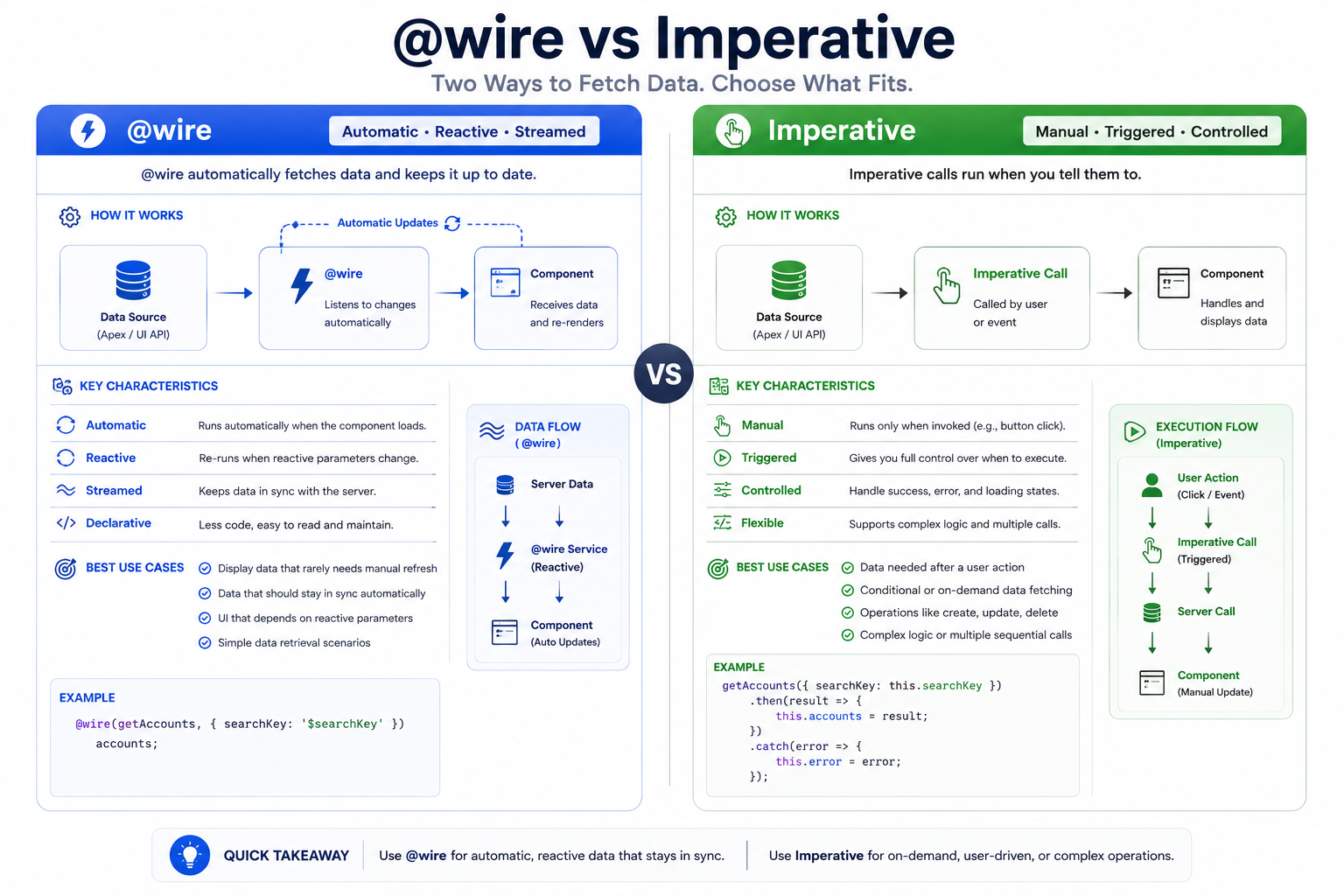
One of the first decisions Lightning Web Component developers face is choosing how to retrieve data from Salesforce: using the @wire decorator for automatic, reactive data access or making imperative Apex calls for manual, event-driven data retrieval. While both approaches work, they serve different purposes and choosing the right one dramatically impacts component performance, code complexity, and user experience. This post explores both patterns, their trade-offs, and provides guidance on when to use each approach.
THE DATA RETRIEVAL CHALLENGE
Why Data Access Matters in LWC
Retrieving data efficiently in Lightning Web Components is fundamental to building responsive, performant applications:
Key Challenges:
- Performance – Minimizing unnecessary API calls and network latency
- Reactivity – Keeping component state in sync with Salesforce data
- Caching – Avoiding duplicate requests for the same data
- Error Handling – Managing failures gracefully
- Code Complexity – Keeping code maintainable and readable
- Governor Limits – Managing Salesforce API limits efficiently
- User Experience – Providing fast, responsive interactions
- Data Consistency – Ensuring data is current and accurate
The choice between @wire and imperative calls affects all of these dimensions.
THE @WIRE DECORATOR
Automatic and Reactive Data Access
The @wire decorator provides a declarative way to call Apex methods, with Salesforce handling the execution and caching automatically.
What is @wire?
Definition:
A Salesforce decorator that automatically calls an Apex method when the component loads and whenever specified parameters change, with built-in caching and error handling.
Characteristics:
- Declarative (you declare data needs, Salesforce handles retrieval)
- Automatic execution
- Reactive to parameter changes
- Built-in caching
- Less code
- Handles loading states
- Centralizes error handling
@wire Syntax and Usage
Basic @wire Pattern:
// Import required modules
import { LightningElement, wire } from ‘lwc’;
import getAccounts from ‘@salesforce/apex/AccountController.getAccounts’;
export default class AccountList extends LightningElement {
// Wire the method to get accounts
@wire(getAccounts)
accounts; // { data, error, loading }
}
Accessing Wire Data:
export default class AccountList extends LightningElement {
@wire(getAccounts)
accounts; // Wire object with data, error, loading
// In template:
get isLoading() {
return !this.accounts.data && !this.accounts.error;
}
get accountList() {
return this.accounts.data ? this.accounts.data : [];
}
get errorMessage() {
if (this.accounts.error) {
let message = ‘Unknown error’;
if (Array.isArray(this.accounts.error.body)) {
message = this.accounts.error.body.map(e => e.message).join(‘, ‘);
} else if (typeof this.accounts.error.body.message === ‘string’) {
message = this.accounts.error.body.message;
}
return message;
}
return undefined;
}
}
@wire with Parameters (Reactive)
The power of @wire is its reactivity to parameter changes:
import { LightningElement, wire, track } from ‘lwc’;
import searchAccounts from ‘@salesforce/apex/AccountController.searchAccounts’;
export default class AccountSearch extends LightningElement {
@track searchTerm = ”;
@track industryFilter = ”;
// Wire with reactive parameters
@wire(searchAccounts, { searchTerm: ‘$searchTerm’, industry: ‘$industryFilter’ })
accounts; // Re-executes whenever searchTerm or industryFilter change
handleSearchChange(event) {
this.searchTerm = event.target.value;
// @wire automatically calls searchAccounts with new searchTerm
}
handleIndustryChange(event) {
this.industryFilter = event.target.value;
// @wire automatically calls searchAccounts with new industryFilter
}
}
Key Concept: The $ prefix indicates a reactive variable. When the variable changes, @wire automatically re-executes the Apex method with the new parameters.
@wire Caching
Salesforce provides automatic caching for @wire calls:
First call to getAccounts():
- Component renders
- @wire executes
- Apex method called
- Results cached by Salesforce
- Component receives data
Second call to getAccounts (same parameters):
- Different component or same component
- @wire executes
- Data returned from cache
- NO new Apex call made
- Much faster response
Cache invalidation:
– When parameters change
– After 30 seconds (default)
– When refreshForce() is called
Refreshing Wired Data
import { LightningElement, wire } from ‘lwc’;
import getAccounts from ‘@salesforce/apex/AccountController.getAccounts’;
export default class AccountList extends LightningElement {
@wire(getAccounts)
accounts;
handleRefresh() {
// Manually refresh the wired data
return refreshApex(this.accounts);
}
}
IMPERATIVE APEX CALLS
Manual and Controlled Data Access
Imperative calls give you full control over when and how Apex methods execute, making them ideal for event-driven interactions.
What is Imperative?
Definition:
A programmatic approach to calling Apex methods from LWC components, where you explicitly call the method in response to user actions or events.
Characteristics:
- Programmatic (you write code to call the method)
- Manual execution (you control when it runs)
- No automatic caching
- Full error handling control
- More code
- Ideal for mutations (create, update, delete)
- Event-driven
Imperative Syntax and Usage
Basic Imperative Pattern:
import { LightningElement } from ‘lwc’;
import saveAccount from ‘@salesforce/apex/AccountController.saveAccount’;
export default class AccountForm extends LightningElement {
accountName = ”;
isSaving = false;
errorMessage = ”;
async handleSave() {
if (!this.accountName) {
this.errorMessage = ‘Account name is required’;
return;
}
this.isSaving = true;
this.errorMessage = ”;
try {
const result = await saveAccount({
accountName: this.accountName
});
this.accountName = ”;
this.showSuccessMessage(‘Account saved successfully’);
} catch (error) {
this.errorMessage = this.handleError(error);
} finally {
this.isSaving = false;
}
}
handleError(error) {
let message = ‘Unknown error’;
if (Array.isArray(error.body)) {
message = error.body.map(e => e.message).join(‘, ‘);
} else if (error.body.message) {
message = error.body.message;
}
return message;
}
}
Imperative with Error Handling
import { LightningElement } from ‘lwc’;
import { ShowToastEvent } from ‘lightning/platformShowToastEvent’;
import updateContact from ‘@salesforce/apex/ContactController.updateContact’;
export default class ContactEditor extends LightningElement {
contactId = ”;
@track contact = {};
isLoading = false;
async handleUpdate() {
this.isLoading = true;
try {
const result = await updateContact({
contactId: this.contactId,
contactData: this.contact
});
// Success handling
this.dispatchEvent(
new ShowToastEvent({
title: ‘Success’,
message: ‘Contact updated successfully’,
variant: ‘success’
})
);
// Optional: Refresh data or navigate
this.refreshData();
} catch (error) {
// Error handling
console.error(‘Update failed:’, error);
this.dispatchEvent(
new ShowToastEvent({
title: ‘Error’,
message: error.body.message || ‘An error occurred’,
variant: ‘error’
})
);
} finally {
this.isLoading = false;
}
}
refreshData() {
// Refresh or re-fetch data after update
}
}
Imperative for Multiple Actions
export default class DataForm extends LightningElement {
@track formData = {};
// Different imperative calls for different actions
async handleCreate() {
try {
const newRecord = await createRecord({
data: this.formData
});
this.showSuccess(‘Record created’);
} catch (error) {
this.handleError(error);
}
}
async handleUpdate() {
try {
const updated = await updateRecord({
recordId: this.formData.Id,
data: this.formData
});
this.showSuccess(‘Record updated’);
} catch (error) {
this.handleError(error);
}
}
async handleDelete() {
try {
await deleteRecord({
recordId: this.formData.Id
});
this.showSuccess(‘Record deleted’);
this.formData = {};
} catch (error) {
this.handleError(error);
}
}
}
@WIRE VS IMPERATIVE COMPARISON
Side-by-Side Feature Comparison
| Feature | @wire | Imperative |
| Execution | Automatic | Manual (you call it) |
| Trigger | Parameter change | User action/event |
| Caching | Built-in | Not included |
| Best For | Read-only data | Mutations (CUD) |
| Code Amount | Less code | More code |
| Error Handling | Simpler | Full control |
| Loading State | Automatic | Manual |
| Reactivity | Automatic | Not reactive |
| Performance | Optimized | You control it |
| Governor Limits | Cached calls reduced | Each call counts |
| Learning Curve | Easier | Moderate |
| Debugging | Straightforward | More complex |
WHEN TO USE EACH
Decision Framework
Use @wire When:
- Loading Data on Component Initialization
// Good use of @wire
@wire(getAccountList)
accounts; // Automatically loads when component renders
- Displaying Related Records
// Good use of @wire
@wire(getContactsByAccount, { accountId: ‘$recordId’ })
contacts; // Updates when recordId changes
- Populating Picklists or Lookups
// Good use of @wire
@wire(getPicklistValues, { objectName: ‘Account’, fieldName: ‘Industry’ })
industryOptions; // Loads automatically
- Searching or Filtering with Auto-Update
// Good use of @wire
@wire(searchAccounts, { searchTerm: ‘$searchTerm’ })
searchResults; // Auto-updates as user types
- Dashboard or Report Data
// Good use of @wire
@wire(getReportMetrics, { dateRange: ‘$selectedRange’ })
metrics; // Refreshes when range changes
Use Imperative When:
- Form Submission
// Imperative is correct
async handleSave() {
await saveFormData({
data: this.formData
});
}
- Button Click Actions
// Imperative is correct
handleDelete() {
deleteRecord({ recordId: this.selectedId });
}
- Creating Records
// Imperative is correct
async handleCreate() {
const newRecord = await createAccount({
accountData: this.newAccount
});
}
- Updating Records
// Imperative is correct
async handleUpdate() {
await updateContact({
contactId: this.contact.Id,
contactData: this.contact
});
}
- Search with Manual Trigger
// Imperative is correct (user clicks search button)
async handleSearch() {
const results = await searchAccounts({
searchTerm: this.searchTerm
});
this.searchResults = results;
}
- Conditional Data Loading
// Imperative when loading based on condition
async handleLoadMore() {
if (this.canLoadMore) {
const more = await loadMoreRecords({
offset: this.offset
});
this.records = […this.records, …more];
}
}
PERFORMANCE CONSIDERATIONS
Optimizing Data Access
@wire Performance Advantages
Caching Example:
Scenario: 5 components on page, all load accounts
With @wire:
– Component 1: getAccounts() called → Cache miss → Apex runs
– Component 2: getAccounts() called → Cache hit → No Apex
– Component 3: getAccounts() called → Cache hit → No Apex
– Component 4: getAccounts() called → Cache hit → No Apex
– Component 5: getAccounts() called → Cache hit → No Apex
Result: 1 Apex call, 5 components populated
Benefit: Uses 1/5 of the API limit
Imperative Performance Considerations
Imperative calls bypass caching:
Scenario: handleSearch() called 10 times
Each call:
– Apex method executed
– Database query runs
– Results returned
– API limit consumed each time
Total: 10 Apex calls
Impact: Uses 10x the API limit compared to cached @wire
Governor Limit Impact
In one transaction:
@wire Scenario:
– 5 components load same @wire method
– Caching: 1 Salesforce API call
– Effective rate: 1/5 governor limit used
Imperative Scenario:
– 5 components call imperative method
– No caching: 5 Salesforce API calls
– Effective rate: Full 5/5 governor limit used
Recommendation: Use @wire when possible for efficiency
FINAL THOUGHTS
Choosing between @wire and imperative Apex calls is not a binary decision—it’s about using each tool for its intended purpose. @wire excels at automatic, reactive data loading with built-in caching, making it ideal for read-only scenarios. Imperative calls put you in control of execution, making them perfect for event-driven mutations and complex workflows.
The most effective Lightning Web Components use both patterns strategically: @wire decorators for retrieving data automatically when the component loads or parameters change, and imperative calls for handling user actions like saves, deletes, and searches. This combination gives you the best of both worlds—automatic reactivity where it makes sense and full control where you need it.
Understanding these patterns is fundamental to building performant, maintainable Lightning Web Components. Embrace reactivity with @wire, take control with imperative calls, and use both together to create responsive, efficient Salesforce applications that delight users and respect governor limits.

