

INTRODUCTION
Data lives everywhere in modern enterprises. Sales and customer data in Salesforce. Analytics and data warehousing in Snowflake. The challenge isn’t collecting data—it’s moving it efficiently between systems without manual intervention, maintaining consistency, and ensuring security.
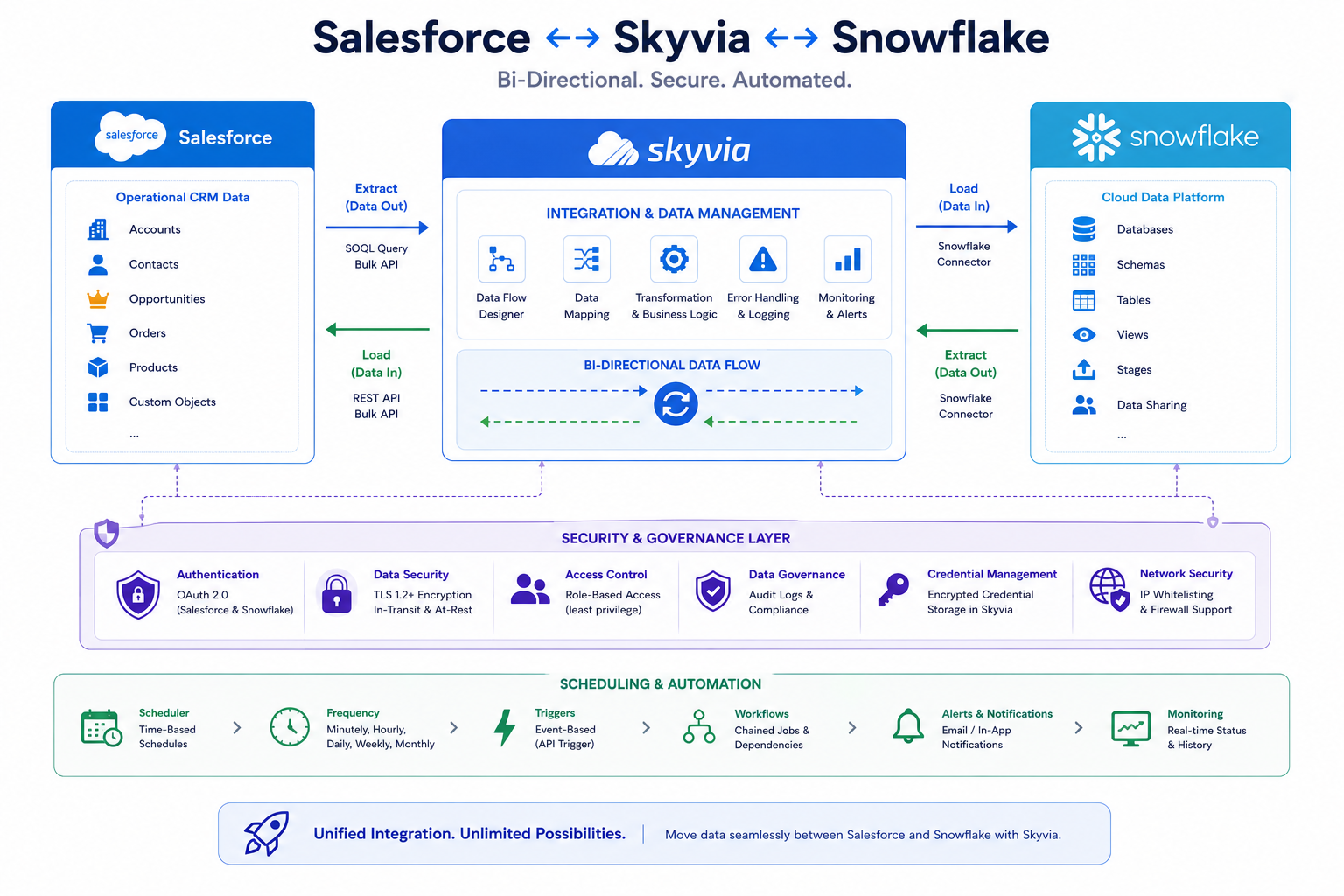
Recently, I completed a bidirectional data integration between Salesforce and Snowflake using Skyvia, an iPaaS (Integration Platform as a Service) solution. The result was a secure, automated, scalable system that synchronizes data in both directions on a schedule—no manual exports, no scripting, no data entry errors.
This post explores what was built, why Skyvia was chosen, the technical approach, and the business value delivered through this integration.
THE INTEGRATION CHALLENGE
Why Salesforce and Snowflake Need to Talk
Organizations using both Salesforce and Snowflake face a fundamental data synchronization challenge.
The Scenario
Salesforce Role:
- Customer relationship management
- Sales pipeline and opportunities
- Account and contact data
- Customer interactions and history
Snowflake Role:
- Enterprise data warehouse
- Analytics and reporting
- Historical data storage
- Data processing and enrichment
The Gap:
These systems operate independently. Data must flow between them, but traditional approaches are fragile and labor-intensive.
Traditional Approaches (Problems)
Approach 1: Manual Exports/Imports
- Users manually export from Salesforce
- Data uploaded to Snowflake
- Manual transformation and loading
- Error-prone and time-consuming
- Not scalable
- No real-time updates
Approach 2: Custom API Development
- Build custom middleware
- Complex development effort
- Ongoing maintenance required
- Security responsibilities
- High cost
- Long implementation timeline
Approach 3: Third-Party ETL Tools
- Expensive licensing
- Complex configuration
- Steep learning curve
- Overkill for simpler integrations
- May require custom development
Approach 4: Salesforce APIs + Scripts
- Write Apex or Python scripts
- Schedule execution
- Monitor for failures
- Debug integration issues
- Maintain code over time
- Limited scalability
The Opportunity
What if data synchronization between Salesforce and Snowflake was:
- Automated and scheduled
- Bidirectional (not just one-way)
- No custom code required
- Secure with enterprise standards
- Easy to configure and maintain
- Cost-effective
SKYVIA AS A SOLUTION
Understanding iPaaS and Skyvia’s Approach
Skyvia is an Integration Platform as a Service (iPaaS) that specializes in connecting cloud applications without custom code.
What is Skyvia?
Definition:
Skyvia is a cloud-based integration platform that connects Salesforce, Snowflake, and 200+ other applications through pre-built connectors, enabling data synchronization and workflow automation without coding.
Key Characteristics:
- Pre-built connectors for Salesforce and Snowflake
- Visual integration builder (no coding required)
- Scheduled and real-time sync options
- Bidirectional data movement
- Enterprise security (OAuth, key pair authentication)
- Data transformation capabilities
- Error handling and logging
- Affordable pricing model
Why Skyvia for This Integration?
Reason 1: No Custom Code
- Visual configuration interface
- Point-and-click setup
- No API development required
- Faster implementation
Reason 2: Enterprise Security
- OAuth 2.0 support
- Private key authentication
- Encrypted connections
- Compliance-ready (SOC 2, GDPR)
- Audit logging
Reason 3: Bidirectional Capability
- Data flows both directions
- Salesforce → Snowflake
- Snowflake → Salesforce
- Synchronized in both systems
Reason 4: Flexibility
- Scheduled syncs (minute, hourly, daily)
- Field mapping and transformation
- Filtering and conditional logic
- Error handling and retry logic
Reason 5: Scalability
- Handles large data volumes
- Incremental sync (not full reload)
- Performance optimized
- Grows with organization
IMPLEMENTATION APPROACH
Setting Up Bidirectional Integration
The implementation involved authentication setup, connection configuration, and data flow definition.
Phase 1: Snowflake Preparation
Step 1: Generate Key Pair
Snowflake supports key pair authentication (more secure than passwords).
Process:
- Generated public and private keys using OpenSSL
- Created with secure passphrase
- Stored private key in secure location
- Public key uploaded to Snowflake
Step 2: Create Snowflake User
- Created dedicated user for integration
- Named: SKYVIA_INTEGRATION_USER
- Assigned key pair for authentication
- Configured with secure passphrase
Step 3: Configure Permissions
- Assigned warehouse role: COMPUTE_WH
- Database role: ANALYTICS_DB
- Schema role: INTEGRATION_SCHEMA
- Granted appropriate read/write permissions
- Set object privileges (CREATE, SELECT, INSERT, UPDATE)
Phase 2: Salesforce Preparation
Step 1: Create Connected App
- Salesforce Setup → Connected Apps
- Created app named “Skyvia Integration”
- Generated Consumer Key and Secret
- Configured OAuth scopes (API access)
Step 2: Configure OAuth Credentials
- Allowed full API access
- Enabled refresh token flow
- Set callback URL to Skyvia platform
- Tested OAuth connection
Phase 3: Skyvia Configuration
Step 1: Create Salesforce Connection
- Connected to Salesforce org via OAuth
- Authorized Skyvia app in Salesforce
- Verified connection test
- Confirmed data accessibility
Step 2: Create Snowflake Connection
- Entered Snowflake account details
- Provided private key (from Phase 1)
- Entered secure passphrase
- Specified warehouse, database, schema, role
- Tested connection security
Step 3: Define Data Flow – Salesforce → Snowflake
- Selected source: Salesforce Account object
- Mapped to destination: Snowflake ACCOUNTS table
- Configured field mappings (Account.Name → ACCOUNT_NAME)
- Set sync schedule: Daily at 2 AM
- Configured incremental sync (only new/changed records)
Step 4: Define Data Flow – Snowflake → Salesforce
- Selected source: Snowflake PROCESSED_ACCOUNTS table
- Mapped to destination: Salesforce Account object
- Applied field mappings with transformation
- Configured data filters (only specific records)
- Set sync schedule: Daily at 3 AM
Phase 4: Testing and Validation
Test 1: Salesforce to Snowflake
- Created test account in Salesforce
- Ran manual sync
- Verified record appeared in Snowflake
- Confirmed data accuracy
Test 2: Snowflake to Salesforce
- Created test record in Snowflake table
- Ran manual sync
- Verified record created in Salesforce
- Confirmed field mappings correct
Test 3: Large Volume Test
- Synced 50,000 Salesforce accounts
- Monitored performance
- Verified completion
- Checked data integrity
DATA SYNCHRONIZATION PATTERNS
How Data Flows in Both Directions
Pattern 1: Salesforce → Snowflake (Push)
Use Case: Archive and analyze customer data
Flow:
- Salesforce Account records store customer information
- Scheduled sync runs daily (2 AM)
- Skyvia queries new/updated accounts since last sync
- Data transformed according to field mappings
- Records inserted/updated in Snowflake ACCOUNTS table
- Snowflake analysts can query complete customer data
- Reports generated on historical trends
Example Scenario:
- 5,000 new opportunities created daily in Salesforce
- Each sync captures new opportunities
- Snowflake builds analytics on opportunity trends
- Sales leadership views trend reports without touching Salesforce
Pattern 2: Snowflake → Salesforce (Pull)
Use Case: Enrich Salesforce with processed/analytical data
Flow:
- Snowflake data warehouse contains processed customer data
- Data includes enrichment: credit scores, risk assessment, predictive segment
- Scheduled sync runs daily (3 AM)
- Skyvia queries Snowflake PROCESSED_CUSTOMERS table
- Data merged/updated into Salesforce Account records
- Sales reps view enriched customer data in Salesforce
- Decision-making improves with additional context
Example Scenario:
- Marketing team processes customer data in Snowflake
- Adds segment classification (High Value, Standard, Nurture)
- Adds engagement score based on historical interactions
- Daily sync updates Salesforce accounts with segment and score
- Sales rep opens account: sees segment and engagement score automatically
Pattern 3: Bidirectional Synchronization
Use Case: Master data management between systems
Scenario:
- Salesforce is source for customer contacts
- Snowflake is source for enriched customer data
- Both systems must stay in sync
Sync Strategy:
- Morning: Salesforce → Snowflake (contacts update)
- Data team processes in Snowflake (enrichment, validation)
- Afternoon: Snowflake → Salesforce (enriched data update)
- Evening: Validation and error correction
- Next day: Repeat cycle
Benefits:
- Both systems have current data
- No manual updates required
- Enrichment happens automatically
- Salesforce reps see current information
FIELD MAPPING AND TRANSFORMATION
Connecting Data Between Systems
Basic Field Mapping
Field mapping connects source fields to destination fields with potential transformation.
Example: Salesforce Account → Snowflake Table
| Salesforce Field | Snowflake Column | Transformation |
| Name | ACCOUNT_NAME | Direct copy |
| Industry | INDUSTRY_CODE | Lookup mapping (Finance → FIN) |
| AnnualRevenue | REVENUE_USD | Direct copy |
| CreatedDate | CREATED_DATE | Convert to Snowflake date format |
| BillingCity | CITY | Direct copy |
| Phone | PHONE_NUMBER | Remove formatting |
Advanced Transformations
Transformation 1: Conditional Logic
- If Account.Type = ‘Partner’, set Snowflake.PARTNER_FLAG = 1
- If Account.Revenue > 1M, set Snowflake.TIER = ‘Enterprise’
- Otherwise, set Snowflake.TIER = ‘SMB’
Transformation 2: Data Enrichment
- Salesforce account has Contact count
- Snowflake calculates engagement score based on activity
- Sync brings enrichment back: Account.EngagementScore
Transformation 3: Filtering
- Only sync accounts with Industry = ‘Technology’
- Only sync if AnnualRevenue > $100K
- Skip if marked as ‘Do Not Export’
SCHEDULING AND AUTOMATION
Making Synchronization Hands-Off
Sync Schedule Options
Option 1: Real-Time (Continuous)
- Data syncs immediately after change
- Lowest latency
- Highest resource usage
- Best for: Critical data requiring instant sync
Option 2: Scheduled Intervals
- Every minute: Quick updates, frequent syncs
- Every hour: Balanced approach
- Daily: Standard schedule, lower overhead
- Weekly: Heavy data, can batch process
For This Integration:
- Salesforce → Snowflake: Daily 2 AM (off-peak hours)
- Snowflake → Salesforce: Daily 3 AM (after Snowflake processing)
Scheduling Benefits
Benefit 1: Off-Peak Processing
- 2-3 AM schedules avoid business hours
- Lower network impact
- Better performance
- No user interruption
Benefit 2: Predictable Data
- Salesforce reps know data updated nightly
- Snowflake team knows fresh Salesforce data available each morning
- Analytics teams can schedule reports after sync
Benefit 3: Error Isolation
- Issues discovered during off-hours
- Support team can remediate before business day
- Automatic retries if sync fails
Monitoring and Alerts
Skyvia provides:
- Sync completion status (success/failure)
- Records processed count
- Error logs and details
- Performance metrics
- Email notifications on failure
SECURITY AND COMPLIANCE
Enterprise-Grade Data Protection
Authentication Methods
Salesforce – OAuth 2.0:
- Standard enterprise authentication
- User credentials never stored
- Token-based access
- Revocable at any time
- Audit trail of access
Snowflake – Key Pair Authentication:
- Private/public key encryption
- Stronger than password authentication
- Passphrase protection for private key
- No credentials in configuration
- Encrypted key storage
Data Protection
In Transit:
- TLS encryption for all connections
- Secure channels between systems
- Certificate validation
- No unencrypted data transmission
At Rest:
- Salesforce: Standard Salesforce encryption
- Snowflake: Snowflake native encryption
- Skyvia: Encrypted storage for credentials
Access Control:
- Salesforce: OAuth scopes limit permissions
- Snowflake: User roles and permissions
- Skyvia: Role-based access to integration configs
Compliance Considerations
GDPR Compliance:
- PII handling: Personal data remains encrypted
- Data retention: Configurable sync windows
- Right to be forgotten: Can exclude records from sync
SOC 2 Compliance:
- Skyvia maintains SOC 2 Type II certification
- Security controls documented
- Regular audits conducted
- Audit logs available for review
BUSINESS VALUE DELIVERED
Outcomes and ROI
Value 1: Elimination of Manual Data Handling
Before:
- Weekly manual exports from Salesforce
- Spreadsheet manipulation
- Manual uploads to Snowflake
- Potential for errors and data loss
- 2-3 hours per week per person
After:
- Automatic daily sync
- Zero manual effort
- Complete accuracy
- Time reclaimed: 100+ hours per year per person
Value 2: Complete Data Visibility
Before:
- Salesforce data in Salesforce only
- Analytics required special reports
- Historical trends difficult to analyze
- Decision-making based on partial data
After:
- Salesforce data available in Snowflake data warehouse
- Full analytics and reporting capabilities
- Historical trends easily analyzed
- Strategic decisions based on complete picture
Value 3: Enriched Salesforce Data
Before:
- Sales reps lacked customer intelligence
- Decision-making based on CRM data alone
- No predictive insights
- Generic customer treatment
After:
- Accounts enriched with Snowflake intelligence
- Segment classification visible
- Engagement scores available
- Reps make better-informed decisions
Value 4: Scalable Architecture
Before:
- Manual processes don’t scale
- More data = more problems
- Adding new integrations expensive
- High technical debt
After:
- Handles 100K+ records automatically
- Adding new data flows: hours not weeks
- Scalable without code changes
- Maintainable and flexible
Value 5: Cost Efficiency
Before:
- Development team maintains custom scripts
- IT support overhead for integration issues
- Manual exports/uploads (personnel cost)
- Potential data quality issues (remediation cost)
After:
- Skyvia manages platform
- No custom code maintenance
- Automation eliminates manual effort
- Improved data quality reduces issues
FUTURE ENHANCEMENTS
Expanding the Integration
Potential Additions
Enhancement 1: Real-Time Sync
- Current: Daily scheduled syncs
- Future: Real-time sync for critical data
- Would require configuration and performance testing
Enhancement 2: More Objects
- Current: Accounts and related tables
- Future: Opportunities, Contacts, Cases
- Follows same pattern as initial setup
Enhancement 3: Advanced Transformations
- Current: Basic field mapping
- Future: Complex business logic, ML enrichment
- Snowflake’s computation power enables sophisticated enrichment
Enhancement 4: Error Recovery Automation
- Current: Manual review of failed records
- Future: Automatic retry and remediation logic
- Reduces manual intervention
FINAL THOUGHT
The Salesforce–Snowflake integration using Skyvia demonstrates that enterprise data integration doesn’t require custom code or months of development. With the right platform and careful planning, you can build scalable, secure, bidirectional data flows that serve both operational and analytical needs.
The business value is immediate: elimination of manual data handling, complete data visibility across systems, enriched insights for decision-making, and a scalable architecture for growth. The technical implementation is straightforward when the right tools are chosen.
For organizations using both Salesforce and Snowflake, this pattern is worth implementing. The ROI is achieved quickly, and the foundation enables future enhancements as needs evolve.

