

Implementing a CRM system is an important step for businesses looking to improve sales performance, manage customer relationships, and streamline operations. However, successful implementation requires more than installing software. It involves business planning, workflow configuration, data migration, system integration, testing, and user training.
Salesforce implementation services help businesses configure Salesforce according to their operational needs and long-term goals. Whether you are implementing Salesforce for the first time or upgrading an existing CRM environment, a structured approach can help reduce implementation risks and improve adoption.
In this guide, we explain the Salesforce implementation process, expected timelines, major cost factors, and best practices businesses should consider before starting a project.
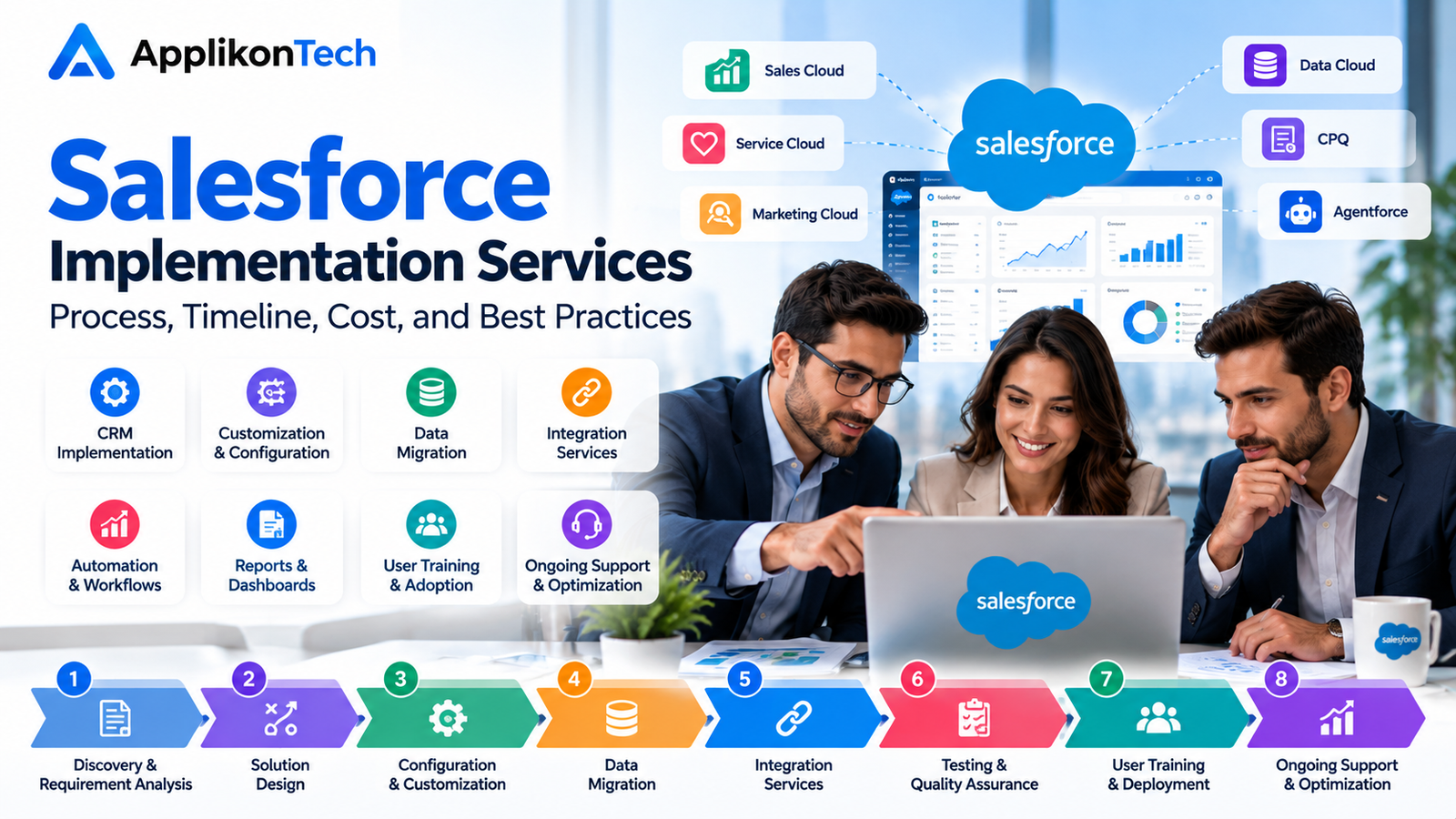
What Are Salesforce Implementation Services?
Salesforce implementation services involve planning, configuring, customizing, testing, and deploying Salesforce solutions for a business.
A Salesforce implementation company typically works with stakeholders to understand business requirements and translate them into CRM functionality.
Depending on the project, implementation may include:
- Salesforce CRM implementation and configuration
- Sales Cloud and Service Cloud setup
- Salesforce customization and workflow automation
- Customer and business data migration
- Third-party system integrations
- Reports and dashboard development
- User training and adoption support
- Testing, deployment, and post-launch assistance
The exact scope depends on your business processes, existing technology, data requirements, and selected Salesforce products.
Why Is Salesforce Implementation Important?
A properly planned Salesforce implementation can help organizations centralize customer information, standardize workflows, and improve visibility across teams.
1. Centralized Customer Data
Salesforce can help bring customer records, interactions, opportunities, and service information into a shared CRM environment. Centralized data can make it easier for authorized teams to access relevant information.
2. Improved Sales Pipeline Management
Businesses can configure opportunity stages, lead assignment rules, follow-up reminders, and sales dashboards to support more consistent sales processes.
3. Workflow Automation
Salesforce automation can reduce repetitive manual work. Depending on the requirements, businesses may automate task assignments, notifications, approvals, and other routine activities.
4. Better Reporting and Decision-Making
Reports and dashboards can provide visibility into sales activity, pipeline status, customer service performance, and other operational metrics.
5. Connected Business Systems
Salesforce integration services can connect the CRM with other business applications, helping reduce manual data entry and disconnected workflows.
The Salesforce Implementation Process: Step by Step
A structured implementation process helps ensure that the final CRM configuration supports actual business requirements.
Step 1: Discovery and Requirement Analysis
The first stage involves understanding your business model, current workflows, pain points, and desired outcomes.
The consulting team should discuss questions such as:
- How does your sales team manage leads and opportunities?
- Which customer service processes need improvement?
- What reports and dashboards do managers require?
- Which systems need to integrate with Salesforce?
- What data needs to be migrated?
- Who will use Salesforce, and what permissions will they need?
The outcome should be a documented scope of work, prioritized requirements, and agreed success criteria.
Step 2: Salesforce Solution Design
After gathering requirements, the implementation team designs the Salesforce environment.
This stage may include defining data structures, user roles, permissions, record types, automation rules, reports, and integrations.
The objective is to use standard Salesforce functionality wherever it meets business needs and introduce customization only when necessary.
Step 3: Salesforce Configuration and Customization
During configuration, Salesforce is set up to support the agreed business processes.
Tasks may include creating fields and page layouts, configuring sales stages, setting up automation, designing dashboards, and defining access permissions.
Where standard functionality is insufficient, custom development may be considered after evaluating its maintenance requirements and long-term value.
Step 4: Salesforce Data Migration
Data migration involves transferring relevant information from spreadsheets, legacy CRM systems, or other databases into Salesforce.
A typical Salesforce data migration process includes:
- Identifying the data sources and required records.
- Reviewing data quality and removing unnecessary duplicates.
- Mapping existing fields to Salesforce fields.
- Preparing and validating the migration data.
- Testing a sample migration.
- Importing the approved data.
- Verifying record counts, relationships, and data accuracy.
Data quality and migration complexity can significantly affect the project timeline. Businesses should also establish appropriate access controls and data-handling procedures.
Step 5: Salesforce Integration Services
Many organizations use multiple applications for accounting, marketing, customer support, and business operations.
Salesforce integration services can connect these applications with the CRM using available APIs, connectors, middleware, or other suitable methods.
Common integration requirements include:
- ERP and accounting systems
- Marketing automation platforms
- Customer support applications
- E-commerce platforms
- Data warehouses and reporting tools
- Internal business applications
The integration approach should account for data synchronization, error handling, security, API limits, and ongoing maintenance.
Step 6: Testing and Quality Assurance
Testing helps identify issues before the system goes live.
The implementation team should verify that workflows, permissions, reports, integrations, and migrated records behave as expected.
Depending on the project, testing may include functional testing, integration testing, user acceptance testing, and regression testing.
Business stakeholders should approve the solution against the agreed requirements before deployment.
Step 7: User Training and Deployment
Even a technically sound CRM may deliver limited value if employees do not understand how to use it.
Training should be tailored to different roles, such as sales representatives, service agents, administrators, and managers.
Before launch, confirm that users have the correct access, data is validated, critical workflows work correctly, and a rollback or issue-management plan is available where appropriate.
Step 8: Post-Implementation Support and Optimization
Implementation does not end when Salesforce goes live.
Post-launch support may involve resolving issues, refining workflows, improving reports, assisting users, and monitoring system performance.
Businesses can also review adoption metrics and user feedback to identify opportunities for further optimization.
How Long Does Salesforce Implementation Take?
The Salesforce implementation timeline depends on project scope, business complexity, customization, data migration, integration requirements, and stakeholder availability.
The following ranges are illustrative planning estimates, not guaranteed delivery timelines.
| Project type | Illustrative timeline |
|---|---|
| Basic CRM configuration | 2–4 weeks |
| Small business implementation | 4–8 weeks |
| Mid-sized implementation | 2–4 months |
| Complex enterprise implementation | 4–6+ months |
A basic configuration with clean data and limited integrations may take less time than a project involving multiple business units, complex workflows, or legacy system migration.
Before confirming a timeline, ask your implementation partner to document project phases, dependencies, milestones, testing periods, and responsibilities.
What Is the Cost of Salesforce Implementation?
The Salesforce implementation cost varies from project to project. There is no single price that applies to every business.
The total investment may include Salesforce subscription fees, consulting services, customization, integrations, data migration, training, and ongoing support.
Key Factors That Affect Implementation Cost
1. Project complexity: More workflows, business units, and requirements generally require additional planning and configuration.
2. Customization: Custom development can increase implementation effort and future maintenance requirements.
3. Data migration: Large datasets, inconsistent records, and complex relationships can require additional cleansing and validation.
4. Integrations: Connecting multiple applications may require API development, middleware, testing, and ongoing monitoring.
5. Training and change management: Employee training and process adoption require time and resources.
6. Ongoing support: Post-launch support and future enhancements should be considered when calculating the total cost of ownership.
To compare proposals effectively, request a breakdown of implementation fees, software subscriptions, third-party costs, deliverables, exclusions, and support arrangements.
Salesforce Implementation Best Practices
Following proven project management practices can help businesses reduce risk and improve implementation outcomes.
Define Clear Business Objectives
Identify the business problems Salesforce should solve. Objectives might include improving lead management, increasing data visibility, standardizing service workflows, or reducing manual administration.
Avoid Unnecessary Customization
Start by evaluating standard Salesforce capabilities. Excessive customization can increase complexity, testing requirements, and maintenance costs.
Prioritize Data Quality
Clean, consistent data supports more reliable reporting and customer management. Plan data cleansing and validation before migration begins.
Involve End Users Early
Include representatives from sales, service, operations, and management during discovery and testing. Their feedback can identify practical issues before launch.
Establish Security and Access Controls
Configure user permissions based on job responsibilities and business requirements. Review access to sensitive customer information and establish appropriate governance procedures.
Set Measurable Success Metrics
Define how you will evaluate implementation success. Possible metrics include user adoption, data completeness, lead response time, reporting accuracy, and workflow efficiency.
Plan for Continuous Improvement
Collect user feedback after launch, monitor system usage, and prioritize enhancements based on business impact.
Common Salesforce Implementation Mistakes to Avoid
Businesses should be aware of common challenges before beginning an implementation project.
- Starting development without documented requirements.
- Migrating inaccurate or duplicate data.
- Over-customizing the CRM without a clear business need.
- Ignoring integration dependencies.
- Providing insufficient employee training.
- Underestimating testing and stakeholder approval.
- Failing to plan for post-launch support.
- Choosing a provider without evaluating relevant experience.
Addressing these risks early can help create a more predictable implementation process.
How to Choose the Right Salesforce Implementation Company
Choosing the right Salesforce implementation company is as important as selecting the appropriate technical solution.
Evaluate potential providers based on:
- Experience with similar business requirements.
- Knowledge of relevant Salesforce products.
- Availability of qualified and certified professionals.
- Data migration and integration capabilities.
- Clear project scope and realistic milestones.
- Security and testing procedures.
- Communication and documentation practices.
- Post-implementation support options.
Ask for a detailed proposal explaining the project approach, deliverables, assumptions, responsibilities, and pricing structure. Certifications can help demonstrate product knowledge, but they should be assessed alongside practical experience and project fit.
Why Consider ApplikonTech for Salesforce Implementation?
ApplikonTech is a potential starting point for businesses exploring Salesforce implementation and CRM improvement. The right implementation approach should begin with an understanding of your business goals, existing systems, data requirements, and operational challenges.
Before starting a project, discuss the proposed scope, implementation methodology, integration needs, testing approach, delivery milestones, and ongoing support requirements.
A consultation can help determine which Salesforce capabilities and implementation services are appropriate for your organization.
Frequently Asked Questions
What do Salesforce implementation services include?
They can include discovery, solution design, configuration, customization, data migration, integrations, testing, deployment, training, and post-launch support.
Can Salesforce be implemented without customization?
Yes. Some businesses can meet their requirements primarily through standard Salesforce functionality and configuration. More complex requirements may need custom development or integrations.
What affects the Salesforce implementation timeline?
Project scope, data quality, integration complexity, customization, testing requirements, and stakeholder availability all influence the timeline.
Is data migration included in Salesforce implementation?
Data migration may be included, but the scope varies by provider and proposal. Confirm whether data cleansing, mapping, test migration, validation, and final migration are covered.
What should I ask a Salesforce implementation partner before hiring them?
Ask about relevant experience, project deliverables, estimated timeline, pricing, data security, testing, training, integration capabilities, and post-launch support.
Can an existing Salesforce setup be improved?
Yes. A review of an existing environment may identify opportunities to improve workflows, data quality, reports, automation, integrations, and user adoption.
Conclusion
Successful Salesforce implementation requires a clear strategy, reliable data, suitable configuration, effective integrations, and employee adoption. Businesses that define their requirements and plan each stage carefully can make better use of their CRM investment.
Whether you are implementing Salesforce for the first time or improving an existing environment, choose a partner that understands your business requirements and provides a transparent project plan.
Planning a Salesforce implementation? Contact ApplikonTech to discuss your CRM requirements, implementation priorities, and potential next steps.