

INTRODUCTION
Record sharing in Salesforce is deceptively complex. What seems simple—”give user access to these records”—becomes intricate when you have hierarchical account structures, multiple warehouse locations, dynamic relationships, and evolving business requirements.
Building a point-solution (code a specific sharing model for Cases, another for WorkOrders, another for Contracts) works temporarily but creates technical debt. Each new object requires new code, new testing, new maintenance.
The elegant solution is a metadata-driven sharing engine—a generic framework that uses custom metadata to configure what gets shared with whom, and applies that configuration across any object without code changes.
This post walks through a real-world implementation of such an engine for Experience Cloud, covering the architecture, design patterns, handling complexity, and the extensibility benefits that make this approach worth the upfront investment.
THE BUSINESS PROBLEM
Why Standard Sharing Models Break Down
The Scenario: Multi-Warehouse Access Management
Business Context:
Company Structure:
– Multiple warehouse accounts (East, West, Central)
– Each warehouse handles Cases, WorkOrders, Shipments
– Contact users need visibility across multiple warehouses
– A single customer contact may be associated with multiple warehouses
– Access must be dynamic (change as relationships change)
Example:
Contact: John Smith
└─ Customer Account 1 (Primary warehouse: East)
├─ Cases (should see)
├─ WorkOrders (should see)
└─ Shipments (should see)
└─ Customer Account 2 (Primary warehouse: West)
├─ Cases (should see)
├─ WorkOrders (should see)
└─ Shipments (should see)
Problem: Manually managing this is not scalable
Solution: Automated, metadata-driven sharing
Why This Is Hard
Challenge 1: Complexity
Multiple dimensions of sharing:
– By account hierarchy (parent/child accounts)
– By account location (warehouse)
– By relationship type (contact, partner, vendor)
– By record type (Cases vs WorkOrders vs Shipments)
– By user role (view-only vs edit)
– Cascading (parent account → child accounts)
Managing manually:
– Creates sharing rules for each combination
– Becomes unmaintainable (hundreds of rules)
– Inflexible (can’t change logic without editing rules)
– Error-prone (easy to miss scenarios)
Challenge 2: Scalability
Large account hierarchies (100+ accounts):
– Manual sharing: 10,000+ share records
– Hard to update or revoke
– Performance issues (sharing calculations slow)
– Difficult to audit
Large user base (10,000+ users):
– Each access change = update shares
– Bulk updates risky
– Governor limits hit easily
Challenge 3: Extensibility
Adding new objects to share:
Traditional approach:
- Build sharing logic (Apex code)
- Create test suite
- Deploy to production
- Monitor and support
- Maintain going forward
Metadata-driven approach:
- Create metadata record
- Checkbox: “Active”
- Done (logic reused)
THE METADATA-DRIVEN APPROACH
Conceptual Foundation
Core Concept
What Is Metadata-Driven?
Instead of hardcoding logic:
if (isCase) { shareLogicForCases(); }
else if (isWorkOrder) { shareLogicForWorkOrders(); }
Use configuration (metadata):
- Define what to share (metadata record)
- Define who to share with (relationship record)
- Generic engine reads both
- Applies sharing dynamically
Example:
Metadata Record:
– Object: Case
– Active: true
– Access Level: Read
– Share with: Account owners, contacts
At Runtime:
– Query metadata for “Case”
– Query relationships (contact to account)
– Apply sharing automatically
– No if/else logic needed
How It Works
Simplified Flow:
- Change Detected
├─ New contact linked to account
├─ Account hierarchy updated
└─ User provisioned for Experience Cloud
- Check Metadata
├─ What objects are configured for sharing?
├─ Case? WorkOrder? Shipment?
└─ Which ones are active?
- Calculate Access
├─ Get account hierarchy
├─ Get related records
├─ Determine access level
└─ Generate sharing operations
- Apply Sharing
├─ Create AccountShare records
├─ Create custom object shares
├─ Handle unsharing (old relationships)
└─ Update user provisioning
- Monitor
├─ Log operations
├─ Handle errors
├─ Alert on failures
└─ Track sharing status
ARCHITECTURE BREAKDOWN
Design Components
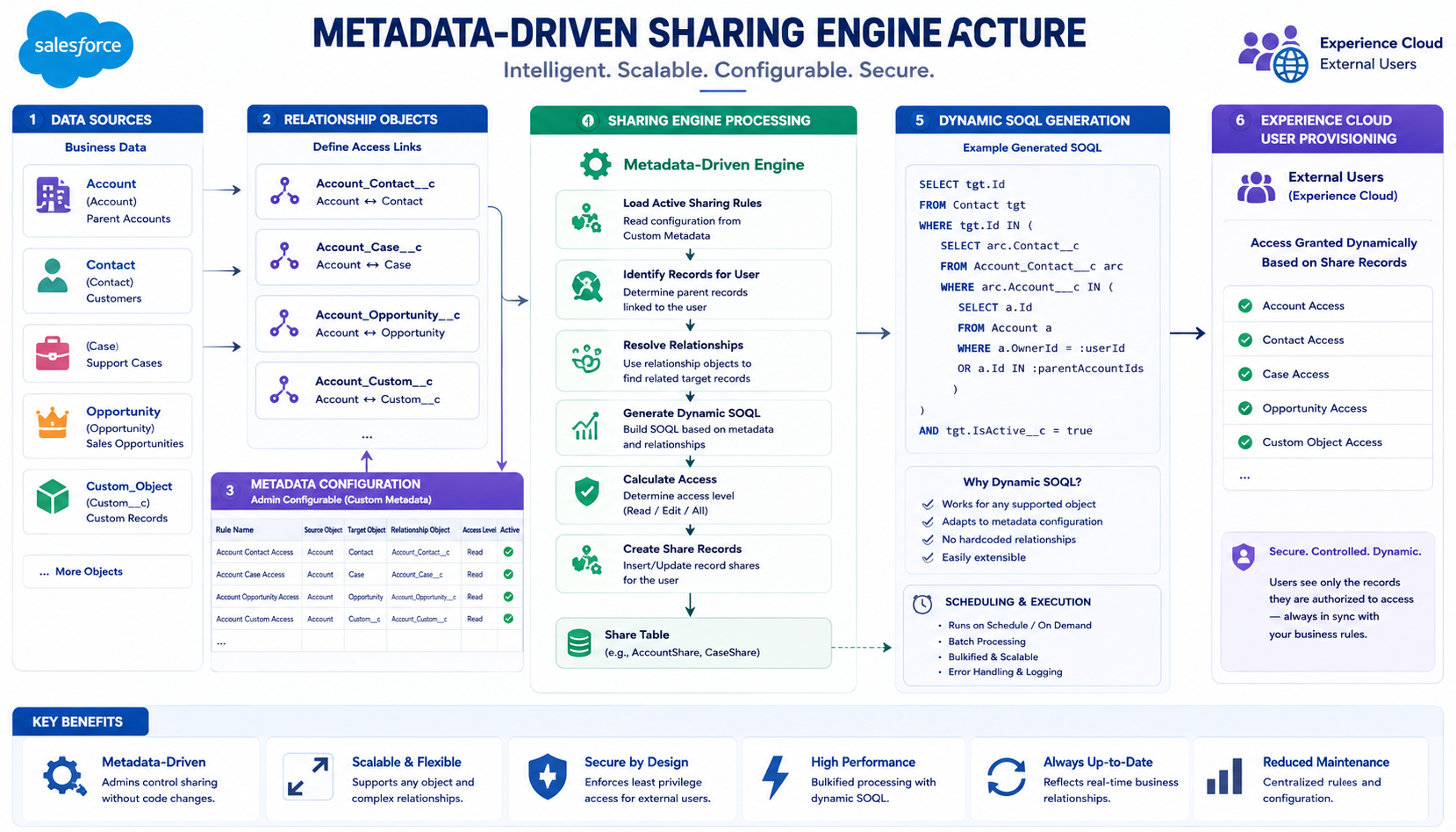
Component 1: Data Sources (Left Side of Diagram)
External Systems:
APIs / Webhooks:
├─ Customer relationship systems
├─ Partner data sources
├─ Legacy systems
└─ Real-time data feeds
Salesforce Objects:
├─ Accounts (warehouse accounts)
├─ Contacts (customer contacts)
├─ Users (Experience Cloud users)
└─ Relationships (AccountContact__c)
Purpose:
Feed data into the sharing engine about who needs access to what.
Component 2: Relationship Objects (WHOLESALES_C)
Custom Relationship Object:
WHOLESALES_C (Relationship Object):
– Represents connection between contact and account
– Fields:
├─ Contact__c (lookup)
├─ Account (Warehouse Account)
├─ Active Flag (boolean)
├─ Relationship Type (picklist)
└─ Custom Fields (domain-specific)
Purpose:
– Define which contacts have access to which accounts
– Act as input to sharing engine
– Drive access decisions
Component 3: Metadata Configuration (Center of Diagram)
Custom Metadata Types:
Shareable_Object__mdt (Custom Metadata):
– Defines which objects to share
– Fields:
├─ API Name
├─ Active Checkbox
├─ Access Level (Read, Read/Write)
├─ Share Type
└─ Configuration JSON
Example Records:
- Case Sharing Config
– Object: Case
– Active: true
- WorkOrder Sharing Config
– Object: WorkOrder
– Active: true
- Shipment Sharing Config
– Object: Shipment__c
– Active: false (not yet enabled)
Purpose:
– Configure what to share (without code)
– Enable/disable sharing (checkbox)
– Define access levels
– Extensible for future objects
Sharing Rules Metadata:
Sharing_Rule__mdt (Custom Metadata):
– Defines sharing rules per object
– Fields:
├─ Object Name
├─ Rule Name
├─ Relationship Path (SOQL syntax)
├─ Access Level
└─ Description
Example:
– Object: Case
– Rule: Account Owner Access
– Path: (Contact → Account → Case)
– Access: Read
Purpose:
– Define how sharing decisions are made
– Express relationship hierarchies
– Configure access levels per rule
Component 4: Metadata-Driven Sharing Engine (Heart of System)
Read Shareable Objects:
Apex logic:
- Query all Shareable_Object__mdt records
- Filter where Active = true
- Build list of objects to share
Result: [Case, WorkOrder, Shipment]
Expand Account Hierarchy:
Apex logic:
- Start with contact’s accounts (from relationship object)
- Query parent accounts
- Query child accounts
- Build complete hierarchy
Example:
Contact linked to: Account East
Hierarchy expansion:
├─ Parent: Warehouse Global
├─ Self: Account East
└─ Children: East Region, East Central
Result: 5 accounts to share
Resolve Partial Users:
Apex logic:
- Get contact from relationship
- Create or get Experience Cloud user
- Handle user provisioning
- Return user ID for sharing
Purpose: Map contacts to users for sharing
Build Shareable Records Dynamically:
Apex logic:
- For each enabled object:
– Query records linked to account(s)
– Use dynamic SOQL
– Handle relationships
Example for Cases:
SELECT id FROM Case WHERE AccountId IN :accountIds
Result: Case IDs to share with user
Threshold Check (Async Processing):
Apex logic:
- Count total sharing operations needed
- If threshold (e.g., 1000+):
– Queue for Queueable processing
– Avoid governor limits
- If small:
– Process synchronously
– Real-time sharing
Purpose: Balance speed vs governor limits
Create Sharing Records (Async):
Apex logic via Queueable:
- Create AccountShare records
- Create custom object shares
- Create sharing records dynamically
- Handle duplicates (no error)
- Batch insert (efficient)
Purpose: Actually grant access in database
Component 5: User Provisioning (Right Side)
Create Users:
Experience Cloud User Provisioning:
- Get contact from relationship
- Create Experience Cloud user
- Assign community
- Assign roles/permissions
- Return user ID
Challenge: Mixed DML
– User creation is separate DML context
– Can’t mix with record sharing
– Solution: Async processing separates contexts
Assign Sharing DML (Async):
Queueable handles:
- User creation (if needed)
- Sharing DML (separate context)
- No Mixed DML issues
- Reliable execution
HANDLING COMPLEXITY
Solving Hard Problems
Challenge 1: Account Hierarchy Expansion
The Problem:
Contact linked to Account: East
But we need sharing for:
– East (direct)
– Warehouse Global (parent)
– East Region (child)
– East Central (child)
– East South (child)
Without hierarchy expansion: Contact only gets East
With expansion: Contact gets all 5 accounts
Result:
- One contact → multiple accounts
- Multiple accounts → multiple shared records
- All expanded automatically
Challenge 2: Duplicate Access Prevention
The Problem:
Contact linked to Account A (direct)
Contact linked to Account B (parent of A)
Both need access to A’s Cases
– Direct link would create share
– Parent link would create share
– Result: Duplicate shares
Salesforce allows one share per user per object
Second share creation: Error
Benefits:
- No errors on duplicates
- Continues processing
- Idempotent (safe to retry)
Challenge 3: Mixed DML Restrictions
The Problem:
Setup Objects:
– User creation
– User provisioning
Data Objects:
– AccountShare
– CaseShare
– Custom shares
Can’t mix in same transaction:
User userCreated = new User(…);
insert userCreated; // Setup object
AccountShare share = new AccountShare(…);
insert share; // Data object
// Error: Mixed DML Operation
Benefits:
- User creation works
- Sharing works
- No Mixed DML errors
- Reliable execution
EXTENSIBILITY BENEFITS
Why This Design Wins Long-Term
Adding a New Object to Share
Without Metadata-Driven Design (Old Way):
- Write Apex code
– New sharing handler class
– Custom SOQL queries
– Error handling
– Logging
- Write test code
– Unit tests for handler
– Integration tests
– Edge cases
- Deploy to production
– Code review
– Testing
– Deployment risk
- Support
– Maintenance
– Bug fixes
– Future changes
Timeline: 2-3 weeks
Complexity: High
Risk: Medium
Cost: Significant
With Metadata-Driven Design (New Way):
- Create Metadata Record
– Object: WorkOrder
– Active: true
– Access Level: Read
– Done!
- Deploy metadata
– No code review needed
– No tests needed
– No compilation
– Instant
- Live
– Engine auto-discovers
– Auto-applies sharing
– Works immediately
Timeline: 5 minutes
Complexity: Low
Risk: Minimal
Cost: Almost nothing
Example: Adding WorkOrder Sharing
Timeline:
- Identify need: “We need to share WorkOrders”
- Create metadata record:
Shareable_Object__mdt:
- MasterLabel: WorkOrder Sharing
- DeveloperName: WorkOrder_Sharing
- API_Name__c: WorkOrder
- Active__c: true
- Access_Level__c: Read
- Save & deploy
- Engine detects:
– Reads Shareable_Object__mdt
– Finds: WorkOrder (active)
– Queries WorkOrders
– Applies sharing
- Done – WorkOrders now shared automatically
Cost: Zero code changes
Timeline: Deploy immediately
Risk: None
Flexible Configuration Examples
Example 1: Read-Only Access
Metadata:
– Object: Case
– Access: Read
– Result: Users can view, not edit
Example 2: Read/Write Access
Metadata:
– Object: WorkOrder
– Access: ReadWrite
– Result: Users can view and edit
Example 3: Enable/Disable Without Removing
Before:
Metadata: Active = true
Result: Sharing active
Change:
Metadata: Active = false
Result: Sharing inactive (no code change)
Change back:
Metadata: Active = true
Result: Sharing active again
FINAL THOUGHTS
Building a metadata-driven sharing engine represents a shift from point-solution coding to platform architecture. Instead of building one-off features, you build infrastructure that enables future features without code.
The benefits compound over time:
- First object (Case): 80/20 on engine setup
- Second object (WorkOrder): 5 minutes metadata
- Third object (Shipment): 5 minutes metadata
- Tenth object: Still 5 minutes metadata
The ROI is significant for organizations that need flexible, scalable record sharing.
The design patterns—Factory, Strategy, Dynamic SOQL, Async Processing—are fundamental to enterprise Salesforce development. Learning them through a real-world problem makes them stick.
For any organization managing complex access control on Experience Cloud or multi-tenant deployments, this pattern should be considered. It trades upfront architectural complexity for long-term flexibility and maintenance savings.
The hardest part isn’t the code—it’s thinking in abstractions rather than point solutions. But once you shift that mindset, you unlock the ability to build truly scalable, maintainable systems.

