

INTRODUCTION
In customer support environments, efficiency often comes down to the small tasks agents perform hundreds of times each day.
Opening records.
Updating statuses.
Sending emails.
Logging activities.
Saving records.
Individually, these actions take only a few seconds. But when repeated across dozens or even hundreds of cases, they consume a significant portion of an agent’s day.
During my experience working with Salesforce Service Cloud, one observation became very clear:
Many support processes involve the same sequence of clicks being repeated over and over again.
This is exactly where Salesforce Macros deliver value.
Macros allow organizations to bundle multiple actions into a single click, helping agents work faster, maintain consistency, and focus more on customer interactions rather than administrative tasks.
THE CHALLENGE
Why Repetitive Tasks Slow Down Service Teams
Customer service teams often operate under strict service-level agreements (SLAs).
Every minute matters.
However, many common support workflows require agents to manually perform the same actions repeatedly.
Common Repetitive Activities
- Updating Case Statuses
- Sending Standard Responses
- Logging Activities
- Creating Follow-Up Tasks
- Updating Record Fields
- Completing Case Actions
Although these tasks are simple, they create several operational challenges.
Challenge 1: Time Consumption
Small repetitive tasks add up throughout the day.
Challenge 2: Human Error
Agents may forget a step or update the wrong field.
Challenge 3: Inconsistent Responses
Different agents may handle similar situations differently.
Challenge 4: Reduced Productivity
Time spent on repetitive work is time not spent helping customers.
Challenge 5: Training Complexity
New agents must learn multiple process steps for common scenarios.
Organizations need a way to standardize these actions while reducing effort.
WHAT ARE SALESFORCE MACROS?
Automating User Actions Inside Service Cloud
Salesforce Macros are productivity tools that allow agents to execute multiple actions through a single command.
Rather than performing every action manually, agents simply run a Macro.
Salesforce then performs the configured sequence automatically.
Think of a Macro as a predefined workflow designed specifically for user-interface actions.
Common Actions Macros Can Perform
- Update Record Fields
- Launch Quick Actions
- Send Emails
- Insert Email Templates
- Log Activities
- Create Tasks
- Populate Form Data
- Navigate Record Components
The goal is simple:
Reduce repetitive effort while maintaining process consistency.
A REAL-WORLD CUSTOMER FOLLOW-UP SCENARIO
The Perfect Use Case for Macros
One of the most common support scenarios involves following up with customers for additional information.
Consider a support agent handling a Case that requires customer input.
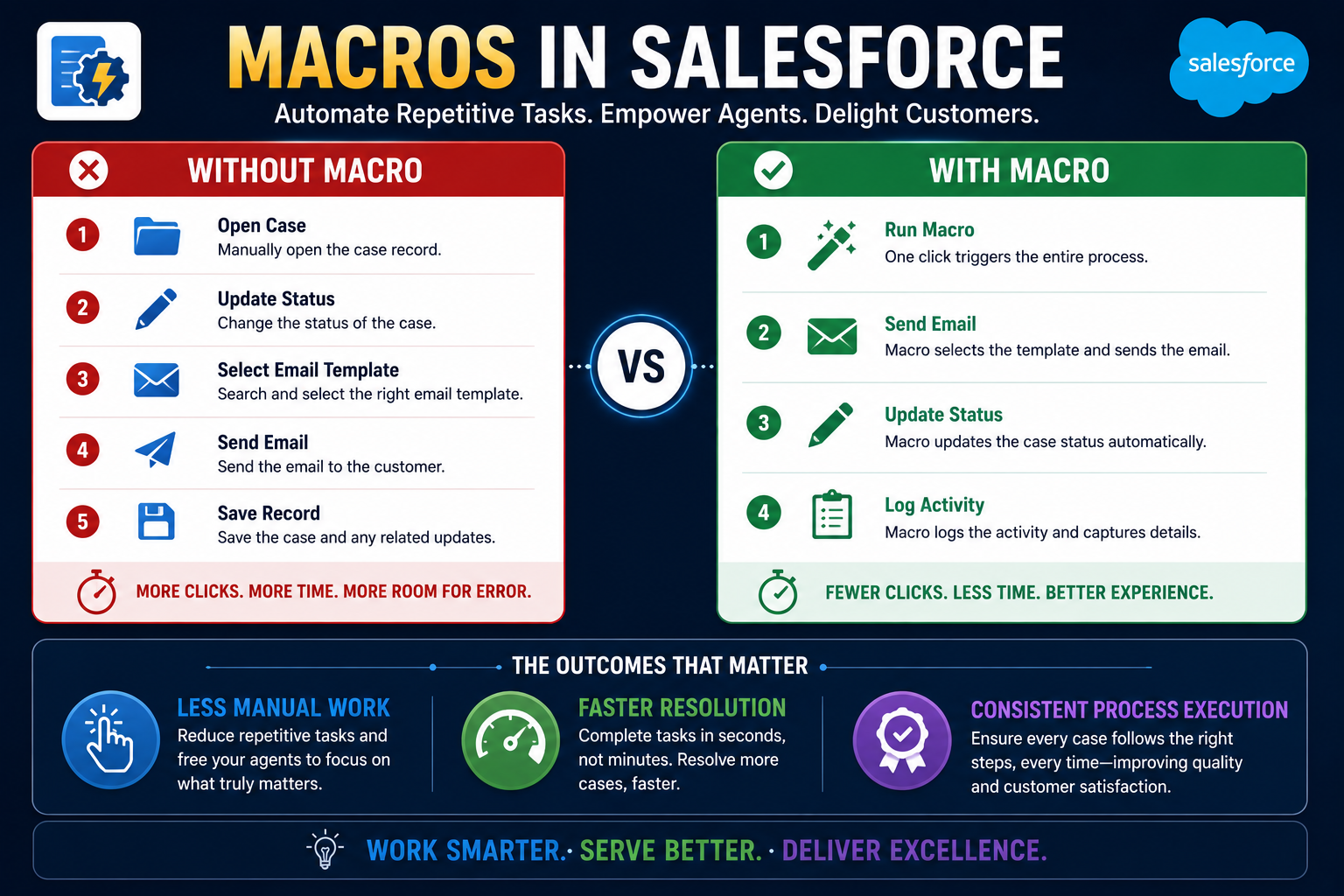
Without a Macro
The agent performs the following steps:
- Open the Case
- Update Status to “Waiting on Customer”
- Open Email Action
- Select Email Template
- Send Email
- Save Record
This process may only take a minute or two.
However, when repeated dozens of times daily, the impact becomes significant.
With a Macro
The agent simply clicks:
Run Macro
Salesforce automatically:
- Updates the Case Status
- Sends the Follow-Up Email
- Logs the Activity
- Saves the Record
The entire workflow executes consistently and instantly.
HOW MACROS WORK
Combining Multiple Actions into One Experience
Macros are built using Salesforce’s Macro Builder.
Administrators can define the exact sequence of actions agents should perform.
Step 1: Identify the Process
Determine which repetitive workflow should be automated.
Examples:
- Customer Follow-Up
- Case Escalation
- Case Closure
- Appointment Confirmation
- Service Request Updates
Step 2: Configure Actions
Define the actions the Macro should execute.
Examples:
- Update Status
- Send Email
- Populate Fields
- Create Activities
Step 3: Test the Workflow
Validate that the Macro performs all actions correctly.
Step 4: Deploy to Agents
Make the Macro available through Service Console.
Agents can begin using it immediately.
BUSINESS BENEFITS
Why Service Teams Love Macros
Benefit 1: Faster Case Resolution
Agents spend less time on administrative tasks and more time helping customers.
Benefit 2: Reduced Manual Work
Repetitive clicking is significantly reduced.
Benefit 3: Consistent Customer Communication
Every customer receives the same approved response.
Benefit 4: Better Process Compliance
Required actions are executed consistently every time.
Benefit 5: Improved Agent Experience
Agents can focus on problem-solving rather than routine tasks.
BEST PRACTICES
Designing Effective Macros
Best Practice 1
Focus on high-volume repetitive tasks.
Best Practice 2
Use approved email templates to maintain consistency.
Best Practice 3
Keep Macros simple and easy to understand.
Best Practice 4
Test thoroughly before deployment.
Best Practice 5
Review Macro usage regularly and optimize where necessary.
KEY LEARNING
What Macros Teach About Automation
Learning 1
Not every automation requires Apex or Flow.
Learning 2
Small efficiency improvements can create significant operational impact.
Learning 3
Standardized processes improve customer experiences.
Learning 4
User adoption increases when automation simplifies daily work.
Learning 5
The best automation often eliminates repetitive actions rather than adding complexity.
KEY INSIGHT
Productivity Is Often Hidden in Repetitive Tasks
Organizations frequently focus on large-scale automation projects.
However, some of the most impactful improvements come from simplifying everyday activities.
If a process requires agents to perform the same sequence of clicks hundreds of times each week, that process is a candidate for automation.
Macros transform repetitive actions into a single click, allowing teams to work smarter rather than harder.
FINAL THOUGHT
Salesforce Macros may seem like a small Service Cloud feature, but their impact can be substantial when applied to real-world workflows.
By reducing repetitive tasks, standardizing processes, and improving agent efficiency, Macros help service teams deliver faster and more consistent customer experiences.
The most successful Service Cloud implementations aren’t always the ones with the most complex automation.
Sometimes the greatest value comes from simplifying the work agents perform every single day.
And that’s exactly where Salesforce Macros shine.

