

INTRODUCTION
While working on Case management in Salesforce Service Cloud, I explored one of the most common questions that comes up when designing a support intake strategy: when should you use Email-to-Case and when should you use Web-to-Case?
On the surface, both tools do something similar — they create Cases in Salesforce from customer interactions. But the way they capture data, the type of interactions they support, and the automation possibilities they enable are fundamentally different.
The real insight, however, is not about choosing one over the other. It is about understanding how both work, what each does best, and how to combine them into a robust Case intake strategy that serves different customer touchpoints effectively.
This blog breaks down both tools — their strengths, their limitations, and the architectural approach that makes them work together seamlessly.
THE CHALLENGE
Why Case Intake Strategy Matters More Than Most Teams Realize
Every support organization needs a reliable way to capture customer issues and create Cases in Salesforce. But not all customer interactions arrive in the same format, carry the same information, or require the same handling.
The Common Problems With Poorly Designed Case Intake:
- Cases created with missing or inconsistent data make routing and prioritization unreliable
- Email-based Cases often arrive without the structured fields needed for automation
- Web form Cases can lack conversation continuity when customers follow up by email
- Assignment rules fail when Case type, priority, or category fields are empty
- Reporting becomes difficult when data quality varies across intake channels
- Support teams spend manual effort categorizing and routing Cases that should be handled automatically
The Underlying Question: Most teams implement one channel — usually Email-to-Case because it is the most visible customer touchpoint — and try to make it do everything. The result is a system that partially works but requires ongoing manual intervention to compensate for its gaps.
The better approach is to treat Case intake as an architectural decision, not a configuration checkbox.
EMAIL-TO-CASE
Email-to-Case — Best for Ongoing Communication and Support Threads
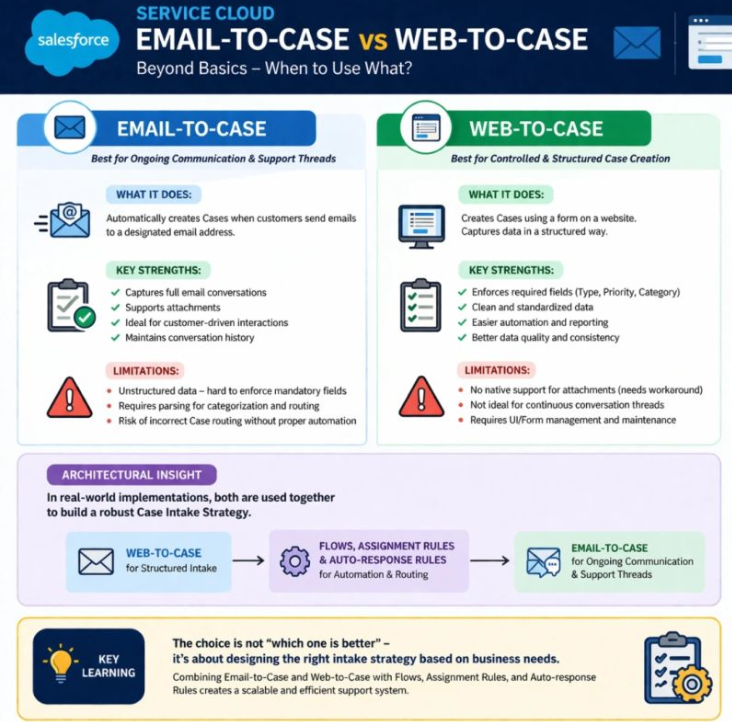
Email-to-Case automatically creates Cases in Salesforce when customers send emails to a designated support email address. Every email from a customer becomes a Case, and subsequent replies in the same thread are attached to that Case, maintaining a full conversation history.
What It Does: Automatically creates Cases when customers send emails to a designated email address. The customer does not need to visit a website or fill out a form — they simply send an email the way they normally would, and Salesforce captures it as a structured Case record.
Key Strengths:
- Captures full email conversations — every reply, follow-up, and agent response is tracked on the Case timeline
- Supports attachments — customers can include files, screenshots, and documents directly in their email
- Ideal for customer-driven interactions — the customer initiates contact through their most familiar channel
- Maintains conversation history — the entire support thread lives on the Case record, giving agents full context at a glance
Limitations:
- Unstructured data — email does not enforce mandatory fields, so Cases often arrive without Type, Priority, or Category populated
- Requires parsing for categorization and routing — without additional automation, Cases must be manually categorized or rely on keyword-based rules
- Risk of incorrect Case routing without proper automation — if routing rules depend on fields that email does not populate, Cases may land in the wrong queue or with the wrong team
When Email-to-Case Is the Right Choice:
- Customers need to communicate back and forth with support over time
- Attachment support is important for the type of issues being handled
- The support channel is customer-initiated and conversational in nature
- The team values continuity of communication on a single Case record
WEB-TO-CASE
Web-to-Case — Best for Controlled and Structured Case Creation
Web-to-Case creates Cases using a form embedded on a website or support portal. Customers fill out the form, and Salesforce captures the submission as a Case with all form fields mapped to Case fields directly.
What It Does: Creates Cases using a form on a website and captures data in a structured, controlled way. The organization defines exactly what information must be provided before a Case can be submitted.
Key Strengths:
- Enforces required fields — Type, Priority, Category, and any other fields defined on the form must be completed before submission
- Clean and standardized data — every Case created through Web-to-Case arrives with consistent, structured field values
- Easier automation and reporting — because data is structured and fields are populated, assignment rules, auto-response rules, and Flow automation work reliably
- Better data quality and consistency — the form controls what information is captured, eliminating the variability that comes with freeform email communication
Limitations:
- No native support for attachments — Web-to-Case does not natively support file attachments; workarounds using Experience Cloud or custom forms are required
- Not ideal for continuous conversation threads — once the Case is created, ongoing customer communication typically needs to happen through email or a portal, not through the original form
- Requires UI and form management — the form must be designed, hosted, maintained, and updated as business requirements change
When Web-to-Case Is the Right Choice:
- Structured data capture is important for routing, reporting, or SLA management
- The team needs Cases to arrive with mandatory fields already populated
- The intake process benefits from guiding the customer through specific questions
- Automation rules depend on field values being present and consistent
SIDE-BY-SIDE COMPARISON
Email-to-Case vs Web-to-Case — At a Glance
Data Structure:
- Email-to-Case: Unstructured — data comes from freeform email content
- Web-to-Case: Structured — data comes from defined form fields
Mandatory Fields:
- Email-to-Case: Cannot enforce mandatory fields at intake
- Web-to-Case: Enforces required fields before form submission
Attachment Support:
- Email-to-Case: Native support for email attachments
- Web-to-Case: No native attachment support — workaround required
Conversation Threading:
- Email-to-Case: Full conversation history maintained on the Case
- Web-to-Case: Not designed for ongoing conversation threads
Automation Reliability:
- Email-to-Case: Requires additional parsing or rules to populate fields for automation
- Web-to-Case: Structured fields make automation straightforward and reliable
Data Quality:
- Email-to-Case: Variable — depends on what the customer includes in the email
- Web-to-Case: Consistent — controlled by the form design
Best For:
- Email-to-Case: Ongoing support communication and customer-initiated interactions
- Web-to-Case: Controlled intake with structured data requirements
THE ARCHITECTURAL INSIGHT
In Real Projects, Both Are Used Together
The most important insight from working with both tools in real implementations is this: the choice is not which one is better. It is about designing the right intake strategy based on business needs.
In real-world implementations, both tools are used together to build a robust Case intake strategy:
Step 1 — Web-to-Case for Structured Intake The customer submits their initial support request through a Web-to-Case form. This captures all required fields — Type, Priority, Category, Product, Description — in a structured and consistent format. The Case is created in Salesforce with clean data from the very beginning.
Step 2 — Flows, Assignment Rules, and Auto-Response Rules for Automation and Routing Because the Case arrives with structured field values, automation works reliably. Assignment Rules route the Case to the correct queue or agent based on Type, Priority, and Category. Auto-Response Rules send an immediate acknowledgment to the customer. Flow automation can trigger additional actions — creating follow-up tasks, setting SLA milestones, or notifying team leads for high-priority Cases.
Step 3 — Email-to-Case for Ongoing Communication and Support Threads Once the Case is created and assigned, ongoing communication between the customer and the support agent happens through email. Email-to-Case captures every reply and attaches it to the existing Case record, maintaining full conversation history. The customer communicates naturally through email, and every message is tracked without manual effort.
Why This Architecture Works:
- Cases start with clean, structured data because of Web-to-Case
- Automation runs reliably because mandatory fields are populated at creation
- Ongoing communication is captured automatically because of Email-to-Case
- The full Case lifecycle — from structured intake to resolution — is tracked in one place
- Support teams have complete context at every stage without manual data entry
REAL-WORLD IMPLEMENTATION CONSIDERATIONS
What to Think About When Designing Your Case Intake Strategy
Consideration 1: What Data Does Your Routing Logic Require? If your Assignment Rules depend on Case Type, Priority, or Category being populated, Email-to-Case alone will not reliably support them. Web-to-Case ensures these fields are captured at intake. Design your routing logic first, then determine which intake channel supports it.
Consideration 2: What Does Your Customer Communication Model Look Like? If customers need to communicate back and forth with agents over days or weeks, Email-to-Case is essential for maintaining conversation continuity. If your support model is more transactional — one submission, one response — Web-to-Case may be sufficient for the full interaction.
Consideration 3: Do Your Customers Need to Submit Attachments? If attachments are important — error logs, screenshots, supporting documents — Email-to-Case handles this natively. Web-to-Case requires additional configuration through Experience Cloud or a custom solution. Factor this into your channel design.
Consideration 4: How Will You Handle Cases That Arrive Through Both Channels? In a combined architecture, a customer might submit a Web-to-Case form and then also send an email to your support address about the same issue. Define how duplicate Case prevention will work — through matching rules, Duplicate Rules, or agent-level merge processes — before both channels go live.
Consideration 5: What Are Your Reporting Requirements? Web-to-Case produces more consistently reportable data because fields are populated at intake. If your service organization requires detailed reporting on Case volume by type, priority, or category, ensuring that data is captured accurately at the point of creation is essential.
KEY LEARNING
What Working With Both Tools Taught Me
Learning 1: Neither Tool Is Complete on Its Own Email-to-Case captures communication beautifully but cannot enforce data structure. Web-to-Case enforces data structure beautifully but does not support ongoing communication. Each tool has a gap that the other fills. Recognizing this early leads to better architecture decisions.
Learning 2: Automation Is Only as Good as the Data Behind It Assignment Rules, Auto-Response Rules, and Flow automation all depend on field values being present and accurate. If Cases arrive with empty Type, Priority, and Category fields because Email-to-Case is the only intake channel, automation becomes unreliable. Structured intake through Web-to-Case is the foundation that makes everything else work.
Learning 3: The Customer Experience Shapes the Channel Choice How customers prefer to interact with support should influence which channels are prioritized. If your customer base primarily uses email, Email-to-Case is essential. If your support model includes a self-service portal, Web-to-Case can be embedded there. Channel design should follow customer behavior, not just technical convenience.
Learning 4: A Combined Strategy Is More Maintainable A Case intake architecture that uses both tools in defined roles — Web-to-Case for intake, Email-to-Case for communication — is easier to maintain than trying to make one tool do everything. Each tool has a clear purpose, a defined scope, and a known set of limitations that have been accounted for in the design.
Learning 5: Think in Workflows, Not Features The right question is not “Should we use Email-to-Case or Web-to-Case?” The right question is “What does the full lifecycle of a customer Case look like, and which tools support each stage of that lifecycle?” Thinking in workflows rather than features leads to better architectural outcomes.
BEST PRACTICES
Design Principles for a Robust Case Intake Strategy
Best Practice 1: Design Your Case Intake Architecture Before Configuration Map out the full Case journey — from first customer contact to resolution — before enabling either tool. Identify which stages require structured data, which require communication continuity, and which require automation. Then assign the right tool to each stage.
Best Practice 2: Use Web-to-Case for Initial Intake Whenever Possible Structured intake at the point of Case creation produces cleaner data, more reliable automation, and better reporting from day one. Use Web-to-Case as the primary intake channel for new Cases and reserve Email-to-Case for the communication thread that follows.
Best Practice 3: Configure Assignment Rules to Handle Both Sources When using both intake channels, ensure your Assignment Rules account for Cases originating from both Email-to-Case and Web-to-Case. Test routing scenarios for both channels before go-live to confirm Cases land in the correct queues.
Best Practice 4: Set Up Auto-Response Rules for Both Channels Customers submitting through a Web-to-Case form and customers emailing your support address both expect an acknowledgment. Configure Auto-Response Rules for both channels to confirm Case creation and set expectations on response time.
Best Practice 5: Monitor Data Quality Regularly After go-live, regularly audit the data quality of Cases created through each channel. Look for Cases with empty required fields, incorrect categorization, or routing anomalies. Use this data to refine your intake configuration and automation rules over time.
Best Practice 6: Document Your Intake Architecture As your Case intake strategy grows more sophisticated, document which channels feed which queues, what fields are required at intake, and how automation rules are configured. This documentation becomes essential when onboarding new admins or troubleshooting routing issues in production.
KEY INSIGHT
The Goal Is Not to Choose — It Is to Design
The choice between Email-to-Case and Web-to-Case is not a competition. It is a design decision.
Combining Email-to-Case and Web-to-Case with Flows, Assignment Rules, and Auto-Response Rules creates a scalable and efficient support system. Each tool plays a defined role. Each tool covers the gaps the other leaves. Together, they provide a complete Case intake architecture that is structured at the point of creation and conversational throughout the support lifecycle.
The question is not “which one is better.” The question is “which one serves this stage of the customer journey better” — and the answer to both stages is usually both.
Final Thought
Email-to-Case and Web-to-Case are not competing tools. They are complementary capabilities that, when used together with proper automation, create a support intake system that is structured, reliable, and scalable.
The teams that get the most from Salesforce Service Cloud Case management are the ones that treat intake architecture as a strategic design exercise — defining what each channel does, where each channel fits in the customer journey, and how automation connects them into a seamless whole.
Design the intake strategy first. Configure the tools second. The result will be a Case management system that works reliably from day one and scales as your support organization grows.

