

INTRODUCTION
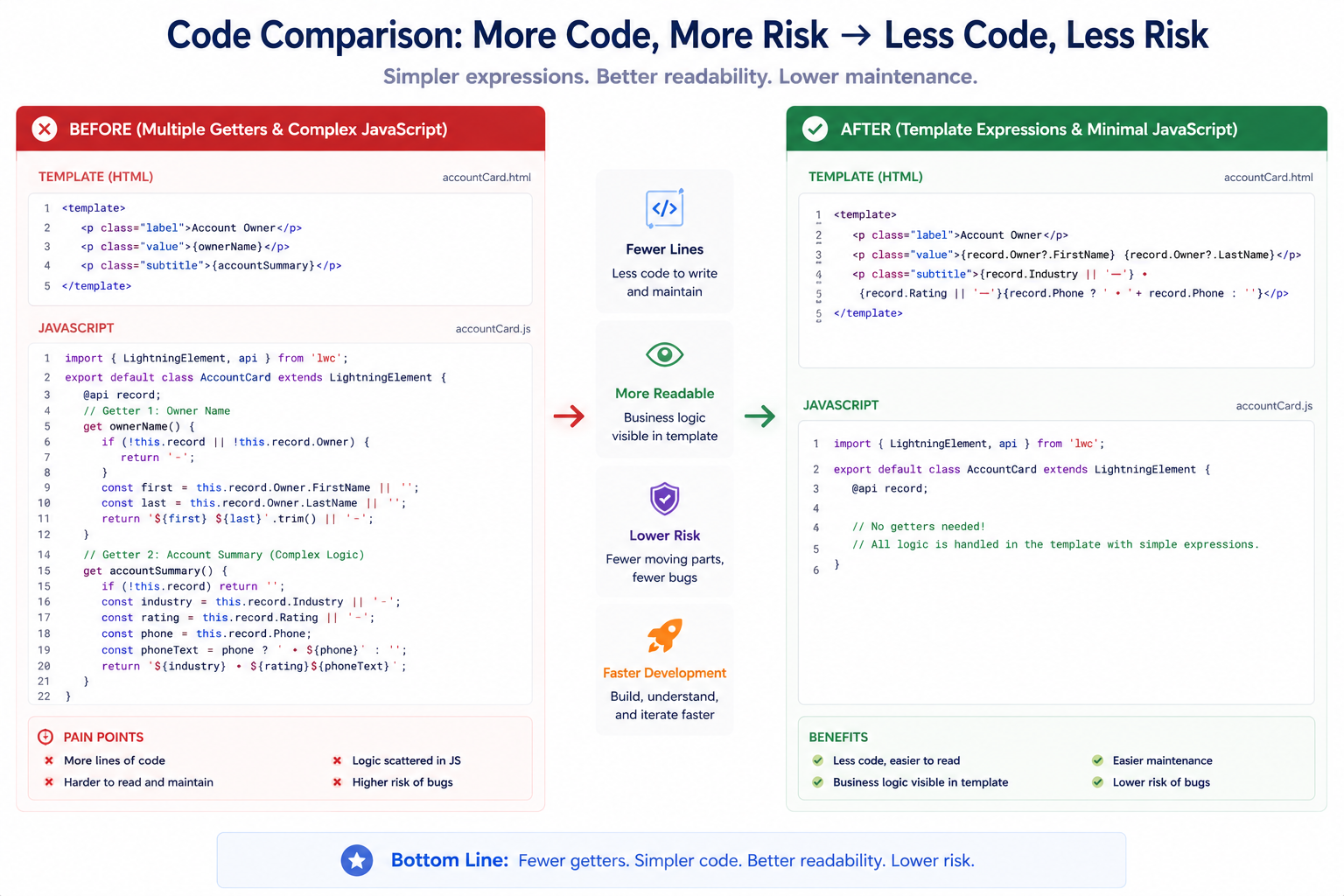
LWC templates have always been limited: simple property bindings work great, but anything more complex required getters in JavaScript. Need to show different text based on a condition? Create a getter. Need to format data? Create a getter. Multiple getters meant extra code, more boilerplate, and harder-to-read components.
Spring ’26 introduces Complex Template Expressions (Beta)—the ability to write ternary operators, conditional logic, and simple operations directly in templates. No more getter boilerplate for common patterns. HTML stays close to its logic. Components become more readable.
This post explores what complex template expressions enable, common patterns, and best practices for using them effectively.
THE GETTER BOILERPLATE PROBLEM
Why This Feature Was Needed
The Before Scenario: Getters for Everything
Problem 1: Simple Conditional
javascript
// JavaScript – Before
export default class EmployeeCard extends LightningElement {
@track empFirstName = ‘John’;
@track empLastName = ‘Doe’;
@track empSalary = 50000;
@track isActive = true;
// Getter just for conditional logic
get empStatus() {
return this.isActive ? ‘Active’ : ‘Inactive’;
}
}
html
<!– Template – Before –>
<template>
<lightning-card title=”Employee“>
<p>{empFirstName} {empLastName}</p>
<p>Status: {empStatus}</p> <!– Uses getter –>
</lightning-card>
</template>
Problem 2: Complex Conditional
javascript
// JavaScript – Before
export default class EmployeeCard extends LightningElement {
@track empAge = 18;
@track empSalary = 50000;
// Getter for age category
get ageCategory() {
return this.empAge >= 18 ? ‘Adult’ : ‘Minor’;
}
// Getter for tax bracket
get taxBracket() {
return this.empSalary > 50000 ? ‘Tax’ : ‘No Tax’;
}
// Getter combining conditions
get fullStatus() {
return this.ageCategory + ‘ / ‘ + this.taxBracket;
}
}
html
<!– Template – Before –>
<p>{fullStatus}</p>
Problem 3: Multiple Getters for Simple Logic
javascript
// JavaScript – Before: Many getters!
export default class EmployeeCard extends LightningElement {
@track empAge = 18;
@track empSalary = 50000;
@track isActive = true;
get ageGroup() {
return this.empAge >= 18 ? ‘Adult’ : ‘Minor’;
}
get taxStatus() {
return this.empSalary > 50000 ? ‘Tax’ : ‘No Tax’;
}
get activeClass() {
return this.isActive ? ‘active’ : ‘inactive’;
}
get displayName() {
return this.isActive ? this.firstName + ‘ ‘ + this.lastName : ‘Unknown’;
}
// 4 getters for relatively simple logic
}
COMPLEX TEMPLATE EXPRESSIONS
What Spring ’26 Enables
What Complex Expressions Include
Feature 1: Ternary Operators
html
<!– Simple ternary –>
<p>{isActive ? ‘Active’ : ‘Inactive’}</p>
<!– Nested ternary –>
<p>{
age >= 18 ? ‘Adult’ : ‘Minor’
}</p>
<!– Complex nested –>
<p>{
status === ‘active’ ? ‘Active Now’ :
status === ‘pending’ ? ‘Pending’ :
‘Inactive’
}</p>
Feature 2: Arithmetic Operations
html
<!– Addition –>
<p>Total: {price + tax}</p>
<!– Subtraction –>
<p>Discount: {originalPrice – salePrice}</p>
<!– Multiplication –>
<p>Total Items: {quantity * unitPrice}</p>
<!– Division –>
<p>Average: {totalAmount / itemCount}</p>
Feature 3: Comparison Operators
html
<!– Greater than –>
<p>{salary > 50000 ? ‘High’ : ‘Standard’}</p>
<!– Less than –>
<p>{age < 18 ? ‘Minor’ : ‘Adult’}</p>
<!– Equality –>
<p>{status === ‘active’ ? ‘Active’ : ‘Inactive’}</p>
<!– Not equal –>
<p>{role !== ‘admin’ ? ‘User’ : ‘Administrator’}</p>
Feature 4: Logical Operators
html
<!– AND –>
<p>{isActive && hasPermission ? ‘Allowed’ : ‘Denied’}</p>
<!– OR –>
<p>{isAdmin || isSupervisor ? ‘Can Approve’ : ‘Cannot Approve’}</p>
<!– NOT –>
<p>{!isActive ? ‘Inactive’ : ‘Active’}</p>
Feature 5: String Operations
html
<!– Concatenation –>
<p>{firstName + ‘ ‘ + lastName}</p>
<!– Method calls –>
<p>{email.toLowerCase()}</p>
<p>{name.toUpperCase()}</p>
<p>{phone.substring(0, 3)}</p>
Feature 6: Method Calls (Limited)
html
<!– Method invocation –>
<p>{formatDate(dateField)}</p>
<!– Array methods –>
<p>{items.length > 0 ? ‘Has items’ : ‘Empty’}</p>
COMMON PATTERNS
Practical Use Cases
Pattern 1: Conditional Text
Before:
javascript
get statusText() {
return this.isActive ? ‘Currently Active’ : ‘Inactive’;
}
html
<p>{statusText}</p>
After:
html
<p>{isActive ? ‘Currently Active’ : ‘Inactive’}</p>
Use Case:
Simple conditional display. Best for short text alternatives.
Pattern 2: Conditional CSS Classes
Before:
javascript
get successClass() {
return this.isSuccessful ? ‘slds-text-color_success’ : ‘slds-text-color_error’;
}
html
<div class=”{successClass}“>
{message}
</div>
After:
html
<div class=”{isSuccessful ? ‘slds-text-color_success‘ : ‘slds-text-color_error‘}“>
{message}
</div>
Use Case:
Conditional styling. Classes directly tied to condition.
Pattern 3: Formatted Display
Before:
javascript
get formattedDate() {
return new Date(this.createdDate).toLocaleDateString();
}
html
<p>Created: {formattedDate}</p>
After:
html
<p>Created: {new Date(createdDate).toLocaleDateString()}</p>
Use Case:
Formatting data for display. Keep formatting in template.
Pattern 4: Numeric Calculations
Before:
javascript
get totalPrice() {
return this.quantity * this.unitPrice;
}
get totalWithTax() {
return this.totalPrice + (this.totalPrice * 0.1);
}
html
<p>Total: {totalWithTax}</p>
After:
html
<p>Total: {quantity * unitPrice + (quantity * unitPrice * 0.1)}</p>
Use Case:
Simple calculations in display context.
Pattern 5: Conditional Rendering
Before:
javascript
get showPremiumBadge() {
return this.userType === ‘premium’ && this.isActive;
}
html
<template if:true={showPremiumBadge}>
<span>Premium</span>
</template>
After:
html
<template if:true={userType === ‘premium’ && isActive}>
<span>Premium</span>
</template>
Use Case:
Conditional block display. Show/hide based on expression.
Pattern 6: Dynamic Attributes
Before:
javascript
get placeholderText() {
return this.type === ’email’ ? ‘Enter email’ : ‘Enter text’;
}
html
<lightning-input placeholder={placeholderText}></lightning-input>
After:
html
<lightning-input
placeholder={type === ’email’ ? ‘Enter email’ : ‘Enter text’}>
</lightning-input>
Use Case:
Dynamic attribute values. Set based on conditions.
LIMITATIONS AND BOUNDARIES
What Complex Expressions Can’t Do
Limitations
Limitation 1: No Function Definitions
html
<!– Cannot define functions –>
<p>{function() { return ‘test’; }}</p>
<!– Can call existing methods –>
<p>{myMethod()}</p>
Limitation 2: No Assignment
html
<!– Cannot assign values –>
<p>{x = 5}</p>
<!– Can use existing properties –>
<p>{x}</p>
Limitation 3: No Complex Statements
html
<!– Cannot use if/else/for/while –>
<p>{if (x > 5) { return ‘yes’; }}</p>
<!– Can use ternary –>
<p>{x > 5 ? ‘yes’ : ‘no’}</p>
Limitation 4: Limited Array Operations
html
<!– Cannot use forEach or other complex array methods –>
<p>{items.forEach(item => item.name)}</p>
<!– Can access length and basic properties –>
<p>{items.length > 0 ? ‘Has items’ : ‘Empty’}</p>
When to Still Use Getters
Use Getters For:
- Complex logic that’s hard to read in template
- Operations that happen frequently (performance)
- Reusable calculations used in multiple places
- Business logic that should be in component
PERFORMANCE CONSIDERATIONS
When Complex Expressions Matter for Performance
Performance Benefit: Reduced Getter Calls
Before (Without Complex Expressions):
html
<!– Each expression evaluates a getter –>
<p>{statusText}</p> <!– Calls getter –>
<p>{ageGroup}</p> <!– Calls getter –>
<p>{taxStatus}</p> <!– Calls getter –>
After (With Complex Expressions):
html
<!– Expressions evaluated inline, no extra function calls –>
<p>{isActive ? ‘Active’ : ‘Inactive’}</p>
<p>{age >= 18 ? ‘Adult’ : ‘Minor’}</p>
<p>{salary > 50000 ? ‘Tax’ : ‘No Tax’}</p>
Impact:
Marginal performance improvement by eliminating function call overhead. Usually negligible unless used in loops.
Performance Caveat: In Loops
html
<!– Expression evaluated for EVERY item –>
<template for:each={employees} for:item=”emp“>
<p key={emp.id}>
{emp.salary > 50000 ? ‘High’ : ‘Standard’}
</p>
</template>
Better approach:
html
<!– Let each component handle its own formatting –>
<template for:each={employees} for:item=”emp“>
<c-employee-card employee={emp}></c-employee-card>
</template>
javascript
// Child component
export default class EmployeeCard extends LightningElement {
@api employee;
get salaryCategory() {
return this.employee.salary > 50000 ? ‘High’ : ‘Standard’;
}
}
BEST PRACTICES
Using Complex Expressions Effectively
Best Practice 1: Use for Display Logic Only
Do:
html
<!– Format for display –>
<p>{amount > 1000 ? ‘$’ + amount : amount}</p>
<!– Conditional text –>
<p>{status === ‘active’ ? ‘Active’ : ‘Inactive’}</p>
Don’t:
html
<!– Complex business logic –>
<p>{calculateTaxes() && validatePermissions() ? ‘Allowed’ : ‘Denied’}</p>
<!– Side effects –>
<p>{saveData() ? ‘Saved’ : ‘Failed’}</p>
Best Practice 2: Keep Expressions Short and Simple
Do:
html
<p>{isActive ? ‘Active’ : ‘Inactive’}</p>
Don’t:
html
<p>{
this.user.status === ‘active’ &&
this.user.permissions.includes(‘write’) &&
!this.user.isOnLeave &&
this.organization.isActive ?
‘User Can Perform Action’ :
‘User Cannot Perform Action’
}</p>
Best Practice 3: Use Getters for Complex Logic
Pattern:
- Simple expressions: use template expressions
- Complex logic: use getters
- Very complex: use methods
Best Practice 4: Comment Non-Obvious Expressions
html
<!–
Determine user tier based on total purchases
Threshold: $1000 for premium, $500 for standard
–>
<p>{totalPurchases > 1000 ? ‘Premium’ : totalPurchases > 500 ? ‘Standard’ : ‘Basic’}</p>
Best Practice 5: Combine with Template if:true
html
<!– Cleaner conditional rendering –>
<template if:true={userType === ‘admin’ && isActive}>
<span>Administrator</span>
</template>
<!– Instead of –>
<template if:true={showAdminBadge}>
<span>Administrator</span>
</template>
FINAL THOUGHTS
Complex Template Expressions represent a maturation of LWC’s templating capabilities. For years, LWC required getters for anything beyond simple property binding. That limitation meant extra code, split logic, and more boilerplate.
This feature doesn’t eliminate the need for getters—complex business logic still belongs in JavaScript. But for the 80% of cases that are simple conditionals, formatting, or calculations, expressions in templates are cleaner and more readable.
The key is restraint: use expressions for display logic, keep business logic in getters. The sweet spot is expressions that are short enough to understand at a glance, but complex enough to eliminate simple getters.

