

INTRODUCTION
In Service Cloud organizations, a well-designed access model is just as important as automation, UI enhancements, and reporting capabilities. Yet many teams overlook this critical foundation, treating access control as an afterthought rather than a strategic component. The reality is that even the most sophisticated automation and stunning interfaces fail when users either lack the data they need or inadvertently access data they shouldn’t. This post explores the essential components of the Service Cloud Access Model and provides a practical framework for building secure, scalable access controls.
THE ACCESS CHALLENGE
Why Access Models Matter More Than You Think
Service Cloud implementations face a unique challenge: balancing security with operational efficiency. Unlike Sales Cloud, where the focus is often on pipeline visibility and forecast accuracy, Service Cloud demands a more nuanced approach to data access because customer data sensitivity and support team accountability are paramount.
The Common Problems:
- Over-Permissioning – Users having access to customer data they don’t need, creating security and compliance risks
- Under-Permissioning – Support agents unable to access data required to resolve customer issues efficiently
- Compliance Violations – Uncontrolled data visibility leading to potential breaches of privacy regulations (GDPR, CCPA, etc.)
- Audit Failures – Inability to demonstrate proper access controls during security audits
- User Frustration – Support teams spending time requesting access instead of helping customers
- Scalability Issues – Ad-hoc access grants leading to inconsistent security postures as the organization grows
- Cost of Complexity – Maintaining poorly designed access models becomes expensive and error-prone
Real-World Impact:
In many organizations, the access model directly impacts customer satisfaction. When support agents can’t see customer history due to restrictive permissions, resolution times increase. Conversely, when access is too permissive, sensitive customer data exposure risks multiply. The sweet spot requires deliberate architectural thinking.
THE BUILDING ANALOGY
Understanding Access Control Through Architecture
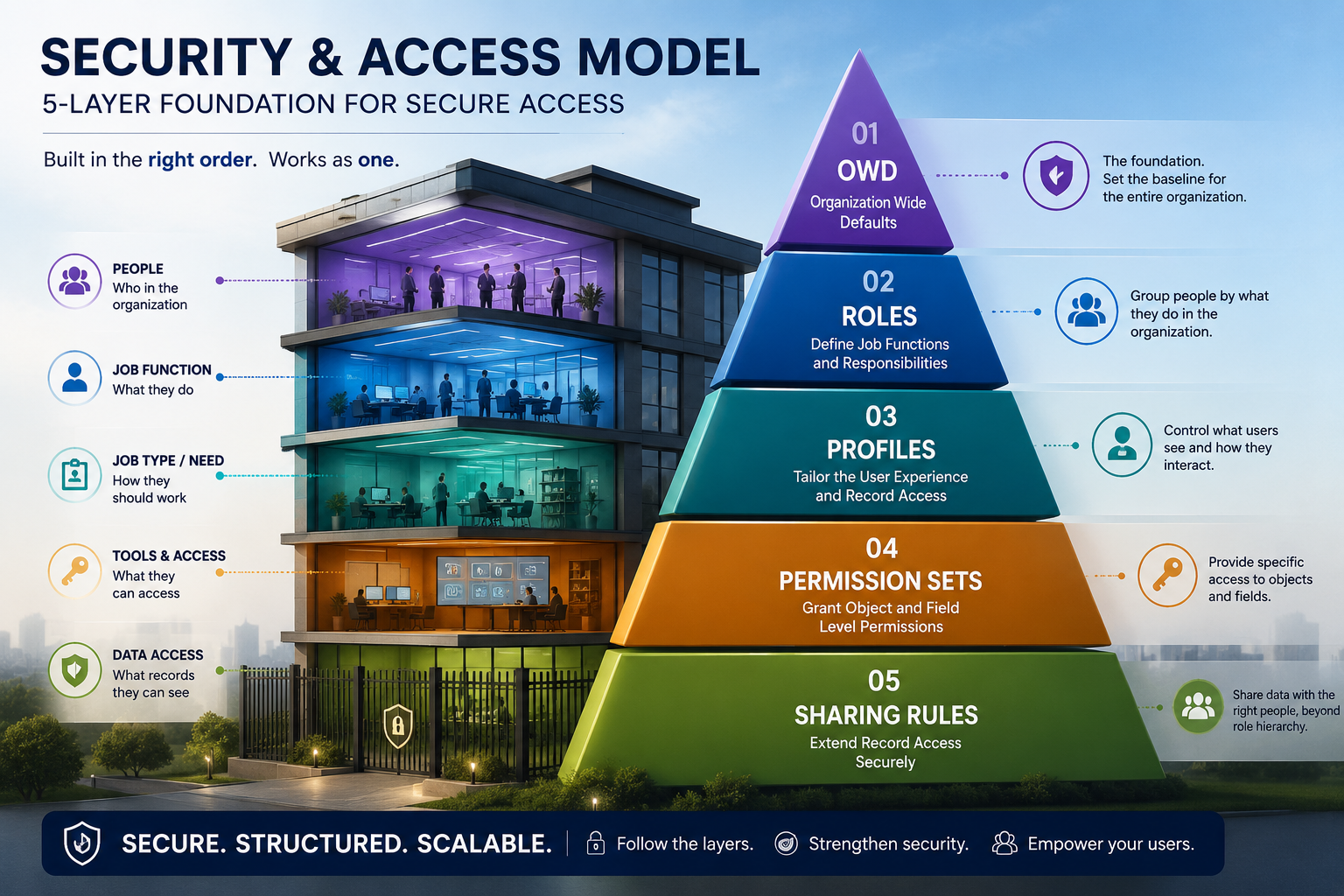
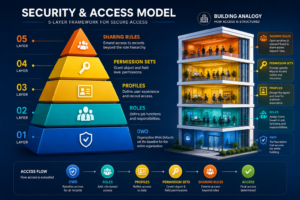
Think of Service Cloud access control like securing a multi-level building:
Ground Floor (Layer 1): Org-Wide Defaults (OWD)
- The main gate controlling baseline access for everyone
- Defines what all users can see by default
- The most restrictive point – everything starts here
- Once you grant access at OWD level, you can’t restrict it at lower levels
Second Floor (Layer 2): Roles
- The organizational structure of the building
- Establishes hierarchy-based access
- Managers on higher floors see more than team members
- Role hierarchy flows downward – parent roles see child role data
Third Floor (Layer 3): Profiles
- The access cards that unlock specific rooms
- Defines object-level and field-level permissions
- Controls CRUD operations (Create, Read, Update, Delete)
- One profile per user (mandatory)
- The core permission structure
Fourth Floor (Layer 4): Permission Sets
- Additional key cards for specific areas
- Provides extra access without modifying the core profile
- Can be assigned multiple permission sets to one user
- Ideal for specialized access needs
- Additive only – can’t restrict what a profile grants
Fifth Floor (Layer 5): Sharing Rules
- The exceptions and special guest passes
- Extends access based on criteria
- Used for cases that role hierarchy can’t handle
- Criteria-based or ownership-based
- The exception to role hierarchy
CORE COMPONENTS EXPLAINED
Demystifying Each Layer of the Access Model
Org-Wide Defaults (OWD) – The Foundation
OWD settings determine what every user can see across all objects:
Options:
- Private – Users see only their own records (most restrictive)
- Public Read Only – Users see all records but can’t edit
- Public Read/Write – Users see and can modify all records
- Controlled by Parent – Access depends on parent record access
Best Practice: Start with Private or Public Read Only, then expand access through Roles and Sharing Rules as needed. Never default to Public Read/Write.
Common Objects:
- Accounts – Usually Public Read/Write
- Contacts – Often Public Read Only (sensitive data)
- Cases – Usually Private (sensitive customer issues)
- Orders – Often Public Read/Write
Roles – The Organizational Hierarchy
Roles establish a hierarchy that mirrors your organization structure:
Key Concepts:
- Hierarchy Flow – Each role can see data of roles below it
- Parent-Child Relationship – Managers see their team’s data
- Role Name Convention – Use meaningful names: “Service Manager – North”, not “Role1”
- Flat vs. Deep – Balance between manageability and functionality
Critical Point: Role hierarchy only grants additional access, it never restricts access granted through OWD or Sharing Rules.
Profiles – Permission Control
Profiles define what actions users can take on objects and fields:
Permissions Controlled:
- Object Permissions – CRUD on each object
- Field Permissions – Read/Write on individual fields
- Feature Access – Access to Chatter, Custom Apps, API, etc.
- Record Type Access – Which record types users can see/create
- Page Layout Assignment – Which layouts users see
Key Rules:
- Every user must have exactly one profile
- Profiles can’t be deleted if assigned to users
- Profile changes affect all assigned users immediately
- Create separate profiles for different user types (Agent, Manager, Admin)
Permission Sets – Granular Additional Access
Permission Sets add access without modifying profiles:
Advantages:
- Multiple permission sets per user (up to 5 custom at a time)
- Non-destructive – can be added/removed without affecting profile
- Ideal for temporary access grants
- Perfect for specialized functionality (Analytics, approval processes, etc.)
Common Uses:
- Manager approval permissions
- Report access permissions
- API access for integrations
- Special object access (case-specific areas)
Sharing Rules – The Exception Handler
Sharing Rules extend access based on criteria beyond role hierarchy:
Types:
- Ownership-Based Sharing Rules
- Share records owned by one user/role with another user/role
- Use case: Support agents own cases, but regional managers need to see all cases in their region
- Criteria-Based Sharing Rules
- Share records matching specific criteria with users
- Use case: Share premium customer cases with senior agents
- Examples: Customer tier = “Platinum”, Case priority = “Critical”
- Guest Rules (Rarely Used)
- Special permissions for specific groups
- Example: Guest users accessing specific content
Key Characteristics:
- Defined for specific objects
- Can be public (shared with roles/groups) or user-specific
- Can be manual or automatic
- Can grant Read-Only or Read/Write access
THE GOLDEN RULE
Start with Least Privilege, Expand Only What’s Needed
This principle should guide every access decision:
The Approach:
- Start Restrictive – Set OWD to Private or Public Read Only
- Define Roles – Create role hierarchy matching your organization
- Build Profiles – Create profiles for different user types
- Use Permission Sets – Add specialized access as needed
- Implement Sharing Rules – Create rules for exceptions to role hierarchy
Never:
- Grant blanket access and try to restrict later (you can’t restrict OWD downward)
- Assume you need Public Read/Write on sensitive objects
- Create custom profiles when a Permission Set would suffice
- Ignore compliance requirements during access design
Always:
- Document your access model decisions
- Review access quarterly
- Audit user permissions regularly
- Test access changes in sandbox first
- Train managers on access requests
COMMON SERVICE CLOUD SCENARIOS
Real-World Access Model Patterns
Scenario 1: Multi-Tier Support
Organization has Support Agents, Team Leads, and Regional Managers.
OWD Setting: Cases = Private
Role Hierarchy:
Regional Manager (top)
└── Team Lead
└── Support Agent
Profile Permissions:
- Agent Profile: Can create/read/update Cases only
- Manager Profile: Can access reports, analytics, custom settings
Sharing Rules:
- Cases owned by Agents → Shared with their Team Lead and Regional Manager
- Cases meeting criteria (Priority = Critical) → Shared with all Team Leads
Result: Agents see only their cases; Team Leads see their team’s cases; Regional Managers see all cases in region.
Scenario 2: Sensitive Accounts
Need to restrict certain accounts (VIP, Legal, Finance) from general visibility.
OWD Setting: Accounts = Private
Sharing Rules:
- Accounts with Customer_Type = “VIP” → Shared with VIP support team
- Accounts with Industry = “Finance” → Shared with finance-certified agents
Permission Sets:
- “VIP Account Access” – Permission Set for authorized agents
- “Financial Data Clearance” – For compliance-certified team members
Result: General agents see no accounts; specialized agents see only assigned accounts.
Scenario 3: Executive Dashboards
Executives need access to consolidated data across the organization.
OWD Setting: Reports/Objects = Private
Sharing Rules:
- Grant all reports to Executive role
- Share summary data through criteria-based rules
Permission Sets:
- “Executive Reporting” – Grants access to sensitive dashboards
- “Data Export” – For executives needing to export data
Result: Executives see organization-wide data; support agents see only their cases.
COMMON MISTAKES TO AVOID
Access Model Anti-Patterns
Mistake 1: Everyone Gets Admin Profile
Many organizations default to granting admin access to simplify access management.
Problem:
- Eliminates field-level security
- Creates compliance nightmares
- Increases risk of accidental data modification
- Violates principle of least privilege
Solution: Create specific profiles with exactly what users need.
Mistake 2: Relying Only on OWD
Setting everything to Public Read/Write and assuming role hierarchy handles security.
Problem:
- Can’t restrict access to specific records
- All users see all data regardless of role
- No control over which records managers access
- Role hierarchy becomes meaningless
Solution: Combine OWD (baseline) with Roles (hierarchy) and Sharing Rules (exceptions).
Mistake 3: Over-Complicating Sharing Rules
Creating dozens of overlapping sharing rules that conflict with each other.
Problem:
- Difficult to audit and maintain
- Unexpected access grants
- Performance impact
- Hard to troubleshoot
Solution: Keep sharing rules simple; consolidate where possible.
Mistake 4: Ignoring Field-Level Security
Creating object access without considering field-level permissions.
Problem:
- Sensitive fields (SSN, Credit Card) visible to everyone
- Compliance violations
- Data breach risks
Solution: Always review field-level security for sensitive data.
Mistake 5: Static Access Assignments
Granting access once and never reviewing it.
Problem:
- Users retain access after role changes
- No visibility into who has access to what
- Compliance audit failures
Solution: Review access quarterly; automate access removal when users change roles.
FINAL THOUGHTS
Access control in Service Cloud isn’t just about security—it’s about operational excellence. The organizations that excel at Service Cloud have carefully designed access models that enable agents to work efficiently while protecting sensitive customer data. This requires thoughtful planning, regular maintenance, and a commitment to the principle of least privilege.
Remember: your access model is the foundation upon which all other Service Cloud features build. Get this right, and everything else becomes easier. Get it wrong, and even the best automation and UI can’t overcome the friction of poor access control.
The building analogy holds true—you can’t build a secure, scalable structure without a strong foundation. Start with OWD, layer in Roles, add Profiles, enhance with Permission Sets, and handle exceptions with Sharing Rules. This systematic approach ensures your Service Cloud implementation is both secure and scalable as your organization grows.

