

INTRODUCTION
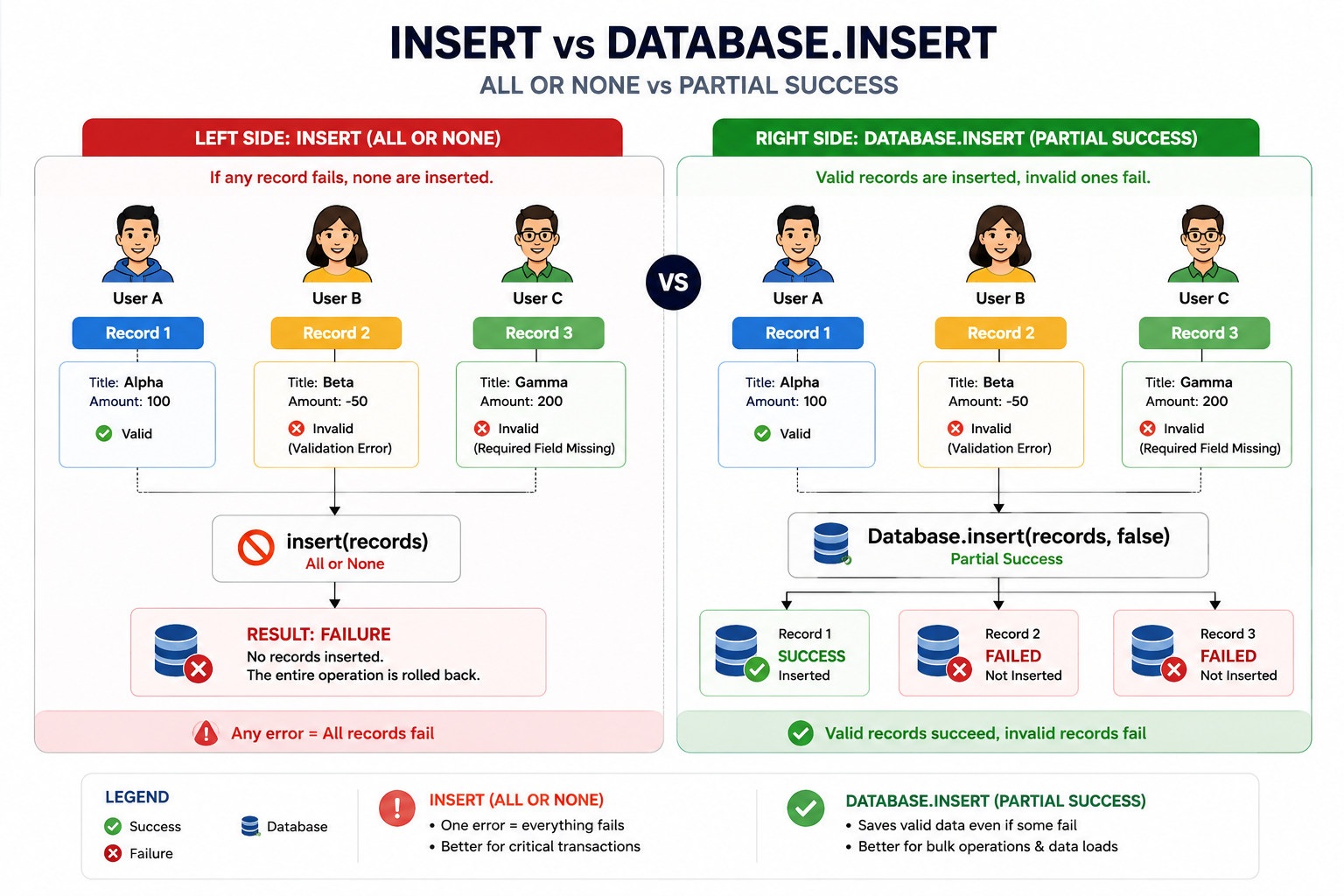
In Apex development, one of the most critical decisions you’ll make is choosing between the insert DML statement and the Database.insert() method. On the surface, they appear to do the same thing—insert records into Salesforce. However, their behavior patterns are fundamentally different, and choosing the wrong one can lead to unexpected data inconsistencies, failed integrations, and frustrated stakeholders. This post explores the critical differences, provides practical examples, and offers guidance on when to use each approach.
THE FUNDAMENTAL DIFFERENCE
Transaction Control and Failure Handling
The core difference between insert and Database.insert() lies in how they handle failures:
insert (DML Statement)
The insert statement follows an all-or-nothing approach:
Behavior:
- Transactional by nature
- One record failure triggers complete rollback
- All records fail if any record fails
- Throws an exception immediately upon failure
- No partial success
Exception Handling:
- Throws DmlException when any record fails
- Must be caught in try-catch block
- Stops execution at the failure point
- Requires exception handling code
When Records Are Committed:
- All records commit together
- Either all succeed or all fail
- No in-between states
Database.insert() (DML Method)
The Database.insert() method provides fine-grained control:
Behavior:
- Non-transactional by default
- One record failure doesn’t affect others
- Remaining records continue to process
- Supports partial success mode
- Returns Database.SaveResult[] array
Exception Handling:
- Returns results without throwing exceptions (by default)
- Each record has individual success/failure status
- Allows inspection of failures before throwing
- Requires result iteration and error checking
When Records Are Committed:
- Records commit as they succeed
- Failed records don’t block successful ones
- Provides visibility into which records succeeded/failed
THE ALLORNONE PARAMETER
Controlling Transaction Behavior with Database.insert()
The Database.insert() method accepts a second parameter: allOrNone, which controls its behavior:
Syntax:
apex
Database.SaveResult[] results = Database.insert(recordList, allOrNone);
allOrNone = true
- Behaves like the insert statement
- All-or-nothing transaction
- One failure = all fail
- Throws exception when failures occur
- Use when you need strict data integrity
allOrNone = false (Default)
- Partial success mode
- One record failure doesn’t affect others
- Successful records commit
- Failed records are skipped
- Returns results array with individual status
Key Difference:
apex
// This throws an exception if any record fails
Database.insert(recordList, true);
// This returns results – doesn’t throw exception
Database.insert(recordList, false);
// Default is false
Database.insert(recordList);
PRACTICAL EXAMPLE
Real-World Scenario: Bulk Insert Operations
Let’s examine a scenario where this difference becomes critical:
Scenario: Bulk importing customer accounts from an external system
Data to Insert:
- Record 1: Valid account with required fields ✓
- Record 2: Missing required field value ✗
- Record 3: Valid account with required fields ✓
Using insert Statement
apex
List<Account> accountsToInsert = new List<Account>{
new Account(Name = ‘ABC Corp’), // Valid
new Account(BillingCity = ‘New York’), // Invalid – missing Name
new Account(Name = ‘XYZ Inc’) // Valid
};
try {
insert accountsToInsert; // All-or-nothing
} catch (DmlException e) {
System.debug(‘Error: ‘ + e.getMessage());
// NO records inserted – all 3 failed
// User loses all data from this batch
}
Result:
- Record 1: NOT inserted ✗
- Record 2: NOT inserted ✗
- Record 3: NOT inserted ✗
- Exception thrown
- Complete failure
- Data loss for batch
Using Database.insert() Method
apex
List<Account> accountsToInsert = new List<Account>{
new Account(Name = ‘ABC Corp’), // Valid
new Account(BillingCity = ‘New York’), // Invalid – missing Name
new Account(Name = ‘XYZ Inc’) // Valid
};
Database.SaveResult[] results = Database.insert(accountsToInsert, false);
// Process results
for (Integer i = 0; i < results.size(); i++) {
if (results[i].isSuccess()) {
System.debug(‘Record ‘ + i + ‘ inserted: ‘ + results[i].getId());
} else {
for (Database.Error err : results[i].getErrors()) {
System.debug(‘Error for record ‘ + i + ‘: ‘ + err.getMessage());
}
}
}
Result:
- Record 1: Inserted ✓ (ID generated)
- Record 2: Failed (logged, not inserted)
- Record 3: Inserted ✓ (ID generated)
- No exception
- Partial success
- 2 records saved, 1 failure documented
WHEN TO USE EACH
Decision Framework for DML Operations
Use insert (All-or-Nothing) When:
- Data Integrity is Critical
- Dependent records must all succeed together
- Example: Creating Account + required Contact in single transaction
- No Partial Data Acceptable
- Business rules require complete data sets
- Example: Financial transactions where partial completion creates inconsistency
- You’re Building Related Data
- Parent records must exist before children
- Example: Creating Order Header + Order Lines together
- Small, Controlled Datasets
- Not dealing with bulk operations
- Manual data entry or single-operation inserts
- Example: Creating a new record through UI action
- Immediate Exception Handling Required
- Want to catch and handle failures immediately
- Stop processing on any failure
- Example: API validation requiring instant feedback
Code Example:
apex
// Use insert for critical, related data
try {
Account acc = new Account(Name = ‘Important Client’);
Contact con = new Contact(FirstName = ‘John’, LastName = ‘Doe’,
AccountId = acc.Id);
insert acc; // Must succeed
insert con; // Depends on acc
} catch (DmlException e) {
// Handle the error – this is expected behavior
}
Use Database.insert() (Partial Success) When:
- Bulk Data Operations
- Inserting hundreds or thousands of records
- Integration from external systems
- Example: Bulk import from CSV file
- Data from External Sources
- Unknown data quality
- Some records may be invalid
- Example: API integration with imperfect data
- Real-World Messy Data
- Third-party feeds with inconsistencies
- Legacy system migrations
- Example: Customer data from multiple sources
- Maximum Data Preservation
- Want to save as many records as possible
- Document failures separately
- Example: Bulk lead import where some leads are duplicates
- Detailed Error Reporting
- Need to know exactly which records failed
- Want to log failures for user review
- Example: Batch job with detailed audit trail
Code Example:
apex
// Use Database.insert for bulk/external data
List<Lead> leadsToImport = getLeadsFromExternalSystem();
Database.SaveResult[] results = Database.insert(leadsToImport, false);
List<String> failedLeadIds = new List<String>();
Integer successCount = 0;
for (Database.SaveResult result : results) {
if (result.isSuccess()) {
successCount++;
} else {
failedLeadIds.add(result.getId());
logFailure(result.getErrors());
}
}
// Report: 950 of 1000 leads imported, 50 failures logged
sendImportSummary(successCount, failedLeadIds);
GOVERNOR LIMITS AND PERFORMANCE
Impact on Salesforce Governor Limits
Both approaches use the same governor limits, but their impact differs:
DML Statements (Limit: 150 per transaction)
- Each insert statement counts toward the limit
- Single large batch insert = 1 DML statement
- Efficient for bulk operations
Example:
apex
// This is 1 DML statement (efficient)
insert accountList; // Even if list has 10,000 records
// This is 10,000 DML statements (inefficient – will hit limit)
for (Account acc : accountList) {
insert acc;
}
Database Methods (Also counts as DML)
- Database.insert() also counts as 1 DML statement
- Same efficiency as insert statement
- No performance penalty for using Database.insert()
Governor Limit Tip:
Always batch DML operations into lists rather than looping. Both insert and Database.insert() count as 1 statement regardless of list size.
FINAL THOUGHTS
The choice between insert and Database.insert() is more than syntactic preference—it’s a design decision that impacts data consistency, error handling, and system reliability. The insert statement provides strict transactional guarantees but is unforgiving with bulk data. The Database.insert() method offers flexibility and partial success but requires careful result handling.
The key principle is matching the tool to your scenario: use insert for critical, transactional operations where data integrity is paramount; use Database.insert() for bulk operations, integrations, and scenarios where you expect data imperfection.
Remember, in production systems dealing with real-world data from integrations, external APIs, or bulk imports, partial success handling isn’t optional—it’s essential. Design your code to handle the failures gracefully, log them comprehensively, and provide a path to resolution. This approach transforms data load failures from catastrophic events into manageable exceptions that your system can recover from.

