

INTRODUCTION
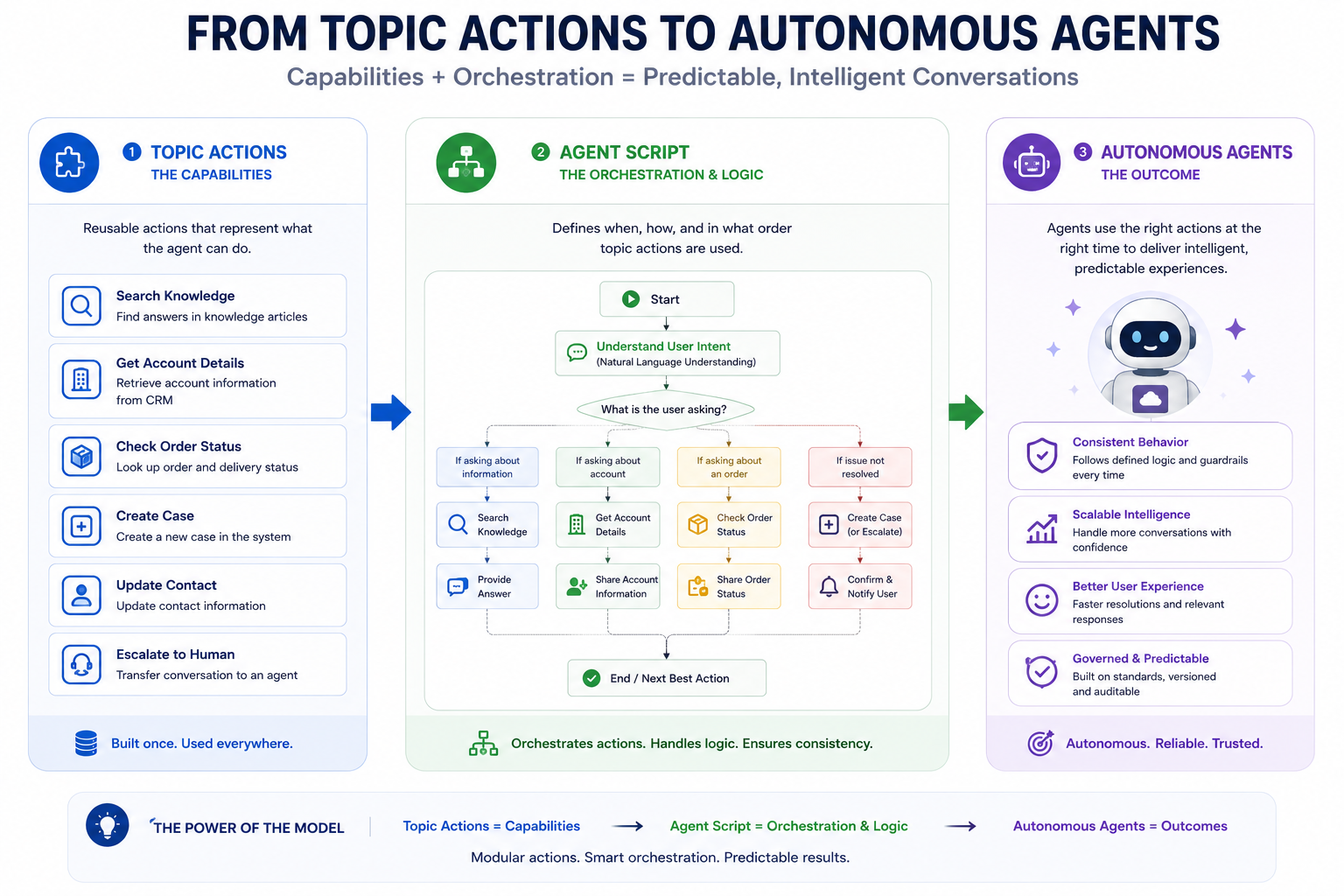
Salesforce Agentforce represents a fundamental shift in how we build AI-powered automation on the platform. Initially, agents were built using Topics and Actions—a pattern that works well for simple, intent-driven scenarios. However, as organizations push Agentforce into mission-critical processes, a new requirement emerged: the need for deterministic, reliable, auditable agent behavior. Enter Agent Script—a declarative language that transforms Agentforce from chatbot-like automation into true autonomous agents capable of handling complex, multi-step workflows with predictable outcomes. This post explores the distinction between Topic Actions and Agent Script, and why this evolution matters for enterprise AI implementation.
THE EVOLUTION OF AGENTFORCE AGENTS
From Simple Actions to Autonomous Workflows
Agentforce’s journey reflects the broader maturation of AI in enterprise systems:
Phase 1: Intent-Driven Automation (Topics + Actions)
- Agent recognizes user intent through Topics
- LLM determines appropriate Action
- Action executes (Flow, Apex, API call)
- Simple, conversational, LLM-controlled
- Works for simple scenarios
Phase 2: Intelligent Orchestration (Agent Script)
- Agent defines deterministic workflow logic
- Combines LLM reasoning with programmatic control
- Multi-step, context-aware execution
- Predictable and auditable
- Suited for complex, mission-critical processes
The Challenge That Drove This Evolution:
Organizations implementing Agentforce discovered limitations with pure action-based automation:
- Non-Deterministic Behavior – Same input could produce different outputs based on LLM interpretation
- Complex Workflows – Multi-step processes were difficult to orchestrate reliably
- Compliance and Auditability – Unpredictable behavior made auditing and compliance challenging
- Error Handling – Difficult to implement consistent error recovery logic
- Business Rule Application – Complex conditional logic couldn’t be easily enforced
- Context Loss – Multi-step workflows struggled to maintain context across steps
- Debugging – Hard to trace why agents made specific decisions
TOPIC ACTIONS EXPLAINED
Understanding the Foundation
Topic Actions are the building blocks of Agentforce agents, defining what agents can do.
What Are Topic Actions?
Definition:
Topic Actions are executable tasks that an Agentforce agent can perform in response to user intent, triggered when the LLM determines they’re appropriate for addressing the user’s need.
Components:
- Topics
- Represent user intents or conversation themes
- Help the agent understand what the user wants
- Example topics: “Create Case”, “Check Order Status”, “Update Account”
- Natural language variations understood through topics
- Actions
- Executable tasks the agent can perform
- Triggered when LLM identifies matching topic
- Can invoke multiple action types
- Example actions: Run Flow, Call Apex, Invoke API, Execute Prompt Template
- Invocation Methods
Action Types Available:
- Flow Action
– Execute a Salesforce Flow
– Pass parameters, receive results
– Best for low-code automation
- Apex Action
– Call Apex method directly
– Full programming capability
– Complex business logic
- HTTP Action
– Call external APIs
– Integrate with third-party systems
– RESTful communication
- Prompt Template Action
– Generate dynamic prompts
– Leverage LLM capabilities
– Data enrichment
- Skill Action
– Reuse pre-built agent capabilities
– Compose complex workflows
– Modular design
How Topic Actions Work
Execution Flow:
- User provides input to agent
- Example: “Create a case for my broken product”
- Agent analyzes input (LLM)
- Identifies intent/topic: “Create Case”
- LLM selects appropriate action
- Matches topic → Finds corresponding action
- Action executes
- Runs associated Flow/Apex/API
- Results returned
- Agent provides response to user
- Conversation continues
- LLM may select another action or respond directly
Topic Actions Example
Topic: “Create Support Case”
Actions Defined:
- Get Customer Info (Apex Action)
– Retrieves customer details
- Create Case Flow (Flow Action)
– Runs flow: Create_Support_Case_Flow
– Passes parameters: customer, description
– Returns case ID
- Send Confirmation (Prompt Template)
– Generates acknowledgment message
– Personalizes response
LLM Workflow:
User: “Create a case for my billing issue”
→ Recognizes topic: “Create Support Case”
→ Executes Get Customer Info action
→ Executes Create Case Flow action
→ Executes Send Confirmation action
→ Returns confirmation to user
Topic Actions Limitations
Limitation 1: LLM-Driven Sequencing
Challenge: If you need actions in specific order
Problem: LLM may choose wrong sequence
Example: Create case before getting customer info
Solution: Agent Script enforces sequence
Limitation 2: Conditional Logic
Challenge: Complex business rules
Problem: LLM may not consistently apply rules
Example: “If case priority = High, escalate”
Solution: Agent Script enables if/else logic
Limitation 3: Non-Deterministic Behavior
Challenge: Same input, different output
Problem: Hard to audit and verify behavior
Example: Two identical case requests processed differently
Solution: Agent Script provides predictable execution
Limitation 4: Multi-Topic Workflows
Challenge: Actions across multiple topics
Problem: LLM must chain topics correctly
Example: Create case → Check inventory → Update stock
Solution: Agent Script orchestrates across topics
AGENT SCRIPT EXPLAINED
The Language of Autonomous Agents
Agent Script introduces programmatic logic to Agentforce, combining LLM reasoning with deterministic execution.
What is Agent Script?
Definition:
Agent Script is a declarative language for building Agentforce agents that combines natural language reasoning capabilities with programmatic logic, enabling deterministic, multi-step workflows with explicit control over execution flow.
Key Capabilities:
- Natural Language Reasoning
– LLM analyzes input and context
– Understands user intent
– Extracts relevant information
- Programmatic Logic
– Variables and data structures
– If/else conditional statements
– Loop constructs
– Function-like routines
- Topic Transitions
– Navigate between topics explicitly
– Control conversation flow
– Jump to appropriate topic based on logic
- Action Sequencing
– Define order of action execution
– Ensure deterministic behavior
– No LLM guessing of sequence
- Business Rules
– Apply conditional logic
– Enforce business constraints
– Validate data before execution
- Error Handling
– Define error recovery paths
– Retry logic
– Fallback actions
Agent Script Syntax and Concepts
Basic Structure:
Agent Script represents a directed acyclic graph (DAG):
Start
↓
Evaluate Condition
├─ Yes → Execute Action 1
│ ↓
├─ Execute Action 2
│ ↓
└─ Transition to Topic/End
↓
Return to User
Script Elements:
- Variables
Stores data across steps
Example: caseId, customerName, priority
- Conditions
Controls execution path
Example: if (priority == “High”) { escalate() }
- Actions
Execute Topic Actions
Example: runFlow(“CreateCase”), callApex(“ValidateData”)
- Transitions
Move between topics or exit
Example: goToTopic(“EscalateCase”), return()
- Loops
Repeat logic
Example: for (item in items) { processItem(item) }
- Error Handling
Manage failures
Example: try { action() } catch (error) { handleError(error) }
TOPIC ACTIONS VS AGENT SCRIPT
Key Differences and Use Cases
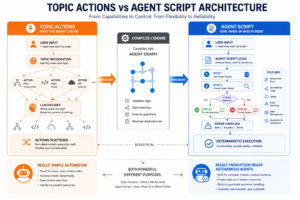
| Aspect | Topic Actions | Agent Script |
| Control | LLM-driven | Programmatic |
| Sequencing | Determined by LLM | Explicitly defined |
| Predictability | Non-deterministic | Deterministic |
| Complexity | Simple workflows | Complex, multi-step |
| Business Logic | Limited | Full control |
| Error Handling | Basic | Comprehensive |
| Multi-Topic | Difficult | Natural |
| Auditability | Challenging | Full visibility |
| Development | Click-based | Script-based |
| Learning Curve | Easy | Moderate |
| Use Cases | Simple Q&A | Enterprise workflows |
When to Use Topic Actions
Use Cases:
- Simple, Single-Action Scenarios
Example: “What’s my account balance?”
Single lookup, return result
- Conversational AI Bots
Example: FAQ agent
User asks → Intent recognized → Action executes
- Quick Information Retrieval
Example: Check case status
Single query, direct answer
- Exploratory Projects
Example: MVP for new agent capability
Quick prototyping without complex logic
Characteristic:
Simple input → Topic recognition → Single/few actions → Response
When to Use Agent Script
Use Cases:
- Multi-Step Business Processes
Example: Order fulfillment
– Validate order
– Check inventory
– Process payment
– Update shipping
– Send confirmation
(Multiple deterministic steps)
- Complex Conditional Logic
Example: Intelligent case routing
– Evaluate case severity
– Apply business rules
– Route to appropriate team
– Escalate if needed
(Multiple conditions affecting flow)
- Cross-Topic Workflows
Example: Complaint resolution
– Topic 1: Receive complaint
– Topic 2: Create case
– Topic 3: Check inventory (refund alternative)
– Topic 4: Execute refund
(Multiple topics in orchestrated sequence)
- Mission-Critical Processes
Example: Payment processing
– Must be deterministic
– Must be auditable
– Must handle errors consistently
(Requires predictable behavior)
- High-Volume Automation
Example: Lead qualification
– Process hundreds of leads
– Apply consistent scoring
– Route to appropriate sales team
(Consistency and reliability critical)
Characteristic:
Complex input → Parse & analyze → Multi-step conditional logic →
Orchestrated actions → Deterministic output
IMPLEMENTATION CONSIDERATIONS
Building Effective Agent Scripts
Best Practice 1: Start with Clear Workflows
Before writing Agent Script:
- Document the complete workflow
– All steps
– All decision points
– All error scenarios
– All edge cases
- Identify decision criteria
– Business rules
– Conditions for branching
– Validation requirements
– Error recovery logic
- Define data flow
– Input requirements
– Transformation steps
– Output format
– Context preservation
- Plan error handling
– Expected failures
– Recovery strategies
– Escalation paths
– Logging requirements
Best Practice 2: Combine Agent Script with Topic Actions
Not Either/Or, But Both:
Agent Script orchestrates the flow:
– Defines the sequence
– Handles conditional logic
– Manages error recovery
– Controls topic transitions
Topic Actions execute the work:
– Provide specific capabilities
– Return results to Agent Script
– Execute business logic
– Integrate with Salesforce
Hybrid Approach:
Agent Script (orchestration layer) + Topic Actions (execution layer)
Best Practice 3: Version and Test Extensively
Development Lifecycle:
- Development Environment
– Write and debug Agent Script
– Test each branch
– Test error scenarios
– Validate data flow
- Sandbox Testing
– Full workflow testing
– Load testing
– Error scenario testing
– User acceptance testing
- Production Deployment
– Gradual rollout
– Monitor behavior
– Gather metrics
– Optimize based on usage
Best Practice 4: Monitor and Audit
Post-Deployment Monitoring:
Metrics to Track:
– Execution success rate
– Average execution time
– Error rates by type
– Topic usage distribution
– User satisfaction
Audit Requirements:
– Log all decisions
– Track all transitions
– Record all actions
– Document all errors
– Maintain execution history
THE FUTURE OF AGENTFORCE AGENTS
Evolution Beyond Topic Actions and Agent Script
Current State (Topic Actions + Agent Script):
- Foundation for autonomous agents
- Deterministic workflows
- Enterprise-grade reliability
- Hybrid reasoning
Near Future:
- Advanced state management
- Complex decision logic
- Cross-system orchestration
- Predictive capabilities
Vision:
Agentforce agents become truly autonomous systems that:
- Handle complex, multi-domain workflows
- Make intelligent decisions with human oversight
- Integrate seamlessly across Salesforce and external systems
- Provide complete transparency and auditability
- Scale to mission-critical processes
FINAL THOUGHTS
Agent Script represents a maturation of Agentforce from conversational automation to production-ready autonomous agents. By combining the flexibility of LLM reasoning with the reliability of programmatic logic, Agent Script enables organizations to deploy agents that are both intelligent and predictable—a critical requirement for enterprise AI.
The distinction between Topic Actions and Agent Script is simple but profound: Topic Actions define what agents can do, while Agent Script defines how, when, and in which order they do it. This separation of concerns allows organizations to build agents that are powerful enough for complex workflows yet predictable enough for mission-critical processes.
As you evaluate Agentforce for your organization, recognize that the most successful implementations will likely use both: Topic Actions for providing specific capabilities and Agent Script for orchestrating those capabilities into coherent, auditable workflows. This hybrid approach delivers the best of AI’s capabilities while maintaining the control and reliability that enterprises demand.
The shift from “chatbot-style automation” to “production-ready autonomous agents” is not just a technical advancement—it’s a fundamental change in what’s possible with AI on the Salesforce platform.

