

INTRODUCTION
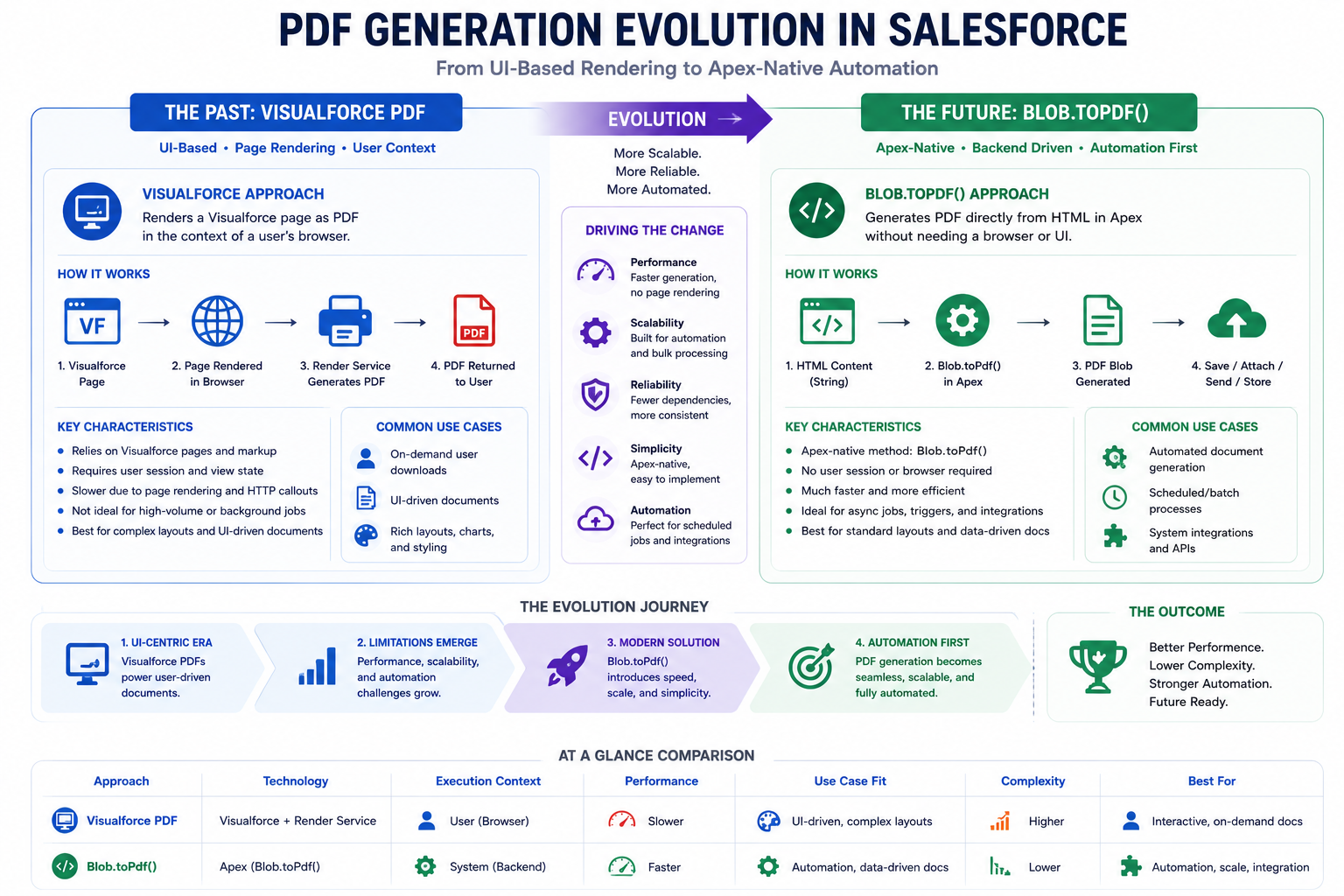
Document generation has long been a point of tension in Salesforce architecture. For years, the standard approach was Visualforce with renderAs=”pdf”—a technique that works well for user-facing documents that require pixel-perfect layouts. But this approach carries architectural overhead: you’re creating a user interface (even if never displayed) and asking a rendering engine to convert it into PDF. For automation-first use cases—batch jobs generating thousands of documents, Agentforce agents creating contracts, scheduled processes producing reports—this feels backwards.
Salesforce Spring ’26 introduces Blob.toPdf(), a native Apex method that enables PDF generation directly from code without Visualforce dependency. This is more than a convenience feature. It represents a philosophical shift in how document generation fits into Salesforce architecture: moving from UI-coupled to backend-native, from synchronous rendering to asynchronous batch processing, from “let’s repurpose a page renderer” to “here’s a tool built for automation.”
This post explores what Blob.toPdf() is, why it matters, how it works, and how it changes the calculus for PDF generation in Salesforce applications.
THE PDF GENERATION LANDSCAPE
The Historical Challenge of PDF Documents in Salesforce
PDF generation in Salesforce has been constrained by its limited native tooling. Until now, developers had a few options, each with trade-offs.
When a user requests this page, Salesforce:
- Renders the Visualforce page as HTML
- Passes the HTML to a rendering engine
- Engine converts HTML to PDF
- PDF returned to user or stored
The Workarounds
Workaround 1: Third-Party PDF Libraries
Options: iText, PDFKit, etc.
Approach:
– Use external library to build PDF
– Call from Apex code
– Bypasses Visualforce entirely
Pros: More flexibility, easier async usage
Cons: Additional licensing, vendor dependency,
maintenance overhead, security concerns
Workaround 2: Headless Browser Approach
Approach:
– Store document markup somewhere
– External service renders to PDF
– Salesforce calls external service
Pros: Decoupled from Salesforce rendering
Cons: Additional infrastructure, latency,
complexity, cost
Workaround 3: Document Assembly Tools
Options: DocuSign, XDoc, Nintex, etc.
Approach:
– Use template-based document assembly
– Merge Salesforce data with template
– Generate document (often PDF)
Pros: Professional document generation
Cons: Additional licensing, vendor lock-in,
limited customization
The Core Problem
All these approaches share a common issue: they treat PDF generation as something separate from the core Apex/backend logic. The natural workflow—”generate a batch of documents”—requires awkward architecture.
BLOB.TOPDF() EXPLAINED
The Native Apex Solution
Salesforce Spring ’26 introduces Blob.toPdf(), a native Apex method that generates PDFs directly from code, without Visualforce or external dependencies.
What is Blob.toPdf()?
Definition:
A Salesforce Apex system method that converts HTML content directly to a PDF Blob object, enabling PDF generation from backend code without requiring Visualforce page rendering or external services.
Basic Syntax
apex
// Simple example
String htmlContent = ‘<html><body><h1>Hello World</h1></body></html>’;
Blob pdfBlob = Blob.toPdf(htmlContent);
// Store as attachment
ContentVersion cv = new ContentVersion();
cv.Title = ‘Generated PDF’;
cv.PathOnClient = ‘document.pdf’;
cv.VersionData = pdfBlob;
cv.IsMajorVersion = true;
insert cv;
// Send as email attachment
Messaging.EmailFileAttachment attachment =
new Messaging.EmailFileAttachment();
attachment.setFileName(‘document.pdf’);
attachment.setBody(pdfBlob);
Messaging.SingleEmailMessage mail = new Messaging.SingleEmailMessage();
mail.setFileAttachments(new Messaging.EmailFileAttachment[]{attachment});
mail.setSubject(‘Your PDF Document’);
mail.setPlainTextBody(‘See attached document’);
mail.setToAddresses(new String[]{‘recipient@example.com’});
Messaging.sendEmail(new Messaging.SingleEmailMessage[]{mail});
Key Characteristics
Characteristic 1: No Visualforce Required
Before (Visualforce):
- Create VF page
- Add controller
- Render as PDF
- In Apex, call PageReference
- Returns Blob
After (Blob.toPdf()):
- Create HTML string in Apex
- Call Blob.toPdf()
- Returns Blob immediately
- Done
Characteristic 2: Works with Batch/Queueable/Scheduled
Before: These patterns didn’t work well with Visualforce
After: Blob.toPdf() works seamlessly
Characteristic 3: Governor Limits
CPU Time Impact:
– Blob.toPdf() consumes CPU time
– Complex HTML = more CPU time
– Batch jobs have higher limits
– Test limit impacts: ~1000ms per PDF typically
Best Practice:
– Monitor CPU time in batch execution
– Optimize HTML complexity
– Use reasonable batch sizes
– Test with realistic data
Characteristic 4: HTML/CSS Support
Supported HTML:
✓ Basic HTML tags (div, p, table, span, etc.)
✓ CSS styling (inline or <style> tags)
✓ Images (base64 encoded or external URLs)
✓ Basic layout control
✓ Fonts and text formatting
✓ Tables and complex layouts
WHEN TO USE EACH APPROACH
Decision Framework for PDF Generation
Use Visualforce PDFs When:
✓ Document is user-facing (download, preview)
✓ Pixel-perfect layout is critical
✓ Complex styling/branding required
✓ WYSIWYG design important
✓ Single document generation
✓ User has rendered the request synchronously
✓ Dynamic UI rendering needed
Example:
– Quote PDF for download
– Contract for review by user
– Custom invoice format
– Marketing material PDF
Use Blob.toPdf() When:
✓ Batch/high-volume document generation
✓ Scheduled or background processing
✓ Integration/API-triggered generation
✓ Agentforce agent workflows
✓ Asynchronous processing required
✓ No user interface needed
✓ Document for storage/sending (not display)
✓ Simpler HTML layout acceptable
Example:
– Batch invoice generation (5,000+)
– Daily report generation
– Scheduled compliance documents
– Agent-generated contracts
– System-triggered documents
Decision Matrix
Volume:
– Single/few documents → Visualforce often fine
– High volume (100+) → Blob.toPdf() preferred
Context:
– User-triggered, synchronous → Visualforce
– Batch/scheduled/async → Blob.toPdf()
Complexity:
– Pixel-perfect required → Visualforce
– Standard layout acceptable → Blob.toPdf()
Processing:
– Real-time needed → Visualforce
– Background acceptable → Blob.toPdf()
Integration:
– User download → Visualforce
– System storage/sending → Blob.toPdf()
GOVERNOR LIMITS AND PERFORMANCE
Understanding Constraints and Optimization
Governor Limit Impact
CPU Time:
– Standard execution: 10 seconds
– Batch execution: 120 seconds
– Scheduled job: 120 seconds
– Queueable: 60 seconds
Each PDF generation consumes CPU time:
– Simple PDF: 500-800ms
– Medium complexity: 800-1500ms
– High complexity: 1500-2500ms
Heap Size:
– HTML string size counts toward heap
– PDF Blob size counts toward heap
– Total limit: 12MB for most orgs
API Calls:
– Blob.toPdf() doesn’t consume API calls
– But storing PDF (insert ContentVersion) does
Best Practices:
– Batch size: 100-200 documents depending on complexity
– Monitor CPU usage
– Test with realistic data volume
– Use batch processing for large volumes
Performance Optimization
Technique 1: Parallel Batch Processing
– Divide records into smaller batches
– Parallel batch jobs (5 at a time max)
– Faster overall completion
Technique 2: Lazy Loading
– Generate PDFs on-demand
– Store only summary/metadata
– Generate when requested
Technique 3: Asynchronous Processing
– Use Queueable jobs
– Don’t block user interactions
– Process in background
Technique 4: Caching
– Cache generated PDFs
– Avoid regenerating same document
– Store in ContentVersion or custom field
MIGRATION FROM VISUALFORCE
Transitioning Existing PDF Generation
Migration Path
Step 1: Audit Current Visualforce PDFs
– List all Visualforce PDF pages
– Document their purpose and usage
– Categorize: user-facing vs system-generated
Step 2: Prioritize for Migration
– High-volume/batch generation → Migrate first
– Scheduled/automated PDFs → Migrate early
– User-facing, design-critical → Keep Visualforce
Step 3: Extract HTML Logic
– Convert Visualforce markup to HTML string generation
– Move data queries to Apex
– Test HTML output
Step 4: Implement Blob.toPdf()
– Create Apex methods returning Blob
– Test PDF output
– Verify content accuracy
Step 5: Update Calling Code
– Replace PageReference calls
– Use Blob.toPdf() instead
– Update storage/sending logic
Step 6: Retire Visualforce PDFs
– Remove deprecated VF pages
– Update documentation
– Monitor for issues
FINAL THOUGHTS
Spring ’26’s introduction of Blob.toPdf() is a meaningful step forward for Salesforce development. It’s not revolutionary—the capability has existed through workarounds—but it’s evolutionary in the right direction. By providing a native Apex method for PDF generation, Salesforce acknowledges that document generation is fundamentally a backend concern, not a UI concern, especially in automation-first architectures.
The implications ripple outward. Agentforce agents can now generate documents natively. Batch jobs can efficiently produce thousands of PDFs. Scheduled workflows can autonomously create reports. Integration patterns become cleaner and more natural. The friction that has historically surrounded high-volume PDF generation in Salesforce begins to disappear.
For developers, this means reevaluating your PDF generation strategy. New projects should leverage Blob.toPdf() for automation-focused work. Existing high-volume generation should be migrated. The decision between Visualforce and Blob should be based on genuine architectural fit, not “that’s what we’ve always done.”
The bigger message from Salesforce is clear: they’re investing in making the platform more suitable for autonomous automation and agent-driven workflows. Blob.toPdf() is a signal that this direction is real. Developer experience improvements, new APIs, backend-focused tools—these aren’t accidents. They’re intentional design decisions that align Salesforce’s platform with how enterprises actually want to build.

