

INTRODUCTION
If you’ve worked with Salesforce long enough, you’ve probably copied thousands of Record IDs without giving them much thought.
Whether you’re working with Accounts, Contacts, Cases, Opportunities, Quotes, Contracts, or custom objects, Record IDs appear everywhere.
They show up in URLs.
They appear in reports.
They’re used in integrations.
They’re referenced in Apex, Flow, APIs, and Data Loader operations.
Most Salesforce professionals eventually accept them as random strings of letters and numbers.
But are they actually random?
Not at all.
Recently, while working on several Salesforce projects, I became curious about the structure behind Salesforce Record IDs. After digging deeper, I discovered that every Record ID follows a carefully designed pattern that helps Salesforce uniquely identify millions of records across its global platform.
What appears to be a random identifier is actually an intelligent system built for scalability, uniqueness, and interoperability. Let’s break it down.
WHAT IS A SALESFORCE RECORD ID?
The Unique Identity of Every Salesforce Record
Every record stored in Salesforce receives a unique identifier known as a Record ID.
Examples include:
- Account Records
- Contact Records
- Lead Records
- Opportunity Records
- Cases
- Contracts
- Quotes
- Assets
- Custom Object Records
No two records within Salesforce share the same ID.
Think of it as a digital fingerprint.
Even if multiple records have the same name, Salesforce can always distinguish them through their Record IDs.
For example:
Account Name:
Acme Corporation
Record ID:
001j000000HWb16AAD
The Account Name can change.
The Record ID never changes.
This makes it the most reliable way to identify records across Salesforce.
UNDERSTANDING THE STRUCTURE OF A RECORD ID
Breaking Down the Salesforce ID
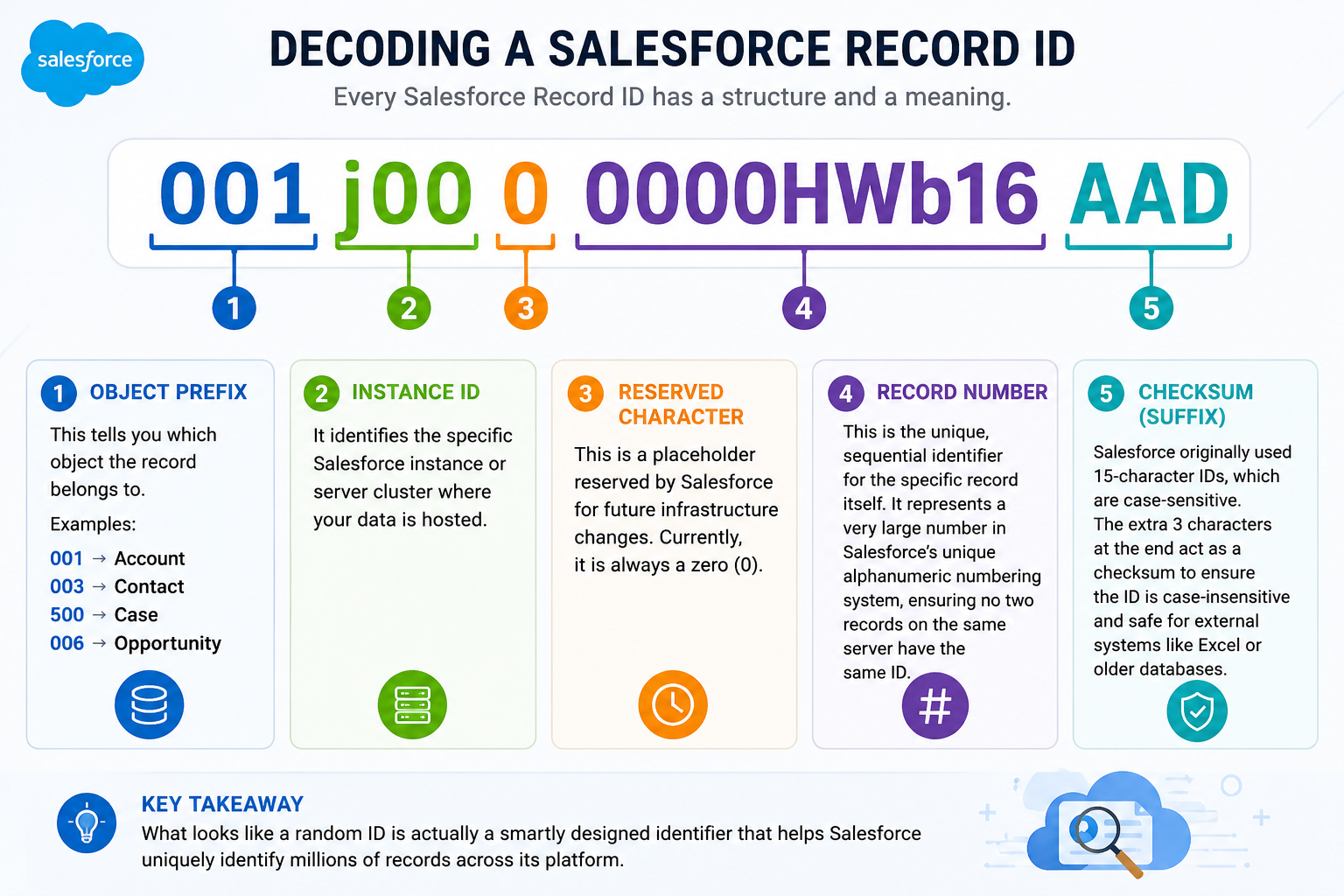
Consider the following example:
001j000000HWb16AAD
Although it looks random, each section serves a specific purpose.
Part 1: Object Prefix
Characters 1–3
The first three characters identify the object type.
Examples:
| Prefix | Object |
| 001 | Account |
| 003 | Contact |
| 500 | Case |
| 006 | Opportunity |
| 005 | User |
| 00Q | Lead |
| 800 | Contract |
| 801 | Order |
This prefix immediately tells Salesforce which object the record belongs to.
For example:
001xxxxxxxxxxxxxxx
Salesforce instantly knows this record belongs to the Account object.
Similarly:
500xxxxxxxxxxxxxxx
Indicates a Case record.
This is often the fastest way for developers and administrators to identify record types.
Part 2: Instance Identifier
Characters 4–6
The next three characters help identify the Salesforce infrastructure instance where the record originated.
Historically, Salesforce used these characters to reference internal server clusters and infrastructure components.
Although Salesforce architecture has evolved significantly, this section remains part of the Record ID structure.
For most administrators and developers, this information is primarily relevant from an architectural perspective.
Part 3: Reserved Character
Character 7
This character is currently reserved by Salesforce.
In most IDs, it appears as:
0
This placeholder allows Salesforce flexibility for future platform enhancements without changing the overall Record ID structure.
Think of it as reserved space for future expansion.
Part 4: Record Identifier
Characters 8–15
This section contains the unique identifier for the actual record.
It represents the sequential and highly scalable numbering system Salesforce uses internally.
This portion is responsible for ensuring uniqueness across millions and sometimes billions of records.
For example:
001j000000HWb16
The ending segment HWb16 is part of the record’s unique identity.
Combined with the earlier portions, it ensures the record remains globally unique.
Part 5: Checksum Suffix
Characters 16–18
This section exists only in the 18-character version of Salesforce IDs.
Example:
AAD
These three characters are known as the checksum.
Their purpose is to make Salesforce IDs case-insensitive.
This solves a significant challenge when records are used outside Salesforce.
WHY SALESFORCE HAS BOTH 15-CHARACTER AND 18-CHARACTER IDS
One of Salesforce’s Most Common Interview Questions
Many Salesforce professionals encounter this question during interviews:
“What is the difference between a 15-character ID and an 18-character ID?”
The answer lies in case sensitivity.
15-Character IDs
The original Salesforce Record ID format contains 15 characters.
Example:
001j000000HWb16
These IDs are case-sensitive.
That means:
001j000000HWb16
and
001J000000HWB16
are considered different values.
Within Salesforce itself, this works perfectly.
18-Character IDs
Salesforce later introduced 18-character IDs.
Example:
001j000000HWb16AAD
The additional three characters create a checksum value.
This allows external systems to recognize the ID regardless of capitalization.
Benefits include:
- Better compatibility with Excel
- Improved API integrations
- Reduced matching errors
- Safer data exports
- More reliable third-party integrations
WHY THE CHECKSUM MATTERS
The Excel Problem
Imagine exporting Salesforce data into Excel.
Excel often ignores letter casing during comparisons.
Without the checksum:
001j000000HWb16
and
001J000000HWB16
might be interpreted as identical values.
This can lead to:
- Duplicate detection issues
- Lookup failures
- Incorrect matching
- Data integrity problems
The checksum solves this challenge.
That’s why APIs and integrations almost always use the 18-character version.
WHERE RECORD IDS ARE USED
More Places Than You Might Realize
Salesforce Record IDs power nearly every aspect of the platform.
URLs
When opening a record:
https://yourorg.lightning.force.com/lightning/r/Account/001xxxxxxxxxxxx/view
The ID identifies the record.
Apex Development
Developers frequently reference IDs when:
- Querying records
- Creating relationships
- Updating data
- Processing integrations
Example:
Account acc = [SELECT Id, Name FROM Account LIMIT 1];
Flow Builder
Flows use Record IDs for:
- Updates
- Deletes
- Lookups
- Record-triggered automation
Integrations
External systems rely on Record IDs for synchronization.
Examples:
- MuleSoft
- Informatica
- Boomi
- Workato
- REST APIs
Data Loader
Record IDs enable:
- Upserts
- Updates
- Relationship mapping
PRACTICAL TIPS FOR ADMINS AND DEVELOPERS
Working Smarter with Record IDs
Tip 1
Learn common object prefixes.
This helps identify records quickly.
Tip 2
Always use 18-character IDs in integrations.
This avoids case-sensitivity issues.
Tip 3
Use Record IDs instead of names whenever possible.
Names can change.
IDs remain constant.
Tip 4
Validate object prefixes when troubleshooting data issues.
The prefix often reveals the source object immediately.
Tip 5
Understand Record IDs before building integrations.
Many integration issues stem from incorrect ID handling.
KEY LEARNING
What Understanding Record IDs Teaches Us
Learning 1
Salesforce Record IDs are structured, not random.
Learning 2
The first three characters immediately identify the object type.
Learning 3
The checksum exists to improve external system compatibility.
Learning 4
18-character IDs are preferred for integrations.
Learning 5
Understanding platform fundamentals improves troubleshooting and development efficiency.
KEY INSIGHT
Small Details Often Reveal Great Platform Design
One of the fascinating aspects of Salesforce is how much thought goes into seemingly simple features.
A Record ID appears to be nothing more than a string of characters.
Yet behind it lies a carefully engineered system designed to support:
- Global scalability
- Data integrity
- Platform performance
- Integration reliability
- Long-term compatibility
Sometimes the most interesting Salesforce concepts are the ones we use every day without noticing.
Final Thought
Salesforce Record IDs may look like random combinations of letters and numbers, but every character serves a purpose.
From identifying object types to ensuring case-insensitive compatibility with external systems, the Record ID structure demonstrates the level of engineering that supports the Salesforce platform.
The next time you see an ID such as:
001j000000HWb16AAD
you’ll know that it isn’t random at all.
It’s a carefully designed identifier helping Salesforce manage and uniquely identify millions of records across the world’s leading CRM platform.
Understanding these small platform details not only makes us better administrators and developers—it helps us appreciate the architecture behind the tools we use every day.

