

INTRODUCTION
As Salesforce developers, we’ve all encountered situations where we need to filter records based on calculated values.
Maybe it’s filtering Opportunities based on Expected Revenue.
Maybe it’s identifying Accounts with custom scoring logic.
Or perhaps it’s finding Cases that meet a complex calculated condition.
Historically, Salesforce has offered two common approaches:
- Create a Formula Field and filter on it.
- Query the data and apply the calculation in Apex.
Both approaches work, but neither is ideal.
Formula fields increase metadata complexity and field count, while Apex filtering often means retrieving more data than necessary and performing additional processing in code.
That’s why a recently announced Summer ’26 Pilot feature immediately caught my attention:
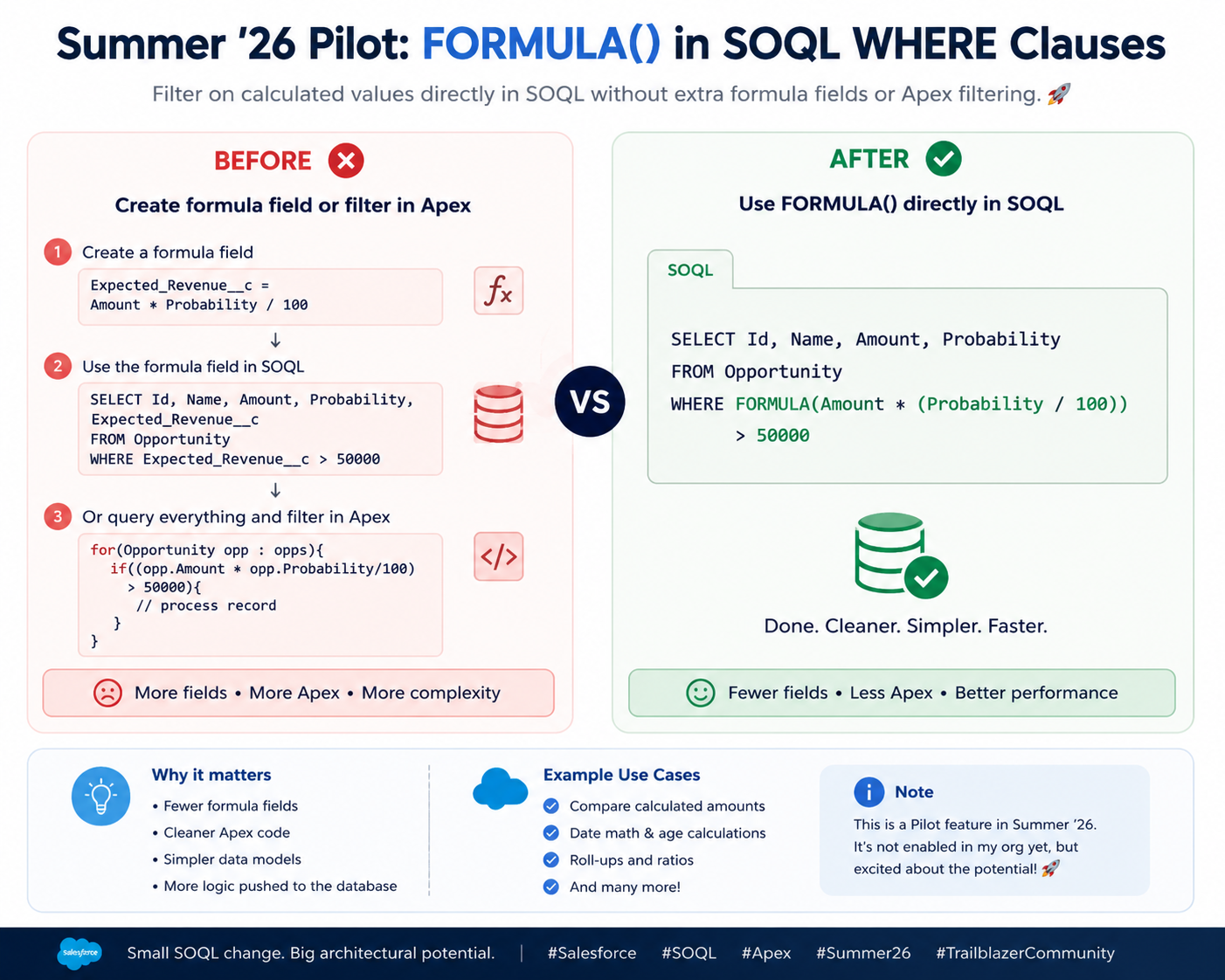
The ability to use FORMULA() directly inside SOQL WHERE clauses.
If this feature becomes generally available, it could significantly simplify query design, reduce unnecessary formula fields, and push more logic directly into the database layer.
THE PROBLEM WITH TODAY’S APPROACH
Why Filtering on Calculated Values Isn’t Always Easy
Developers frequently need to query records using calculated conditions.
Consider an Opportunity example:
Expected Revenue = Amount × Probability
Suppose the business wants all Opportunities where Expected Revenue exceeds $50,000.
Today, we typically choose one of two options.
Option 1: Create a Formula Field
Create:
Expected_Revenue__c
Formula:
Amount * (Probability / 100)
Then query:
SELECT Id, Name
FROM Opportunity
WHERE Expected_Revenue__c > 50000
While effective, this introduces additional metadata that may only exist to support filtering.
Option 2: Filter in Apex
Query records:
List<Opportunity> opps = [
SELECT Id, Amount, Probability
FROM Opportunity
];
Then process:
for(Opportunity opp : opps){
if((opp.Amount * opp.Probability/100) > 50000){
// Process record
}
}
This approach increases:
- Apex complexity
- CPU usage
- Data retrieval volume
- Maintenance effort
Neither option feels particularly elegant.
INTRODUCING FORMULA() IN SOQL
What the Summer ’26 Pilot Introduces
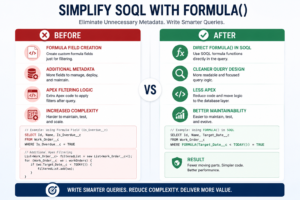
The Summer ’26 Pilot introduces support for FORMULA() expressions directly within SOQL WHERE clauses.
Instead of creating a dedicated formula field, developers can write calculations inline within the query.
Example:
SELECT Id,
Name,
Amount,
Probability
FROM Opportunity
WHERE FORMULA(
Amount * (Probability / 100)
) > 50000
The calculation exists only inside the query.
No additional field required.
No Apex filtering required.
The database evaluates the calculation directly.
This makes the query more self-contained and easier to understand.
WHY THIS FEATURE IS EXCITING
Cleaner Data Models
One of the biggest advantages is reducing the number of formula fields created solely for filtering purposes.
Many Salesforce orgs contain hundreds of formula fields.
Some are genuinely useful to users.
Others exist only because developers needed them in reports, filters, or queries.
This feature could eliminate many of those technical-only fields.
Benefits include:
- Simpler object models
- Fewer fields to maintain
- Reduced metadata clutter
- Easier administration
Less Apex Code
Developers often retrieve large datasets and then perform calculations in Apex.
With FORMULA() in SOQL:
- Less looping
- Less filtering logic
- Less custom code
- Cleaner services
The query itself becomes responsible for filtering records.
More Database-Level Processing
A common principle in software design is:
Filter data as close to the source as possible.
Moving calculations into the query layer means:
- Smaller result sets
- Better performance potential
- Reduced processing overhead
The database handles what databases do best.
POTENTIAL USE CASES
Where This Could Be Extremely Valuable
Although still a Pilot feature, several practical use cases immediately stand out.
Use Case 1: Opportunity Revenue Calculations
Filter opportunities based on expected revenue without creating dedicated formula fields.
Example:
WHERE FORMULA(
Amount * (Probability / 100)
) > 100000
Use Case 2: Date-Based Calculations
Calculate record age dynamically.
Example scenarios:
- Cases older than X days
- Contracts nearing expiration
- Assets approaching warranty end dates
Use Case 3: Ratio Calculations
Filter records based on percentages or performance metrics.
Examples:
- Utilization rates
- Completion percentages
- Service-level compliance metrics
Use Case 4: Service Cloud Analytics
Identify records meeting dynamic operational thresholds.
Examples:
- Escalation scoring
- Resolution efficiency
- Response time calculations
Use Case 5: Field Service Optimization
Filter work records using calculated maintenance indicators without creating supporting formula fields.
IMPORTANT LIMITATIONS
It’s Still a Pilot
One important detail:
This functionality is currently a Summer ’26 Pilot feature.
That means:
- Not all organizations have access.
- It requires Pilot enrollment.
- Behavior may change before General Availability.
- Salesforce may introduce limitations or enhancements during testing.
When I attempted to test it in my own environment, I discovered the feature was not yet enabled.
That’s expected for Pilot-only functionality.
As with any Pilot feature, developers should treat it as experimental until Salesforce officially announces broader availability.
KEY LEARNING
Why This Feature Matters
Learning 1
Many formula fields exist solely for query filtering purposes.
Learning 2
Reducing metadata complexity improves maintainability.
Learning 3
Database-level filtering is generally preferable to Apex-level filtering.
Learning 4
Modern Salesforce releases continue moving toward developer productivity improvements.
Learning 5
Small platform enhancements often have outsized architectural impact.
BEST PRACTICES IF THIS BECOMES GENERALLY AVAILABLE
Recommendations for Future Adoption
Best Practice 1
Use FORMULA() for query-specific calculations.
Best Practice 2
Continue using Formula Fields when users need visibility on page layouts, reports, or dashboards.
Best Practice 3
Avoid overly complex inline formulas that reduce query readability.
Best Practice 4
Measure performance before replacing existing solutions.
Best Practice 5
Document business logic clearly when embedded inside queries.
KEY INSIGHT
Not Every Calculation Needs a Formula Field
For years, Salesforce developers have relied on Formula Fields as a bridge between business logic and query requirements.
This feature suggests a different philosophy:
Sometimes calculations belong in the query itself.
By allowing developers to express calculations where they are actually needed, Salesforce can reduce metadata sprawl and simplify application architecture.
The result is cleaner code, cleaner objects, and potentially cleaner orgs.
FINAL THOUGHT
The introduction of FORMULA() inside SOQL WHERE clauses may seem like a small enhancement, but it has the potential to reshape how Salesforce developers approach filtering logic.
By eliminating the need for temporary formula fields and reducing Apex-based filtering, this feature could simplify development while improving maintainability.
For now, it’s still a Pilot feature, and many of us are waiting for access to explore it further.
But if Salesforce expands support and brings it to General Availability, FORMULA() in SOQL could become one of the most useful developer-focused enhancements in recent releases.
I’m definitely excited to see where this goes next.

