

INTRODUCTION
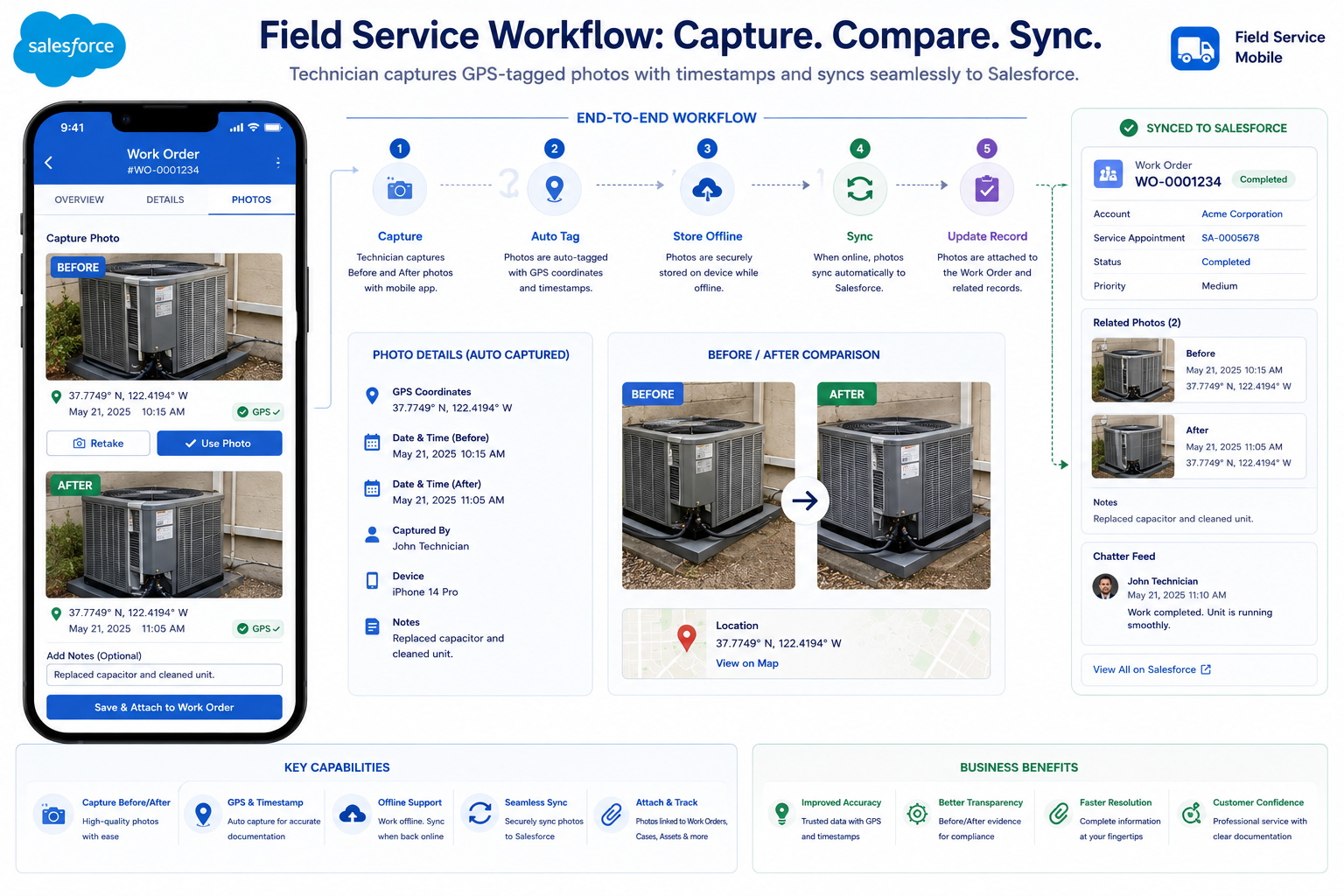
Field Service is a perfect use case for Salesforce. It manages work orders, schedules technicians, routes service calls, and tracks completions. What it doesn’t do well is photo documentation.
Field technicians need proof: before/after photos, location verification, timestamp proof that work was done where and when claimed. Yet Salesforce has no native solution for field photo capture. This creates a gap: technicians leave Salesforce, use their phones to take photos, and store them scattered across multiple places—email, WhatsApp, cloud storage, device folders.
This is where SharinPix enters. It’s a purpose-built Salesforce-managed package designed specifically for field photo documentation. Combined with a thoughtful integration—token-based authentication, secure deep linking, automatic sync—you create an experience that feels native to Salesforce but provides all the field-specific capabilities technicians need.
This post covers the problem, why custom solutions fail, what SharinPix offers, how to integrate it properly, and the architectural principle that should guide the decision:
Integration over custom build when the problem has already been solved well.
THE FIELD SERVICE PHOTO PROBLEM
Why Photo Documentation Is Critical and Hard
The Business Challenge
Field Service Reality:
Field Technician:
– Completes work order
– Takes photos with phone camera
– Stores photos… where?
├─ Email them to office (inefficient)
├─ Upload to cloud storage (multiple places)
├─ Leave them on phone (lost if device damaged)
├─ Send via WhatsApp (not professional)
└─ Some combination (chaos)
Result:
– Photos scattered across multiple locations
– No GPS proof of location
– No reliable timestamp
– No audit trail
– Compliance risk
– Customer disputes possible
Why This Matters
Compliance and Audit:
Regulated Industries:
– HVAC service (environmental codes)
– Electrical work (safety codes)
– Plumbing (health codes)
– Equipment maintenance (safety audits)
Requirements:
- Proof work was done at specified location
- Timestamp showing when work completed
- Before/after documentation
- Photos linked to work order
- Complete audit trail
- No modification without record
Consequences of Missing:
- Compliance violations
- Failed audits
- Customer disputes
- Legal liability
- Regulatory penalties
Customer Satisfaction:
Customer expects:
– Proof work was done
– Photos showing before/after
– Documentation linked to invoice
– Ability to reference later if needed
Without:
– Customer disputes
– Invoices questioned
– Reputation risk
– Repeat business lost
WHY CUSTOM SOLUTIONS FAIL
The Cost of Building from Scratch
Scenario: Build It Yourself
Temptation:
Business asks: “Can we just build photo capture in Salesforce?”
Developer thinks: “Sure, we can build a custom solution”
What You’d Need to Build:
Core Features:
- Photo Capture
– Mobile camera access
– Image compression
– Multiple formats
– Testing across devices
- GPS Metadata
– Location services integration
– Privacy handling
– Permission management
– Accuracy verification
- Timestamp Proof
– Server-side verification
– Timezone handling
– Tamper-proof storage
– Audit logging
- Offline Capability
– Local storage
– Sync logic
– Conflict resolution
– Data integrity
- Before/After
– Comparison UI
– Annotation tools
– Storage optimization
– Performance
- Security
– Encryption (in transit, at rest)
– Token management
– Access control
– Compliance (GDPR, HIPAA, etc.)
- Mobile Experience
– iOS app development
– Android app development
– Platform-specific optimizations
– App store management
- Photo Management
– Storage scaling
– Backup/recovery
– Retention policies
– Compliance archiving
Cost Analysis:
Development:
– Core features: 400-600 hours
– Mobile apps: 300-400 hours
– Security/compliance: 200-300 hours
– Testing: 200-300 hours
Total: 1,100-1,600 hours
At $150/hour: $165,000-240,000
Ongoing:
– Maintenance: 20 hours/month
– Updates: 40 hours/month
– Support: 30 hours/month
Total: 90 hours/month = $13,500/month
First Year Cost: $325,000+
Risks:
- Security vulnerabilities
- Mobile app performance issues
- Compliance gaps
- Scaling problems
- Ongoing maintenance burden
WHAT IS SHARINPIX?
Understanding the Solution
SharinPix Overview
Definition:
SharinPix is a Salesforce-managed package (AppExchange)
designed specifically for field photo documentation.
It provides:
– Mobile photo capture (iOS & Android)
– GPS metadata auto-capture
– Timestamp proof
– Before/after comparison
– Photo tagging and search
– Offline-first sync
– Compliance-ready audit trails
– Deep linking to Salesforce
– Token-based authentication
Think of it as: “Instagram for field service”
But with compliance, security, and Salesforce integration
Key Features
Feature 1: Mobile Photo Capture
Purpose: Capture photos natively on mobile
How it works:
– Native iOS/Android app
– Direct camera access
– Optimized for field conditions
– Works offline and online
Benefits:
- Fast (no web browser loading)
- Native features (photo library, recent, etc.)
- Reliable (works offline)
- User-friendly (designed for field)
Feature 2: GPS Metadata
Purpose: Prove location of work
How it works:
– Automatic GPS capture at photo time
– Server-side verification
– Tamper-proof logging
– Maps integration
Benefits:
- Compliance proof (work was done at location)
- Geofencing possible (confirm at job site)
- Route verification
- Audit trail
Feature 3: Timestamp Proof
Purpose: Prove when work was done
How it works:
– Server-generated timestamp
– Photo creation + server timestamp logged
– Timezone handling
– Tamper-proof
Benefits:
- Compliance proof (done at correct time)
- SLA verification
- Workday tracking
- Audit trail
Feature 4: Before/After Comparison
Purpose: Document work transformation
How it works:
– UI slider showing before/after photos
– Side-by-side comparison
– Interactive switching
– Annotation tools
Benefits:
- Customer communication (see the difference)
- Quality verification
- Dispute prevention
- Professional documentation
Feature 5: Offline Capability
Purpose: Capture photos anywhere (even without cell service)
How it works:
– Photos stored on device
– Auto-sync when connection available
– Conflict resolution
– Data integrity check
Benefits:
- Works in remote areas
- Works when cellular network down
- No waiting for sync
- Seamless experience
Feature 6: Secure Linking
Purpose: Connect photos to Salesforce records securely
How it works:
– Token-based authentication
– Time-limited tokens
– Deep linking
– No password sharing
Benefits:
- Secure (tokens not reusable)
- Seamless (no login needed)
- Audit trail (who accessed what)
- Compliance-ready
INTEGRATION ARCHITECTURE
How to Connect SharinPix with Salesforce
Integration Overview
Architecture Components:
Salesforce FSL:
├─ ServiceAppointment record
├─ WorkOrder record
└─ Custom fields (photo status, etc.)
↓ (Token generation)
Apex Trigger:
├─ Detects record save
├─ Generates secure token
├─ Stores for LWC retrieval
└─ Logs operation
↓ (Token to UI)
Lightning Web Component:
├─ Retrieves token from Apex
├─ Renders “Take Photo” button
├─ Prepares deep link
└─ Handles callback
↓ (Deep link)
SharinPix App:
├─ Receives token in URL
├─ Authenticates user
├─ Launches camera
├─ Captures GPS/timestamp
└─ Syncs photos back
↓ (Auto-sync)
Salesforce Record:
├─ Photos linked
├─ GPS attached
├─ Timestamp recorded
├─ Audit trail created
└─ Complete documentation
RESULTS AND ADOPTION
Real-World Impact
Technician Adoption
Before Integration:
Technician Workflow:
- Open Salesforce (mobile app)
- View work order
- Close app
- Open native camera
- Take photos
- Open Salesforce again
- Manually upload/email photos
- Hope they get to right place
Result: Adoption ~30% (too much friction)
Many technicians skip photo documentation
After Integration:
Technician Workflow:
- Open Salesforce (mobile app)
- View work order
- One click “Take Photo”
- SharinPix app opens (app switch fast)
- Take photos (GPS/timestamp automatic)
- Done (auto-syncs)
- See photos in record immediately
Result: Adoption ~85% (seamless experience)
Technicians use it because it’s frictionless
Compliance and Audit
Before:
Audit Question: “Prove work was done at 123 Main St on May 15”
Answer: “Photos are somewhere, let me find them…”
Result: Can’t prove, audit fails
After:
Audit Question: “Prove work was done at 123 Main St on May 15”
Answer: “Here are the photos with GPS coordinates
and server-verified timestamp from May 15 14:30″
Result: Complete proof, audit passes
Customer Satisfaction
Before:
Customer asks: “Do you have proof the work was done?”
Technician: “Yes, we have photos but they’re…”
Result: Vague, customer skeptical
After:
Customer asks: “Do you have proof the work was done?”
Technician: “Yes, here are before/after photos
from May 15, taken at your location with GPS proof”
Result: Clear proof, customer satisfied
BEST PRACTICES FOR INTEGRATION
Making It Production-Ready
Best Practice 1: Security
Token Management:
- Tokens time-limited (30 minutes)
- Tokens single-use (invalid after use)
- Tokens cryptographically signed
- Tokens don’t contain sensitive data
- Deep links use HTTPS
- No token logging in plain text
- Access logs audited
Data Protection:
- Photos encrypted in transit
- Photos encrypted at rest
- GPS data protected
- Metadata audit trail
- User permissions enforced
- Compliance with data privacy laws
Best Practice 2: Error Handling
Graceful Degradation:
If token generation fails:
- User sees error message
- Can retry
- Issue logged for support
- Doesn’t break work flow
If SharinPix unavailable:
- Alternative photo option (email)
- Notify technician
- Queue for later sync
- No work stoppage
Best Practice 3: Monitoring
What to Track:
- Token generation rate
- Token success rate
- Photo sync success rate
- Sync latency
- Error rates by type
- User adoption rates
- Compliance coverage
Alerting:
Alert when:
- Token generation fails
- Sync latency > threshold
- Error rate spikes
- Adoption drops
- Compliance coverage gaps
Logging:
– All operations logged
– Audit trail maintained
– Compliance reports available
FINAL THOUGHTS
This integration demonstrates a fundamental principle of good software architecture:
know when to integrate vs build, and choose integration for solved problems.
Photo documentation for field service is a solved problem. SharinPix has invested years in building the right solution—mobile apps for iOS and Android, GPS accuracy, timestamp verification, offline synchronization, compliance certifications. Building equivalent from scratch would be expensive, time-consuming, and risky.
The integration itself is elegant: token-based authentication, deep linking, and automatic synchronization mean technicians barely notice they’re leaving Salesforce. They click a button, take photos, and the rest happens automatically.
This is the hallmark of good integration: it solves the business problem so seamlessly that users forget it was integrated. It just works.
For field service organizations, photo documentation isn’t optional anymore—it’s expected. Customers want proof. Audits require documentation. Disputes are prevented by clear visual evidence.
The question isn’t whether to implement photo documentation. The question is whether to build it (expensive, slow, risky) or integrate a proven solution (fast, cost-effective, reliable).
For most organizations, the answer is clear: integrate. Let the experts handle the photos. Focus your Salesforce team on what they do best—integrating with Salesforce.

