

INTRODUCTION
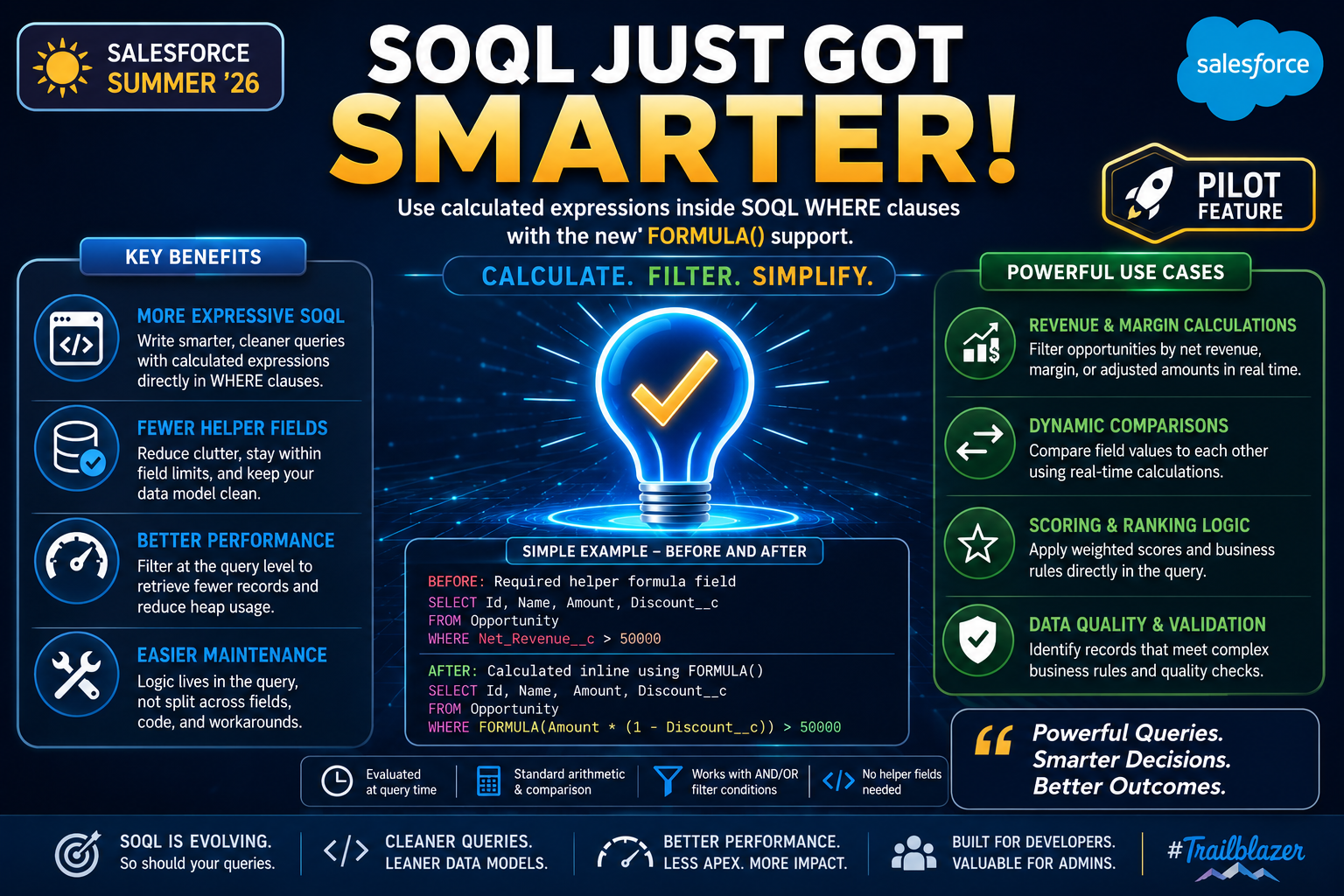
Salesforce Summer ’26 is introducing one of the most exciting SOQL enhancements in recent memory — support for FORMULA() expressions directly inside SOQL WHERE clauses, available as a Pilot feature.
For developers who have spent years working around SOQL’s filtering limitations by creating helper formula fields, maintaining complex workarounds, or running post-query filtering in Apex — this change is a significant step forward.
The concept is straightforward: instead of relying on pre-calculated formula fields to filter records, you can now write calculated expressions directly inside your query. Calculate. Filter. Simplify. Do more in your queries. Do it smarter.
This post covers what FORMULA() support means, why it matters, where it can be applied, and what developers and admins should know as this feature moves through Pilot.
THE CHALLENGE
The Limitations SOQL Developers Have Worked Around for Years
SOQL is powerful, but it has always had a notable gap: you cannot filter on calculated values directly inside a query. If you need to filter records based on a formula — a margin percentage, a score, a dynamic comparison between two fields — you have historically needed a workaround.
Common Workarounds Before FORMULA() Support:
- Create a helper formula field on the object just to expose a calculated value for filtering
- Run a broader SOQL query and apply additional filtering logic in Apex after retrieving results
- Use complex multi-step queries with subqueries to approximate calculated filtering
- Maintain redundant stored fields that duplicate logic already expressed in formulas elsewhere
Problems These Workarounds Create:
- Additional formula fields clutter the data model with fields that exist purely for query support
- Post-query filtering in Apex increases heap size usage and reduces efficiency
- Logic is split between the query layer and the code layer, making maintenance harder
- Each workaround adds complexity that the next developer must understand and maintain
- Formula field limits become a constraint as the number of filtering requirements grows
These were not deal-breakers — developers adapted. But they were friction points that made SOQL less expressive than it could be. FORMULA() support addresses this directly.
THE ENHANCEMENT
What FORMULA() Support in SOQL Actually Does
FORMULA() support allows calculated expressions to be used directly inside SOQL WHERE clauses. Instead of filtering on a stored field value, you can filter on a value that is computed at query time — inline, within the query itself.
The Core Capability:
Use calculated expressions inside SOQL WHERE clauses with the new FORMULA() support. This means the calculation happens at the query level, not as a pre-stored field and not as post-processing in Apex.
Key Characteristics:
- Expressions are evaluated at query time, not stored
- Supports standard arithmetic and comparison operations inside WHERE clauses
- Reduces dependency on helper formula fields for filtering purposes
- Works alongside existing SOQL filter conditions using AND and OR logic
BENEFITS
Why This Enhancement Matters for Developers and Admins
Benefit 1: More Expressive SOQL SOQL queries become smarter and cleaner. Filtering logic that previously required workarounds can now be expressed directly in the query, making queries self-contained and easier to understand at a glance.
Benefit 2: Fewer Helper Fields One of the most immediate practical benefits is the reduction in formula fields created purely for query filtering. The data model stays leaner, field limits are preserved for fields that genuinely need to be stored, and object schemas become easier to document and explain.
Benefit 3: Better Performance Filtering at the query level is more efficient than retrieving a broad result set and filtering in Apex. Calculated filtering directly in the WHERE clause means fewer records travel from the database to the Apex execution context, reducing heap usage and improving overall query efficiency.
Benefit 4: Easier Maintenance When filtering logic lives in the query rather than split across a formula field, an Apex class, and a WHERE clause, maintenance becomes significantly simpler. A developer reading the query understands the full filtering logic without needing to look elsewhere. Changes are made in one place.
PILOT STATUS — WHAT TO KNOW
FORMULA() in SOQL Is a Pilot Feature in Summer ’26
This feature is currently available as a Pilot in Summer ’26. There are important considerations for teams evaluating it:
What Pilot Means:
- The feature is available to a limited group of customers through Salesforce’s Pilot program
- Pilot features are not generally available and require Salesforce enablement
- Functionality, syntax, and behavior may change before general availability
- Production use during Pilot should be evaluated carefully based on your org’s risk tolerance
How to Access It: Contact your Salesforce Account Executive or Success Manager to express interest in the Pilot program. Salesforce evaluates Pilot participants based on use case fit and ability to provide feedback.
What to Watch:
- Salesforce release notes for Summer ’26 will include the official documentation for FORMULA() syntax and supported operations
- Beta and GA timelines have not been announced yet
- The Trailblazer Community will be a valuable resource for early adopter experiences and workarounds during Pilot
Even without immediate production access, now is the right time to understand the feature, identify where it would benefit your current queries, and prepare to adopt it when it reaches general availability.
KEY LEARNING
What This Enhancement Teaches Us About SOQL’s Evolution
Learning 1: SOQL Is Still Evolving SOQL has been a core Salesforce technology for years, and it continues to evolve in meaningful ways. FORMULA() support is not a minor quality-of-life improvement — it is a fundamental expansion of what the query language can express. Staying current with platform releases continues to pay off.
Learning 2: Declarative Thinking Applies to Queries Too The same principle that drives Flow adoption over Apex applies here: when the platform can handle the logic natively, use the platform. FORMULA() support pushes calculated filtering down to the platform layer, keeping logic out of Apex where it does not need to be.
Learning 3: Data Model Cleanliness Has Real Value Every formula field created purely to support a query filter is technical debt. It clutters the schema, counts against field limits, and must be documented and maintained. Features that reduce this dependency directly improve the long-term health of the data model.
Learning 4: Query-Level Filtering Is More Efficient Post-query filtering in Apex has always been a necessary but inefficient pattern. Filtering at the query level reduces record retrieval, reduces heap usage, and keeps Apex focused on business logic rather than data selection. FORMULA() support enables this for scenarios that were previously impossible at the query level.
BEST PRACTICES
How to Prepare for and Use FORMULA() Support Effectively
Best Practice 1: Audit Your Existing Helper Formula Fields Before FORMULA() reaches general availability, identify formula fields in your org that exist purely to support query filtering. These are the first candidates to be replaced with inline FORMULA() expressions when the feature is available.
Best Practice 2: Keep Expressions Readable FORMULA() expressions inside WHERE clauses can become complex. Prioritize readability. If an expression is difficult to understand at a glance, add a comment in your code explaining what it calculates and why.
Best Practice 3: Test Performance with Large Data Volumes Calculated filtering at the query level is generally more efficient than post-query Apex filtering, but complex expressions on large datasets should be tested carefully. Validate query performance in a full-copy sandbox before production deployment.
Best Practice 4: Combine with Existing Filter Conditions Thoughtfully FORMULA() expressions work alongside standard WHERE clause conditions. Use AND and OR logic carefully when mixing calculated expressions with standard field filters to ensure the combined logic returns the expected result set.
Best Practice 5: Stay Current with Pilot Documentation As a Pilot feature, the syntax and supported operations for FORMULA() may evolve. Follow Salesforce release notes, the Trailblazer Community, and official documentation closely as the feature progresses toward general availability.
Best Practice 6: Do Not Remove Helper Fields Prematurely Until FORMULA() reaches general availability and your org has been upgraded, keep existing helper formula fields in place. Migrate gradually and validate each query replacement thoroughly before removing the underlying field.
Final Thought
Salesforce Summer ’26’s FORMULA() support in SOQL WHERE clauses is an exciting step toward making SOQL more powerful and flexible. While it is currently in Pilot, the direction it represents is clear — the platform is investing in giving developers and admins more expressive tools at the query layer.
If you work with SOQL regularly, now is the right time to understand this feature, identify where it applies in your current codebase, and prepare your team to adopt it as it moves toward general availability.
The queries are getting smarter. The decisions that follow will be better for it.

