

INTRODUCTION
Most teams think Omni-Channel in Salesforce is just about routing work from one place to another. In reality, it is about something far more valuable: intelligent workload distribution.
In Salesforce Service Cloud, Omni-Channel ensures that the right work reaches the right agent at the right time — automatically. No manual assignment. No cherry-picking. No overloaded agents while others sit idle.
Yet despite being one of the most powerful features in Service Cloud, Omni-Channel is frequently misconfigured, underutilized, or misunderstood. Teams enable it without setting up proper routing configurations or capacity models, then wonder why it is not delivering results.
This blog covers what actually makes Omni-Channel powerful, the four capabilities that define it, a real-world implementation insight, the most common mistake teams make, and the principles behind using it as a genuine strategy for scalable, efficient, and fair customer support.
THE CHALLENGE
Why Traditional Queue-Based Support Falls Short
Before Omni-Channel, most Salesforce Service Cloud implementations relied on queues. Work items — cases, chats, emails — would land in a shared queue, and agents would manually pick the next item to work on.
This approach has serious structural problems:
Problems With Queue-Only Support Models:
- Agents manually select work, creating opportunity for cherry-picking easier or faster cases
- High-priority or complex work can sit unaddressed while simpler items are taken first
- No visibility into agent capacity means some agents are overwhelmed while others are underutilized
- Skill matching is manual — a technical case may be picked up by an agent without the required expertise
- SLA adherence suffers because work assignment is inconsistent and unpredictable
- Supervisors spend significant time monitoring queues and manually reassigning work
The Hidden Cost: Beyond the operational inefficiency, queue-only models create a poor agent experience. Agents with high workloads burn out while lower-utilization agents remain unaware there is work to be done. The system has no intelligence — it simply holds work and waits for humans to act.
Omni-Channel replaces this passive model with an active, intelligent one. Work does not wait for agents. Work finds the right agent automatically.
WHAT OMNI-CHANNEL ACTUALLY IS
Omni-Channel — Intelligent Routing, Not Just a Feature
Omni-Channel in Salesforce Service Cloud is a routing and workload management framework that automatically assigns work to agents based on defined rules, capacity, skills, and real-time availability.
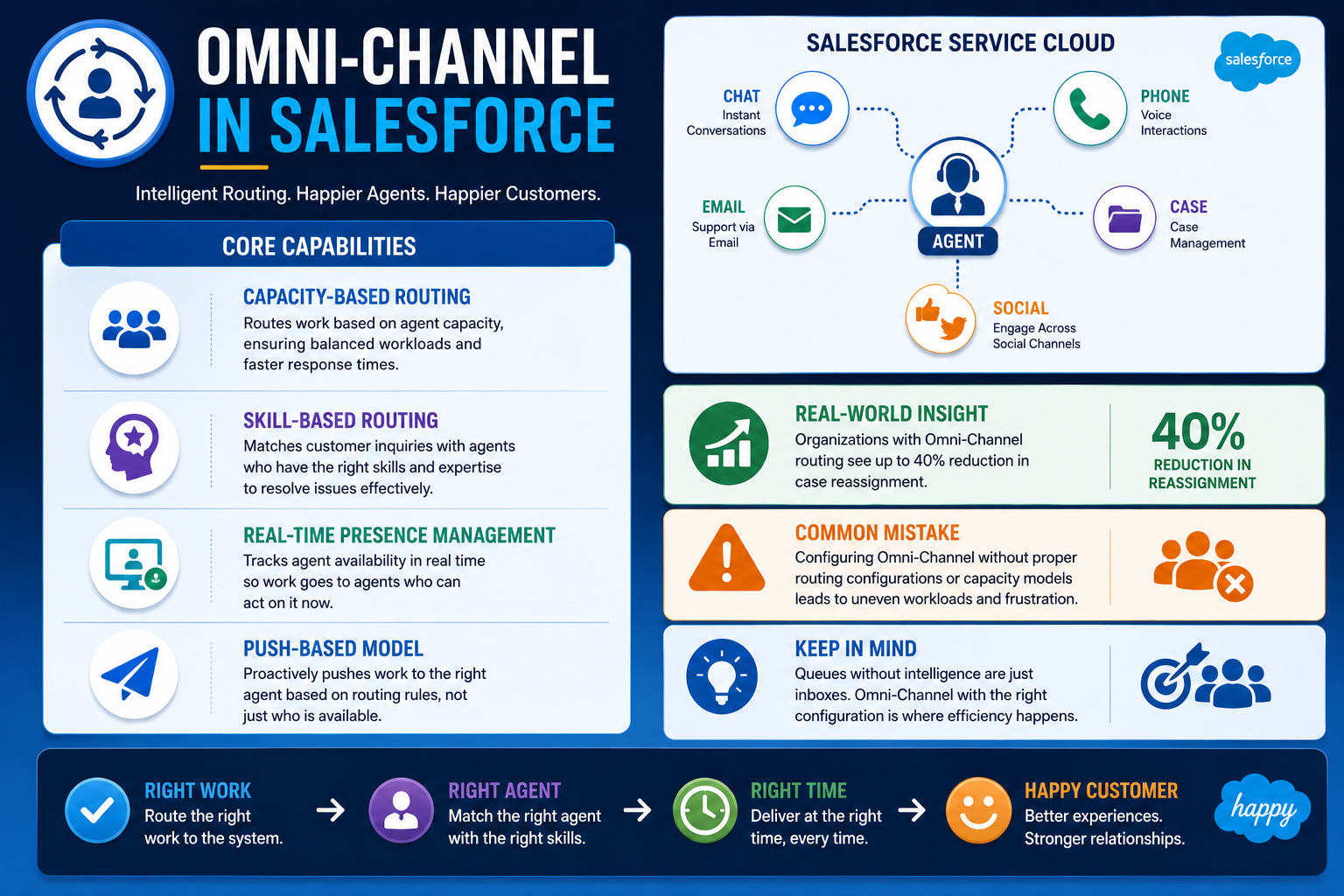
It connects every support channel — Chat, Phone, Email, Cases, and Social — into a single unified routing layer managed through Service Cloud. Regardless of where a customer reaches out, Omni-Channel ensures the resulting work item is routed intelligently to the agent best positioned to handle it.
Supported Work Channels:
- Chat — live messaging conversations
- Phone — call center interactions via Service Cloud Voice
- Email — inbound email cases routed as work items
- Cases — standard Salesforce case records
- Social — social media interactions managed through Service Cloud
The Core Promise: Omni-Channel ensures that the right work reaches the right agent at the right time — automatically. This single principle, applied consistently, transforms how support teams operate.
WHAT MAKES OMNI-CHANNEL POWERFUL
Four Capabilities That Define Intelligent Workload Distribution
Capability 1: Capacity-Based Routing
Not all work is equal. A chat conversation requires different attention and effort than a complex technical case or an inbound phone call. Omni-Channel accounts for this by assigning work based on defined capacity units.
Each work type is assigned a capacity weight. Each agent has a defined total capacity. Omni-Channel assigns work only when an agent has available capacity, preventing overload and ensuring no agent is assigned more simultaneous work than they can handle effectively.
The result: no agent is overwhelmed while others sit idle. Work is distributed based on actual capacity, not chance or seniority.
Capability 2: Skill-Based Routing
High-priority or technically complex issues should go directly to agents with the right expertise. Skill-based routing makes this automatic.
Agents are assigned skills — technical support, billing, language proficiency, product expertise — and work items are tagged with required skills at the point of creation. Omni-Channel matches the work to the agent whose skill profile fits the requirement, without any manual intervention from a supervisor or queue manager.
This reduces case transfers, improves first-contact resolution, and ensures complex issues do not get stuck with agents who lack the knowledge to resolve them.
Capability 3: Real-Time Presence Management
Routing decisions are only as good as the availability information behind them. Omni-Channel includes real-time presence management, allowing agents to set their status — Available, Busy, or Offline — and having the routing engine respect that status dynamically.
When an agent moves to Busy or goes Offline, Omni-Channel stops routing new work to them immediately. When they return to Available, work assignment resumes automatically. Supervisors have visibility into real-time presence across the entire team, enabling better workforce management without manual tracking.
Capability 4: Push-Based Model — Not Pull
This is perhaps the most structurally important difference between Omni-Channel and traditional queue-based models. In a queue model, agents pull work — they choose what to pick up next. In Omni-Channel’s push model, work is assigned to agents automatically based on capacity, skills, and availability.
Agents do not select work. Work finds them.
This eliminates cherry-picking — the tendency for agents to select easier, faster, or more familiar work items over challenging ones. Every agent receives work appropriate to their skills and current capacity, regardless of personal preference. SLA adherence improves because high-priority work is routed immediately rather than waiting for an agent to notice and select it.
REAL-WORLD INSIGHT
What Intelligent Routing Delivers in Practice
In one Salesforce Service Cloud implementation, enabling skill-based routing produced a measurable and immediate impact:
- Case reassignment reduced by approximately 40%
- First-contact resolution improved significantly
- Average handle time decreased as cases reached agents with the right expertise from the start
The reason this improvement happened was straightforward. Before skill-based routing, cases were routed to whoever was next in the queue — regardless of whether that agent had the expertise to resolve the issue. Transfers were frequent. Customers repeated themselves. Resolution took longer.
After enabling skill-based routing, cases with technical requirements went directly to technical agents. Billing issues went to billing specialists. The routing layer became a precision tool rather than a first-come, first-served mechanism.
The configuration effort was modest. The operational impact was significant. This is the compounding return that well-configured Omni-Channel delivers over time.
THE COMMON MISTAKE
Why Many Omni-Channel Implementations Underdeliver
Despite its capabilities, Omni-Channel frequently underdelivers in practice. The reason is almost always the same: teams enable the feature without configuring the intelligence behind it.
The Most Common Mistake: Configuring Omni-Channel without defining proper Routing Configurations and Capacity Models.
When routing configurations are missing or incomplete, Omni-Channel has no rules to apply. Work gets distributed without regard for agent skills or workload, producing the same uneven distribution that queues created — just with more complexity underneath.
When capacity models are not defined, Omni-Channel cannot prevent overload. Agents receive work regardless of how much they are already handling, defeating the core purpose of the feature.
What This Looks Like in Practice:
- Agents receive new work items while already at maximum capacity
- High-priority cases are not differentiated from routine ones at the routing layer
- Skill requirements are not matched, leading to continued reassignments
- The team concludes that Omni-Channel is not working — when the configuration was never complete
The Fix: Treat Omni-Channel configuration as a design exercise, not a feature toggle. Define capacity weights for every work type. Define agent skills and assign them carefully. Set routing rules that reflect your actual support model. Test with realistic work volumes before go-live.
Omni-Channel is only as intelligent as the configuration behind it.
KEY LEARNING
What Working With Omni-Channel Teaches You
Learning 1: Routing Is a Strategy, Not a Setting The biggest mindset shift Omni-Channel requires is treating routing as a deliberate strategy rather than a default setting. Every routing decision — which work type gets which capacity weight, which skills are required for which issues — reflects a choice about how your support organization operates.
Learning 2: Capacity Models Require Honest Assessment Defining capacity models means understanding how much simultaneous work different types of work items actually require. A chat conversation is not the same effort as a complex technical case. Getting capacity weights right requires input from experienced agents and supervisors, not just system administrators.
Learning 3: Skill-Based Routing Has Compounding Returns The benefits of skill-based routing compound over time. As agents develop expertise and skill profiles are refined, routing accuracy improves. First-contact resolution increases. Transfer rates drop. Customer satisfaction follows. The initial configuration investment pays ongoing dividends.
Learning 4: Presence Management Is Often Overlooked Real-time presence management is frequently treated as a minor feature rather than a core component. In practice, accurate presence data is what makes capacity-based routing reliable. If agents do not update their status accurately, routing decisions become unreliable regardless of how well the routing rules are configured.
Learning 5: Queues Without Intelligence Leave Efficiency on the Table If your team is using Salesforce Service Cloud with queues but without Omni-Channel routing intelligence, you are operating with a significant efficiency gap. The platform has the capability. The configuration is the investment required to unlock it.
BEST PRACTICES
Design Principles for Effective Omni-Channel Implementation
Best Practice 1: Design Routing Configurations Before Enabling the Feature Map out your routing logic on paper before touching configuration. Define every work type, its capacity weight, its required skills, and its priority level. Implementing Omni-Channel without this design work leads to the common mistake of underdelivering on the feature’s potential.
Best Practice 2: Start With Fewer Skill Definitions and Expand Begin with a focused set of clearly differentiated skills — technical, billing, general — rather than an exhaustive taxonomy. As the routing model matures and you observe actual routing behavior, add skill granularity where it adds genuine value.
Best Practice 3: Validate Capacity Weights With Real Data Set initial capacity weights based on your best estimate of relative work effort, then monitor agent workload in the first weeks after go-live. Adjust weights based on observed behavior rather than assumptions made during design.
Best Practice 4: Train Agents on Presence Management Agent adoption of accurate presence status is critical to Omni-Channel’s effectiveness. Train agents on why presence management matters, how to update their status correctly, and what happens when they do not. This is a people practice as much as a technical one.
Best Practice 5: Monitor Routing Metrics Regularly Use Omni-Channel Supervisor and reporting to monitor key routing metrics — average wait time, reassignment rate, first-contact resolution, agent utilization. These metrics reveal where routing configurations need adjustment and where agent skills need development.
Best Practice 6: Review and Refine Quarterly Support operations evolve. New product lines create new skill requirements. Team growth changes capacity dynamics. Review and refine your Omni-Channel configuration at least quarterly to ensure it reflects current reality rather than the state of the org at initial implementation.
KEY INSIGHT
Omni-Channel Is a Strategy, Not Just a Feature
The teams that get the most from Omni-Channel are not the ones who enabled it fastest. They are the ones who treated it as a strategic design exercise from the beginning.
Right Work. Right Agent. Right Time. Happy Customer.
This four-step chain only holds together when every link is deliberately designed — the work types are correctly weighted, the agents have accurate skill profiles, the routing rules reflect real support priorities, and the presence management is consistently maintained.
When all of that is in place, Omni-Channel does not just route work. It transforms how a support organization operates — making it more scalable as volume grows, more efficient as complexity increases, and fairer for every agent on the team.
If you are still relying on queues without intelligence, you are leaving efficiency on the table. The platform already has what you need.
Final Thought
Omni-Channel in Salesforce Service Cloud is not a feature you turn on — it is a capability you design. The difference between an Omni-Channel implementation that transforms support operations and one that disappoints is almost always configuration depth, not platform limitation.
Invest the time to define your routing strategy properly. Build capacity models that reflect how your team actually works. Match skills to the work that requires them. Maintain presence data accurately.
Do those things consistently, and Omni-Channel becomes exactly what it promises to be: the backbone of modern customer support — scalable, efficient, and fair for every agent and every customer it serves.

