

INTRODUCTION
For years, deploying Flows with email templates has been a silent source of post-deployment disasters. You move a Flow to production, test passes, everything looks good—then the Flow fails in production because the email template reference broke during deployment.
The problem was fundamental: Send Email actions stored template references by name, not by ID. When deployed to an environment where template names didn’t exist or were different, the reference broke. Simple in concept, nightmarish in practice.
Salesforce Summer ’26 finally fixes this with Send Email Action Version 3.0.1, which stores email templates as proper references that survive deployment. This post explores the problem, why it happened, the solution, and how to implement it safely.
THE EMAIL TEMPLATE DEPLOYMENT PROBLEM
Why Deployments Failed Silently
The Scenario
Setup:
- Developer org has Flow with Send Email action
- Flow uses email template: “Welcome Email”
- Flow tested locally, works fine
- Flow deployed to production
What Happened (Before Fix):
Deployment occurs:
- Flow XML includes template name: “Welcome Email”
- Flow deploys to production
- Production environment loads Flow
- Flow tries to find template by name
- Template exists but reference doesn’t resolve correctly
- Flow fails silently
- User reports email not sent
Why It Broke:
- Template stored by name in XML
- During deployment, name-based reference doesn’t properly resolve
- ID-based reference would have worked
- Framework couldn’t guarantee name uniqueness across environments
The Silent Failure Pattern
What Made It Worse:
Problem 1: Tests Pass, Production Fails
- Sandbox tests: Template reference works
- Production deployment: Same template reference breaks
- Different environments, different metadata state
- Hard to predict
Problem 2: Post-Deployment Discovery
- Deployment completes successfully
- Tests show green
- Users report issues hours/days later
- Fire-fighting mode activated
Problem 3: Hard to Troubleshoot
- Flow doesn’t error visibly
- Email just silently doesn’t send
- No clear error message
- Requires debugging to find root cause
Problem 4: Workarounds Were Messy
- Manually recreate templates in target environment
- Use Apex to send email (complex)
- Avoid using Send Email action (defeats purpose)
- Post-deployment manual fixes
Real-World Impact
Scenario 1: Customer Onboarding
- Automated Flow sends welcome email
- Template reference breaks in production
- Customers don’t receive welcome emails
- Customer experience suffers
- Support escalations
Scenario 2: Case Notification
- Flow sends email on case creation
- Template reference breaks
- Stakeholders don’t get notified
- Work coordination breaks down
- Delays in issue response
Scenario 3: Approval Flow
- Flow sends approval request email
- Template reference breaks
- Approvers don’t get email
- Approvals don’t happen
- Deals don’t progress
WHY THE PROBLEM EXISTED
Root Cause of Template Reference Issues
How Send Email Action Worked (Pre-Fix)
Template Storage (Old Way):
Flow XML stored template reference as text:
xml
<action>
<name>Send Email</name>
<templateName>Welcome Email</templateName>
</action>
Deployment Process:
- Template name included in deployment
- Target environment receives Flow with template name
- Runtime tries to find template by name
- If name doesn’t resolve → reference breaks
Why Name-Based Reference Failed:
- Template names not unique identifiers
- Multiple templates could have same name (different types)
- Name resolution is environment-dependent
- Different metadata state = different resolution
The Problem with Name-Based References
Issue 1: Name Resolution Ambiguity
Template Name: “Welcome Email”
Could refer to:
– Email template (HTML)
– Email template (Text)
– Email template (Visualforce)
Multiple templates might match
Framework can’t determine which one
Issue 2: Environment Differences
Sandbox:
– Template “Welcome Email” exists
– Reference resolves correctly
Production:
– Template “Welcome Email” might not exist
– Or might be different version
– Reference breaks during deployment
Issue 3: Deployment Order Dependencies
If template not deployed before flow:
– Flow deploys with template name reference
– Template doesn’t exist yet
– Reference can’t resolve
– Must manually fix after
If template deployed after flow:
– Flow tries to resolve name
– Template not available yet
– Reference breaks
Why IDs Are Better
ID-based references are more reliable:
ID-based reference:
Template ID: 00X1H000001H9nQAU (globally unique)
Reference: <templateId>00X1H000001H9nQAU</templateId>
Advantages:
– Globally unique identifier
– No ambiguity
– Deployment order independent
– Guaranteed reference
THE SUMMER ’26 FIX
How the Fix Works
What Changed
Action Version Evolution:
Version 1.0:
- Original Send Email action
- Template stored by name
- Name-based resolution
- Prone to breaking
Version 2.0:
- Improved, but still name-based
- Some enhancements
- Still unreliable
Version 3.0.1 (Summer ’26):
- Template stored as proper reference
- ID-based resolution
- Reliable across deployments
- Proper metadata handling
How to Enable the Fix
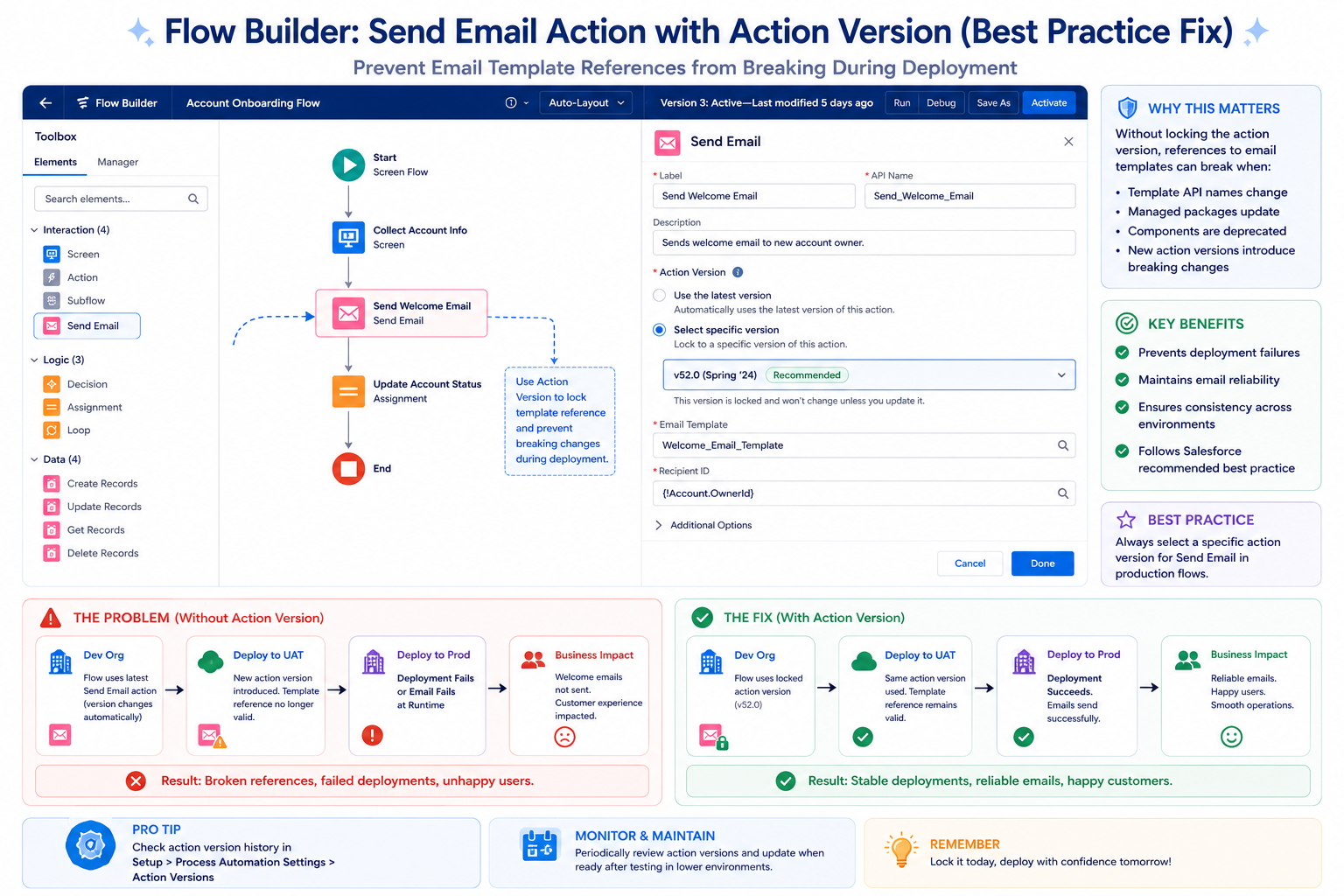
Step 1: Open Send Email Action
In Flow Builder:
- Select Send Email action in flow
- Action panel opens on right
Step 2: Show Advanced Options
In action panel:
- Scroll down
- Find “Show advanced options”
- Click to expand
Step 3: Check Action Version
Advanced options now visible:
- Find “Action Version” field
- Current version displayed
Step 4: Update to 3.0.1 or Higher
Set action version:
- Default might be 1.0 or 2.0
- Change to 3.0.1 or higher
- Newer version available
Step 5: Re-select Email Template
Important: Re-select template:
- After updating version, template field resets
- Click template field
- Search for template
- Select template
- Template now stored with proper reference
Step 6: Save and Test
- Save flow
- Test in sandbox
- Verify email sends with new template reference
- Deploy to production
What Action Version 3.0.1 Does
Technical Changes:
Change 1: Template ID Storage
- Before: Template name stored in XML
- After: Template ID stored in XML
- Result: Unique, unambiguous reference
Change 2: Proper Metadata Handling
- Before: Name-based lookup during runtime
- After: Reference to metadata element
- Result: Deployed like other metadata
Change 3: Deployment Compatibility
- Before: Fragile references
- After: Robust references
- Result: Deployments work reliably
Backward Compatibility:
- Old flows with Action Version 1.0/2.0 still work
- But use old (unreliable) approach
- Upgrading to 3.0.1 recommended for reliability
- No breaking changes when upgrading
MIGRATION AND IMPLEMENTATION
How to Update Existing Flows
Which Flows to Update
Priority 1: Critical Flows
Update immediately:
- Customer communication flows
- Notification flows
- Approval flows
- Any flow users depend on
Priority 2: Important Flows
Update soon:
- Marketing automation
- Case automation
- Opportunity workflows
Priority 3: Everything Else
Update eventually:
- Batch processes
- Background automation
- Low-impact flows
Safe Update Process
Step 1: Audit Current Flows
Find all flows using Send Email:
Flow Builder search:
– Find all flows
– Filter: uses Send Email action
– Note which ones
– Prioritize by criticality
Step 2: Update in Sandbox
For each flow:
- Open flow in sandbox
- Find each Send Email action
- Show advanced options
- Update Action Version to 3.0.1
- Re-select email template
- Save flow
Step 3: Test Thoroughly
For each updated flow:
- Test normal scenario
- Test email is received
- Test email content correct
- Test with various test data
Step 4: Deploy to Production
Standard deployment:
- Change set or package
- Deploy to production
- Run smoke tests
- Monitor for issues
Bulk Update Strategy
For Large Flow Portfolios:
Approach 1: Phased Updates
- Week 1: Update critical flows
- Week 2: Update important flows
- Week 3: Update remaining flows
- Gradual, controlled rollout
Approach 2: Coordinated Push
- Update all flows together
- Single deployment
- Comprehensive testing
- One change window
Recommended:
Phased approach (lower risk)
PREVENTING FUTURE DEPLOYMENT ISSUES
Proactive Strategies
Prevention 1: Adopt Latest Features Proactively
Pattern:
- Stay informed on Salesforce releases
- Adopt new features like Action Version 3.0.1
- Don’t wait for problems
- Be ahead of curve
Benefit:
Avoid issues before they become problems.
Prevention 2: Test Deployments in Sandbox First
Always:
- Make changes in sandbox
- Test in sandbox
- Deploy to sandbox refreshed (if needed)
- Then deploy to production
Benefit:
Catch issues in safe environment.
Prevention 3: Comprehensive Pre-Deployment Testing
For flows with email:
- Test happy path (email sends)
- Test error scenarios (email fails gracefully)
- Test with various data
- Test with multiple recipients
- Verify email content
Benefit:
High confidence before production deployment.
Prevention 4: Staging Environment Testing
If available:
- Full sandbox or staging environment
- Deploy flows here first
- Test in pre-production setting
- Then deploy to production
Benefit:
Final validation before production.
Prevention 5: Post-Deployment Monitoring
After deployment:
- Monitor flow executions
- Watch for email delivery failures
- Check user reports
- Have rollback plan ready
- Monitor for 24-48 hours
Benefit:
Quick detection of issues.
FINAL THOUGHTS
Email template references breaking during Flow deployments was one of those silent, frustrating problems that affected many Salesforce implementations. Tests pass. Deployments complete. Users report issues. Post-deployment panic ensues.
Salesforce’s fix—Action Version 3.0.1 using ID-based template references—is simple but effective. It solves the problem at the root by changing how templates are referenced and resolved.
For any Salesforce administrator or developer working with Flows and email templates, this is a must-implement fix. The cost of updating existing flows is minimal. The benefit of reliable email delivery is enormous.
More broadly, this fix exemplifies how Salesforce continuously improves the platform based on real-world problems. Something that worked poorly gets fixed. Old patterns are abandoned. New patterns are established.
If you’re managing Flows with email templates, prioritize updating to Action Version 3.0.1 this release cycle. Your future self—when deployments work reliably—will thank you.

