

A Salesforce Revenue Cloud implementation can help businesses modernize complex pricing, quoting, ordering, subscription, and revenue processes. But the success of the project depends heavily on how well the implementation is planned and executed.
Many Salesforce projects become more expensive or take longer than expected because of issues that could have been identified during the planning and discovery stages.
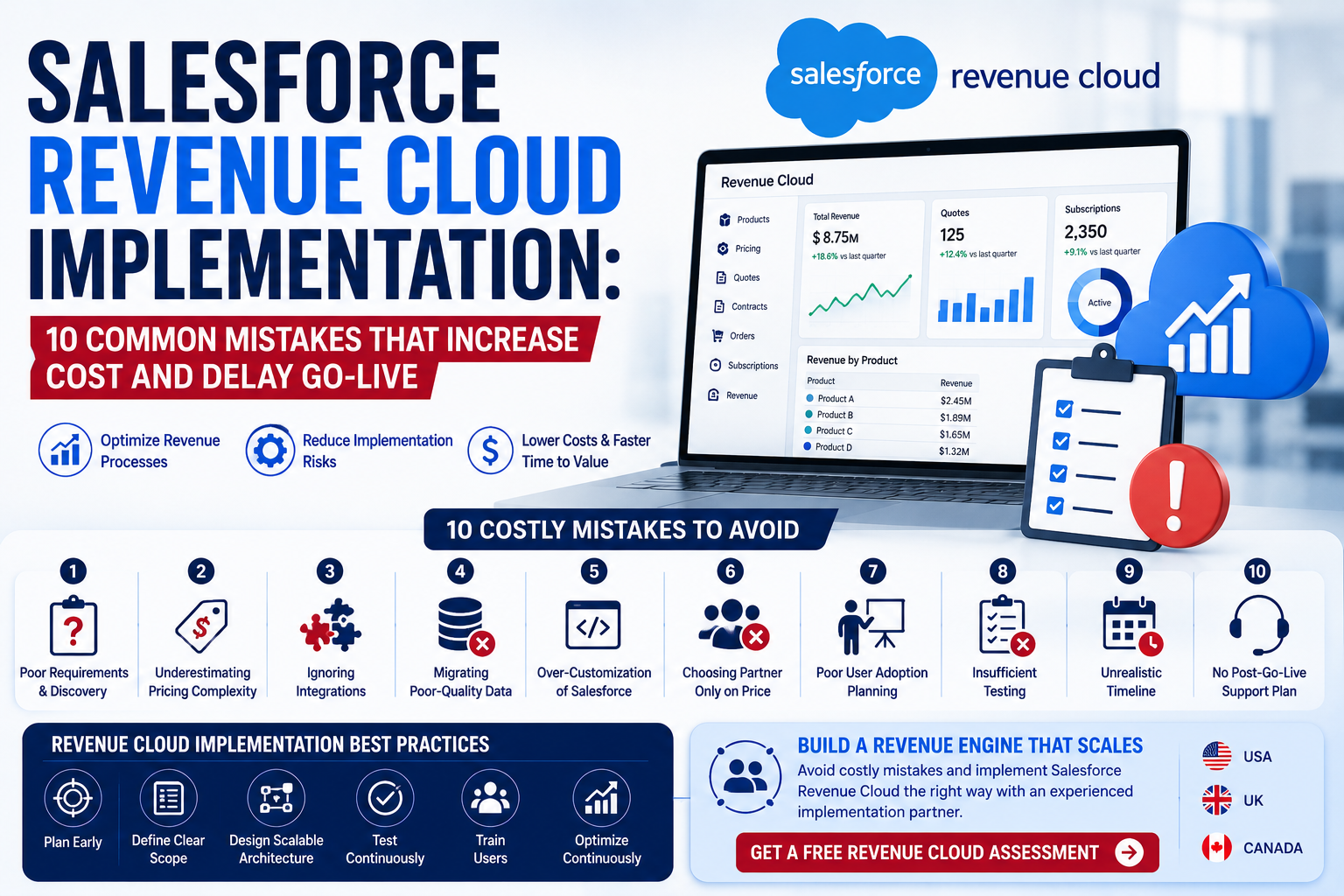
Common problems include unclear requirements, excessive customization, poor data quality, complicated integrations, inadequate testing, and selecting a Salesforce partner based primarily on price.
For organizations considering Revenue Cloud, understanding these risks before implementation can help control costs, reduce delays, and create a more scalable Salesforce environment.
In this guide, we’ll cover 10 common Salesforce Revenue Cloud implementation mistakes, how they affect your project, and what businesses can do to avoid them.
What Is Salesforce Revenue Cloud Implementation?
Salesforce Revenue Cloud implementation involves configuring and integrating Salesforce to support a company’s revenue-related business processes.
Depending on the organization’s requirements, the project may involve:
- Product management
- Pricing
- Product configuration
- Quoting
- Approvals
- Contracts
- Orders
- Subscriptions
- Usage-based models
- Revenue processes
- Data migration
- Third-party integrations
- Reporting and analytics
The exact scope depends on the company’s business model, existing Salesforce environment, technology stack, and future requirements.
A successful implementation should connect technology with business processes rather than simply configuring features.
How Much Does Salesforce Revenue Cloud Implementation Cost?
There is no universal price for a Revenue Cloud implementation.
Salesforce Revenue Cloud implementation cost depends on factors such as:
- Business complexity
- Number of users
- Existing Salesforce architecture
- Product catalog complexity
- Pricing rules
- Customization
- Data migration
- Third-party integrations
- Testing requirements
- Training
- Project timeline
- Post-launch support
A small implementation with relatively standard processes can be considerably less complex than an enterprise transformation involving multiple systems and sophisticated revenue models.
This is why businesses should complete discovery and requirements analysis before expecting an accurate implementation estimate.
10 Salesforce Revenue Cloud Implementation Mistakes
1. Starting Configuration Before Understanding Business Requirements
One of the most common mistakes is jumping directly into Salesforce configuration.
A business may begin creating products, pricing rules, workflows, and automation before properly documenting how its revenue processes actually work.
This can result in:
- Rework
- Conflicting automation
- Incorrect pricing logic
- Poor user experience
- Additional development costs
Better Approach
Start with a structured discovery process.
Document:
- Current processes
- Business requirements
- Revenue models
- Product structures
- Pricing rules
- Approval requirements
- Integration requirements
- Reporting needs
Then create the solution architecture.
Business requirements should drive Salesforce configuration—not the other way around.
2. Underestimating Pricing Complexity
Pricing is often one of the most complicated parts of a Revenue Cloud implementation.
Businesses may have:
- Volume discounts
- Tiered pricing
- Customer-specific pricing
- Contract pricing
- Promotional discounts
- Subscription pricing
- Usage-based pricing
- Product dependencies
- Approval-based pricing
If these rules aren’t clearly documented, implementation teams may build solutions that are difficult to maintain.
Better Approach
Create a detailed pricing framework before configuration begins.
Identify:
Product → Pricing Rule → Discount → Approval → Quote → Order
This helps your Revenue Cloud consultant understand the complete pricing process instead of solving individual pricing requirements in isolation.
3. Treating Revenue Cloud Like a Standalone System
Revenue operations rarely exist entirely inside Salesforce.
Your Revenue Cloud environment may need to exchange data with:
- ERP systems
- Billing platforms
- Accounting software
- Payment systems
- E-commerce platforms
- Data warehouses
- Marketing platforms
Ignoring these dependencies until late in the project can significantly affect your Revenue Cloud implementation timeline.
Better Approach
Design your integration architecture during the discovery and solution-design phases.
Determine:
- Which system owns each data element
- What information must be synchronized
- How frequently data should move
- How integration errors will be handled
- Which APIs or integration methods are appropriate
4. Migrating Poor-Quality Data
Moving bad data into a new Salesforce environment doesn’t solve the data problem.
It simply transfers it into a new system.
Common data issues include:
- Duplicate accounts
- Duplicate contacts
- Incomplete customer information
- Outdated products
- Incorrect pricing
- Inconsistent field values
- Legacy records that are no longer required
Poor data quality can affect reporting, automation, customer service, and sales operations.
Better Approach
Follow a structured migration process:
Extract → Clean → Transform → Validate → Migrate → Test
Also determine which historical information actually needs to be migrated.
Not every legacy record needs to be moved into the new environment.
5. Over-Customizing Salesforce
Salesforce offers extensive customization capabilities, but more customization isn’t automatically better.
Organizations sometimes create complex custom functionality when standard capabilities could address the requirement.
Excessive customization can increase:
- Development costs
- Testing requirements
- Maintenance effort
- Upgrade complexity
- Technical debt
Better Approach
Use a configuration-first approach where appropriate.
Before requesting custom development, ask:
Can this requirement be handled through standard Salesforce functionality?
If customization is necessary, document why it is required and how it will affect future maintenance.
6. Choosing a Partner Based Only on Price
A low implementation quote can appear attractive, but price shouldn’t be the only selection criterion.
An inexperienced Salesforce Revenue Cloud partner may underestimate project complexity and later request additional budget for requirements that weren’t properly considered.
This can lead to:
- Change requests
- Timeline extensions
- Rework
- Unexpected costs
- Poor implementation quality
Better Approach
Evaluate potential partners based on:
- Salesforce expertise
- Revenue Cloud experience
- Technical capabilities
- Industry experience
- Implementation methodology
- Integration experience
- Data migration capabilities
- Case studies
- Post-launch support
The right partner should explain why a particular architecture is recommended—not simply provide a quote.
7. Not Planning for User Adoption
Even technically successful implementations can fail if users don’t adopt the new processes.
Sales teams may resist a system when:
- Workflows are complicated
- Too many fields are required
- Processes are slow
- Training is inadequate
- Existing workflows change without explanation
Better Approach
Include users throughout the implementation.
Use:
- User workshops
- Process demonstrations
- Training sessions
- Documentation
- User acceptance testing
- Feedback sessions
The objective is to make Salesforce easier for employees to use—not simply to satisfy technical requirements.
8. Insufficient Testing
Testing should not be left until the final days before go-live.
Revenue processes can involve multiple connected systems and business rules. A small configuration issue can create problems across pricing, quoting, orders, or downstream processes.
Better Approach
Build testing into the entire implementation.
Testing may include:
- Functional testing
- Integration testing
- Data validation
- User acceptance testing
- Regression testing
- End-to-end business process testing
For complex implementations, test the complete business journey:
Product → Pricing → Quote → Approval → Contract → Order → Downstream System
9. Creating an Unrealistic Implementation Timeline
Businesses sometimes set an aggressive go-live date before understanding the actual project scope.
This can create pressure to:
- Skip testing
- Reduce training
- Delay data cleansing
- Rush integrations
- Cut important requirements
A realistic Revenue Cloud implementation timeline should account for discovery, configuration, development, migration, testing, training, and deployment.
Better Approach
Build the timeline around project dependencies rather than an arbitrary launch date.
A good implementation roadmap should identify:
- Milestones
- Dependencies
- Responsibilities
- Testing periods
- User training
- Data migration
- Deployment
- Post-launch support
10. Failing to Plan for Post-Go-Live Optimization
Go-live is not the end of your Salesforce journey.
After implementation, users will identify new requirements. Business processes will change. Products and pricing models may evolve. Salesforce itself will continue to develop.
Without ongoing support, your environment can gradually become outdated or difficult to maintain.
Better Approach
Plan for post-launch support from the beginning.
Ongoing Salesforce implementation services may include:
- Administration
- Technical support
- Automation improvements
- New functionality
- Integration support
- Performance optimization
- Data quality management
- User support
- Release management
For many organizations, ongoing managed services provide a practical way to maintain and improve the Salesforce environment.
How to Reduce Salesforce Revenue Cloud Implementation Costs
Avoiding mistakes is one of the most effective ways to control implementation costs.
Follow these best practices:
1. Define Requirements Early
Document business requirements before development begins.
2. Prioritize Requirements
Separate:
Must Have → Should Have → Nice to Have
This prevents unnecessary scope expansion.
3. Build a Clear Architecture
Define data, integrations, automation, and security before development.
4. Clean Data Before Migration
Don’t use Salesforce implementation as an opportunity to transfer unnecessary legacy data.
5. Limit Unnecessary Customization
Use standard capabilities where they satisfy the business requirement.
6. Test Continuously
Identify issues early rather than immediately before go-live.
7. Train Users Before Launch
Prepare users for new processes before production deployment.
8. Plan Post-Go-Live Support
Have a support strategy ready before the system launches.
Salesforce Revenue Cloud Implementation Best Practices
A successful project generally follows a structured process:
Discovery
Understand business objectives, revenue processes, and technical requirements.
↓
Solution Architecture
Design Salesforce, data, automation, and integration architecture.
↓
Configuration & Development
Build the required Salesforce functionality.
↓
Data Migration
Clean, transform, validate, and migrate required data.
↓
Testing
Validate business processes and system integrations.
↓
Training
Prepare administrators and end users.
↓
Go-Live
Deploy the solution and monitor production.
↓
Optimization
Continuously improve the environment based on business requirements and user feedback.
When Should You Hire a Salesforce Revenue Cloud Consultant?
Consider working with a Revenue Cloud consultant if your organization has:
- Complex pricing
- Subscription products
- Usage-based pricing
- Large product catalogs
- Multiple approval processes
- Complex quoting requirements
- Existing CPQ customizations
- Multiple integrations
- Data migration requirements
- A large Salesforce user base
A consultant can help identify technical and business risks before they become expensive implementation problems.
Salesforce Revenue Cloud vs Salesforce CPQ Implementation
Organizations already using Salesforce CPQ should not automatically assume that they need to replace their current environment.
Before making a major architectural decision, evaluate:
- Existing CPQ configuration
- Customizations
- Product catalog
- Pricing rules
- Integrations
- Data
- Business requirements
- Future growth plans
A Salesforce consulting partner can assess your existing environment and determine whether you should optimize the current architecture, modernize it, or consider a broader Revenue Cloud implementation.
How to Choose the Right Revenue Cloud Implementation Partner
Before selecting a partner, ask these questions:
- How much Revenue Cloud experience does your team have?
- Have you implemented complex pricing models?
- How do you approach discovery?
- How do you handle data migration?
- What integration experience do you have?
- How do you control customization?
- What testing methodology do you follow?
- How do you manage scope changes?
- What post-launch support do you provide?
- Can you provide relevant case studies?
The right Revenue Cloud implementation company should be able to explain its methodology clearly and demonstrate relevant experience.
Why Choose ApplikonTech?
ApplikonTech helps businesses across the USA, UK, and Canada with Salesforce consulting, implementation, integration, optimization, and ongoing support.
Our Salesforce capabilities include:
- Salesforce Revenue Cloud
- Salesforce CPQ
- Sales Cloud
- Service Cloud
- Data Cloud
- Experience Cloud
- Salesforce Integration
- Data Migration
- Salesforce Automation
- Custom Development
- Salesforce Managed Services
- CRM Optimization
Our approach begins with understanding your business processes and requirements before recommending a Salesforce solution.
Whether you’re planning a new Revenue Cloud implementation, evaluating your existing CPQ environment, or looking to improve complex pricing and revenue processes, our team can help you develop a practical implementation roadmap.
Frequently Asked Questions
What is the biggest Salesforce Revenue Cloud implementation mistake?
One of the biggest mistakes is starting configuration or development before fully understanding business requirements, revenue processes, integrations, and data.
How can I reduce Salesforce Revenue Cloud implementation costs?
Define requirements early, prioritize scope, minimize unnecessary customization, clean data before migration, plan integrations early, and test throughout the project.
How long does Salesforce Revenue Cloud implementation take?
The timeline depends on project complexity, business requirements, integrations, data migration, customization, testing, and organizational readiness. There is no single timeline that applies to every business.
Do I need a Salesforce Revenue Cloud consultant?
A consultant can be particularly valuable when your business has complex pricing, products, subscriptions, integrations, CPQ customizations, or large-scale CRM requirements.
Can Salesforce CPQ be migrated to Revenue Cloud?
Potentially, but migration should not be treated as an automatic requirement. Your existing architecture, customizations, data, integrations, and future business requirements should be assessed first.
Final Thoughts
A successful Salesforce Revenue Cloud implementation requires more than configuring Salesforce features.
Businesses need a clear understanding of their revenue processes, a scalable architecture, clean data, reliable integrations, realistic timelines, effective testing, and strong user adoption.
The most expensive implementation mistakes are often avoidable when organizations invest enough time in discovery and planning before development begins.
If you’re considering Revenue Cloud, don’t start by asking:
“How quickly can we go live?”
Start by asking:
“What architecture will allow our business to scale without creating unnecessary complexity?”
That approach can help control Salesforce Revenue Cloud implementation cost, reduce project risk, and create a stronger foundation for long-term CRM success.
Planning a Salesforce Revenue Cloud Implementation?
Before committing to a major Salesforce project, get your requirements, architecture, integrations, and implementation roadmap reviewed by experienced consultants.
ApplikonTech helps businesses across the USA, UK, and Canada with Salesforce Revenue Cloud consulting, implementation, integration, and managed services.
Get a Free Revenue Cloud Assessment
Discuss your current Salesforce environment, implementation goals, pricing requirements, and potential challenges with our Salesforce experts.
→ Talk to a Salesforce Revenue Cloud Consultant

