

INTRODUCTION
When people talk about MuleSoft, many conversations begin with a common misconception:
“MuleSoft is an integration tool.”
In reality, MuleSoft is an integration ecosystem composed of multiple products designed to solve different business and technical challenges.
Organizations often evaluate integration requirements and immediately jump into selecting a tool without first understanding the problem they are trying to solve. This frequently leads to over-engineered solutions for simple integrations or underpowered solutions for enterprise-scale requirements.
Recently, while exploring MuleSoft Composer and Anypoint Platform, I noticed that many teams compare them as competing products.
They are not.
They solve different problems.
Understanding where each tool fits can save months of development effort, reduce operational complexity, and help organizations build scalable integration architectures.
This article explores the differences, strengths, and ideal use cases for MuleSoft Composer and Anypoint Platform.
THE COMMON INTEGRATION CHALLENGE
Why Integration Tool Selection Matters
Modern businesses operate across dozens of applications:
- Salesforce
- Slack
- Jira
- NetSuite
- SAP
- Workday
- Google Workspace
- Microsoft 365
- Custom Applications
The challenge isn’t connecting systems.
The challenge is selecting the right integration approach.
Many organizations encounter one of two common mistakes:
Mistake 1: Overengineering Simple Integrations
Teams deploy enterprise integration platforms for straightforward requirements such as:
- Creating Slack notifications from Salesforce
- Synchronizing contacts
- Updating records between systems
- Sending approval notifications
The result:
- Increased project costs
- Longer delivery timelines
- Unnecessary complexity
Mistake 2: Underestimating Complex Integrations
Teams attempt to use low-code solutions for enterprise-level integrations involving:
- Large-scale data processing
- Complex transformations
- API-led architecture
- Multi-system orchestration
The result:
- Performance limitations
- Scalability challenges
- Maintenance difficulties
The key question isn’t:
“Which MuleSoft tool is better?”
The real question is:
“Which MuleSoft tool fits the business requirement?”
UNDERSTANDING THE MULESOFT ECOSYSTEM
MuleSoft Is More Than One Product
Under the MuleSoft umbrella, several products serve different purposes.
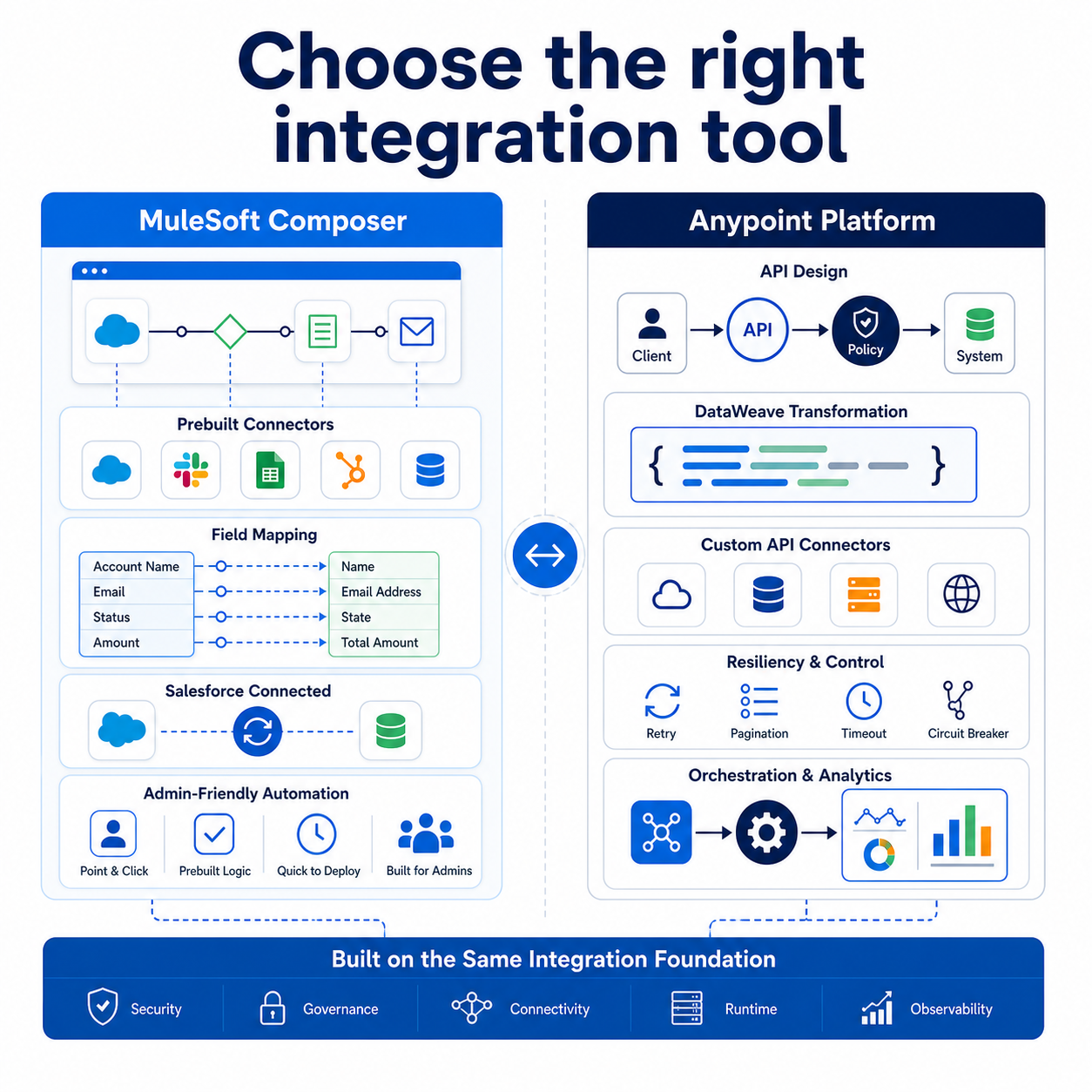
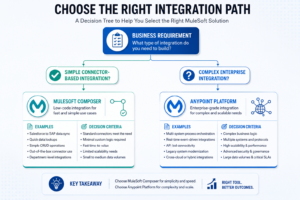
MuleSoft Composer
A low-code integration platform designed for admins and business users.
Anypoint Platform
A full enterprise integration and API management platform.
API Manager
Provides governance, security, monitoring, and API lifecycle management.
Intelligent Document Processing (IDP)
Extracts structured information from documents using AI-powered processing.
Robotic Process Automation (RPA)
Automates repetitive manual tasks across systems and applications.
Additional Platform Services
- API Designer
- Exchange
- Runtime Manager
- Monitoring
- Governance Tools
Each product addresses a different integration challenge.
Understanding these distinctions is essential when designing scalable architectures.
MULESOFT COMPOSER
Fast and Simple Integration for Business Teams
MuleSoft Composer was created to simplify integration development.Instead of writing code, users build integrations through a visual experience.
The process is straightforward:
Step 1: Choose a Trigger
Examples:
- Salesforce Record Created
- Salesforce Record Updated
- Scheduled Event
Step 2: Connect Applications
Composer provides prebuilt connectors for:
- Salesforce
- Slack
- Jira
- NetSuite
- Google Sheets
- HubSpot
- Workday
- Microsoft Applications
Step 3: Map Data
Users visually map fields between systems.
No coding required.
Step 4: Test the Integration
Validate results before activation.
Step 5: Activate and Monitor
Monitor execution history and troubleshoot failures through the Composer interface.
Why Composer Works So Well
The strength of Composer is simplicity.
Organizations can deliver integrations in hours rather than weeks.
Benefits include:
Low-Code Development
Minimal technical expertise required.
Faster Time to Value
Rapid deployment of common integrations.
Salesforce-Friendly Experience
Designed specifically with Salesforce users in mind.
Business User Enablement
Admins can build and maintain integrations independently.
Reduced Development Costs
Less reliance on integration developers.
IDEAL USE CASES FOR COMPOSER
Where Composer Excels
Composer is most effective when integrations are connector-driven and relatively straightforward.
Example 1: Salesforce to Slack
When a high-priority Case is created:
- Salesforce triggers Composer
- Composer sends Slack notification
- Support team receives alert instantly
Example 2: Salesforce to Jira
When a defect Case is logged:
- Composer automatically creates a Jira ticket
- Development team begins work immediately
Example 3: Salesforce to NetSuite
Customer information remains synchronized between CRM and ERP systems.
Example 4: Salesforce to Google Sheets
Sales data automatically populates reporting spreadsheets.
Example 5: Salesforce Org to Salesforce Org
Data synchronization between multiple Salesforce environments.
Best Scenarios for Composer
- Point-to-point integrations
- Lightweight automation
- Connector-based workflows
- Business-user managed integrations
- Salesforce-centric ecosystems
WHERE COMPOSER REACHES ITS LIMITS
Simple Does Not Mean Unlimited
As integration requirements become more sophisticated, limitations begin to appear.
Challenges may include:
Complex Data Transformation
Business logic requires advanced mapping.
Multiple System Orchestration
Coordinating activities across many applications.
Large Data Volumes
Processing thousands or millions of records.
Custom API Development
Building reusable enterprise services.
Advanced Error Handling
Managing retries and failure recovery.
Governance Requirements
Security, auditing, and API lifecycle controls.
At this point, organizations often need a more powerful integration platform.
ENTER ANYPOINT PLATFORM
Enterprise Integration at Scale
Anypoint Platform is MuleSoft’s enterprise-grade integration solution.
Unlike Composer, which focuses on speed and simplicity, Anypoint focuses on flexibility, architecture, and control.
API-Led Connectivity
Build reusable APIs that separate systems and reduce dependencies.
DataWeave Transformations
Perform advanced data mapping and transformation.
Custom Connectors
Integrate systems without standard connectors.
Orchestration
Coordinate multiple systems and business processes.
Error Recovery
Support retries, dead-letter processing, and resiliency patterns.
Monitoring and Analytics
Enterprise-level visibility into integration performance.
API Governance
Manage API lifecycle, security, versioning, and compliance.
IDEAL USE CASES FOR ANYPOINT PLATFORM
When Enterprise Requirements Demand More Control
Scenario 1: ERP Modernization
Integrating Salesforce, SAP, and multiple legacy systems.
Scenario 2: API Strategy
Building reusable APIs consumed across departments.
Scenario 3: High-Volume Data Processing
Processing millions of records daily.
Scenario 4: Multi-System Orchestration
Coordinating workflows across CRM, ERP, finance, and logistics systems.
Scenario 5: Enterprise Security Requirements
Implementing API governance and compliance frameworks.
COMPOSER VS ANYPOINT PLATFORM
Side-by-Side Comparison
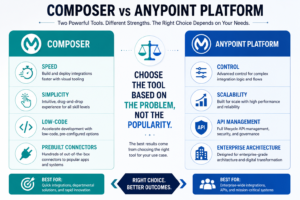
| Capability | MuleSoft Composer | Anypoint Platform |
| Development Approach | Low-Code | Pro-Code / Enterprise |
| Target Users | Admins, Analysts | Developers, Architects |
| Integration Complexity | Simple to Moderate | Moderate to Highly Complex |
| API Development | Limited | Full Support |
| Data Transformation | Basic | Advanced DataWeave |
| Scalability | Moderate | Enterprise Scale |
| Monitoring | Basic | Advanced |
| Governance | Limited | Enterprise Grade |
| Time to Deploy | Hours | Days to Months |
| Best Use Case | Point-to-Point Integrations | Enterprise Integration Architecture |
KEY LEARNING
What Exploring Both Platforms Reinforced
Learning 1
Every integration does not require enterprise architecture.
Learning 2
Low-code solutions can deliver tremendous value when used appropriately.
Learning 3
Enterprise integrations require governance and scalability from day one.
Learning 4
Tool selection should follow requirements, not trends.
Learning 5
The most successful architectures balance speed with long-term maintainability.
BEST PRACTICES
How to Choose the Right Integration Tool
Best Practice 1
Start by understanding business requirements.
Best Practice 2
Estimate future scalability needs.
Best Practice 3
Evaluate transformation complexity.
Best Practice 4
Consider ownership and maintenance responsibilities.
Best Practice 5
Use Composer for rapid business automation.
Best Practice 6
Use Anypoint Platform when architecture, governance, and scalability matter.
KEY INSIGHT
Integration Success Is About Fit, Not Features
One of the biggest mistakes in integration design is assuming that the most powerful platform is always the best solution.
Sometimes speed is more valuable than complexity.
Sometimes architecture is more valuable than speed.
MuleSoft Composer and Anypoint Platform are not competing products.
They are complementary tools designed for different integration journeys.
The real challenge is understanding when to use each one.
Final Thought
Choosing between MuleSoft Composer and Anypoint Platform is not about determining which tool is superior.
It is about aligning technology choices with business requirements.
Composer excels when integrations are simple, connector-driven, and need rapid delivery.
Anypoint Platform shines when organizations require enterprise-grade integration architecture, API management, advanced transformations, and scalability.
The most effective integration strategy is not built around tools.
It is built around solving the right problem with the right level of complexity.
And that is where great architecture begins.

